• Home
  • News
  • Software
  • Knowledge
  • MMO
  • Tips
  • Security
  • Network
  • Office
AnonyViet - English Version
  • Home
  • News
  • Software
  • Knowledge
  • MMO
  • Tips
  • Security
  • Network
  • Office
No Result
View All Result
  • Home
  • News
  • Software
  • Knowledge
  • MMO
  • Tips
  • Security
  • Network
  • Office
No Result
View All Result
AnonyViet - English Version
No Result
View All Result

How to Pentest Android Apps on Windows 11 Using WSA

AnonyViet by AnonyViet
January 26, 2023
in Software
0

Many people think that the best way to pentest Android apps is to connect your Android phone directly to your PC or Mac and debug it. This combination provides a lot of control options for pentesting and for many cases it will be more optimal than typical Android emulators.

Join the channel Telegram of the AnonyViet 👉 Link 👈

Even if you don’t have access to multiple devices, Android Studio’s built-in virtual device (AVD) is often the right choice for such pentest jobs. It is possible to root the AVD and it integrates perfectly with the debugger, so everything works fine. But if you are running Windows 11 and you want to pentest Android apps, then you can easily do so without relying on emulators or virtual machines, thanks to the support of Windows Subsystem for Android (WSA).
How to Pentest Android Apps on Windows 11 Using WSA

How to pentest Android apps on Windows 11 with WSA

According to Michael Higgo from Orange Cyberdefense, one can use WSA to test Android security in the same way as on a physical Android device. Higgo, Lead Security Analyst at SensePost, recently posted a blog post with some general details on how to conduct Android app security testing on WSA.

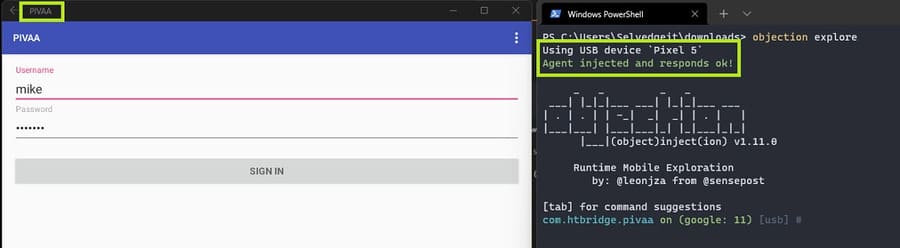
When assessing the security status of an Android application, using a mobile runtime exploit kit like Objection in combination with the Windows Subsystem for Android makes the job quite affordable for a researcher. security rescue.
How to Pentest Android Apps on Windows 11 Using WSA 4

The Android Subsystem for Windows 11 is developed by the same technology as the Windows Subsystem for Linux. Thanks to the seamless virtualization supported by Hyper-V, WSA is significantly faster than any other Android emulator available. Furthermore, you can load apps on WSA or even modify the underlying system image to install CH Play and other Google apps. In summary, it makes sense to use Windows Subsystem for Android as a mobile application testing platform.

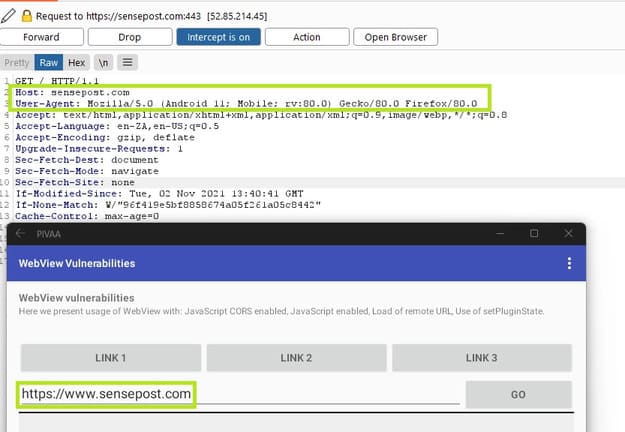
After installing the launcher in WSA, you can access the network settings of the Android layer. Next, you can install the certificate authority and set up a custom proxy to intercept traffic using web vulnerability scanning tools like Burp suite.
How to Pentest Android Apps on Windows 11 Using WSA 5

For more on Android security testing using WSA, check out Michael Higgo’s blog post here. Whether you are a professional security researcher or you simply want to learn about Windows Subsystem for Android, this is a great way to learn penetration testing on Android applications.


The article achieved: 5/5 – (100 votes)

Tags: AndroidappsPentestWindowsWSA
Previous Post

Lesson 81: How to display formulas in Excel

Next Post

Basic CMD tutorial for newbies

AnonyViet

AnonyViet

Related Posts

Create an avatar to celebrate April 30 with a beautiful red flag shirt with yellow stars
Software

Create an avatar to celebrate April 30 with a beautiful red flag shirt with yellow stars

April 30, 2026
How to get 2 months of Super Duolingo for free worth 300k
Software

How to get 2 months of Super Duolingo for free worth 300k

April 30, 2026
How to create a Face Sticker Collection using ChatGPT
Software

How to create a Face Sticker Collection using ChatGPT

April 29, 2026
How to install the cute Bongo Cat mouse pointer for Windows
Software

How to install the cute Bongo Cat mouse pointer for Windows

April 29, 2026
Instructions for looking up prescriptions on VNeID instead of paper medical books
Software

Instructions for looking up prescriptions on VNeID instead of paper medical books

April 26, 2026
Compare Poco X8 Pro and Poco X7 Pro: A new step for the “king” of mid-range performance
Software

Compare Poco X8 Pro and Poco X7 Pro: A new step for the “king” of mid-range performance

April 24, 2026
Next Post
Basic CMD tutorial for newbies

Basic CMD tutorial for newbies

0 0 votes
Article Rating
Subscribe
Login
Notify of
guest

guest

0 Comments
Oldest
Newest Most Voted
Inline Feedbacks
View all comments

Recent News

Create an avatar to celebrate April 30 with a beautiful red flag shirt with yellow stars

Create an avatar to celebrate April 30 with a beautiful red flag shirt with yellow stars

April 30, 2026
How to get 2 months of Super Duolingo for free worth 300k

How to get 2 months of Super Duolingo for free worth 300k

April 30, 2026
How to create a Face Sticker Collection using ChatGPT

How to create a Face Sticker Collection using ChatGPT

April 29, 2026
How to install the cute Bongo Cat mouse pointer for Windows

How to install the cute Bongo Cat mouse pointer for Windows

April 29, 2026
Create an avatar to celebrate April 30 with a beautiful red flag shirt with yellow stars

Create an avatar to celebrate April 30 with a beautiful red flag shirt with yellow stars

April 30, 2026
How to get 2 months of Super Duolingo for free worth 300k

How to get 2 months of Super Duolingo for free worth 300k

April 30, 2026
How to create a Face Sticker Collection using ChatGPT

How to create a Face Sticker Collection using ChatGPT

April 29, 2026
AnonyViet - English Version

AnonyViet

AnonyViet is a website share knowledge that you have never learned in school!

We are ready to welcome your comments, as well as your articles sent to AnonyViet.

Follow Us

Contact:

Email: anonyviet.com[@]gmail.com

Main Website: https://anonyviet.com

Recent News

Create an avatar to celebrate April 30 with a beautiful red flag shirt with yellow stars

Create an avatar to celebrate April 30 with a beautiful red flag shirt with yellow stars

April 30, 2026
How to get 2 months of Super Duolingo for free worth 300k

How to get 2 months of Super Duolingo for free worth 300k

April 30, 2026
No Result
View All Result
  • Home
  • News
  • Software
  • Knowledge
  • MMO
  • Tips
  • Security
  • Network
  • Office

wpDiscuz
0
0
Would love your thoughts, please comment.x
()
x
| Reply