• Home
  • News
  • Software
  • Knowledge
  • MMO
  • Tips
  • Security
  • Network
  • Office
AnonyViet - English Version
  • Home
  • News
  • Software
  • Knowledge
  • MMO
  • Tips
  • Security
  • Network
  • Office
No Result
View All Result
  • Home
  • News
  • Software
  • Knowledge
  • MMO
  • Tips
  • Security
  • Network
  • Office
No Result
View All Result
AnonyViet - English Version
No Result
View All Result

How to manage Startup programs on Ubuntu Linux

AnonyViet by AnonyViet
January 26, 2023
in Network
0

Many applications will automatically set up the system to start when you log in to Linux. But there are also some programs that do not automatically support this feature. So, in this article, I will show you how to manage your favorite programs in your startup on Ununtu Linux.

Join the channel Telegram of the AnonyViet 👉 Link 👈

I have applied the methods below on Ubuntu 20.04 LTS with the default desktop GNOME. If you’re using other Linux distros, the steps below are similar, and are made even easier when you’re also using GNOME.

GNOME Startup Manager Enables

To launch GNOME’s Startup manager, you need to click the “Show Applications” button on the Ubuntu Dock and search for the application called “Startup Applications”.
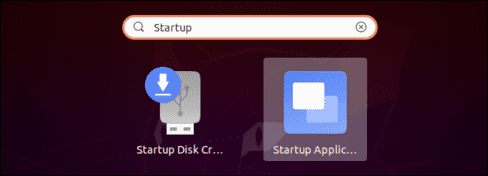
GNOME Startup Manager

You can also press Alt+F2 to bring up the run command dialog and enter the following command:

gnome-session-properties 
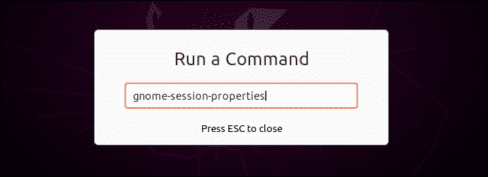
gnome-session-properties

If the Startup Tool doesn’t appear in your application menu for some reason, don’t worry, you can also open a Terminal window and run the following command:

sudo apt install gnome-startup-applications
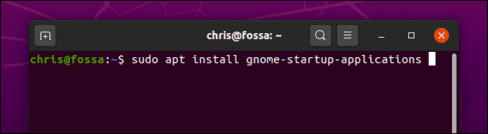
sudo apt install gnome-startup-applications

How to stop programs from automatically starting on Ubuntu

After doing the above steps, the window Startup Applications Preferences will open. You will see a list of programs that automatically start when you log into Ubuntu. Each app has a name, options, and description.

To stop a program in startup, simply uncheck it. Unselected programs will not automatically turn on when you start the machine.

You can also select the programs you don’t like and press “Remove” to remove it from the startup list, but I recommend unchecking that program because it will be easier if you want to reactivate it in the future.
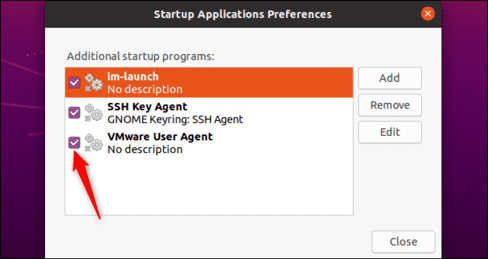
Startup Applications Preferences

If you’re not sure what program you’re working with, you can search the web for its name. For example, if you search for im-launcheryou will see that this is command to launch any program you want.

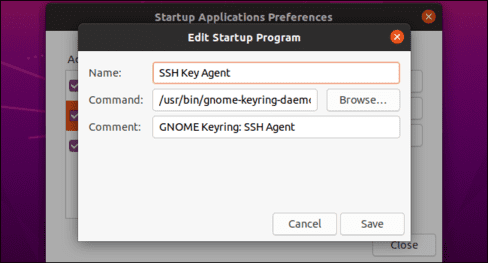
You can also select the program and click “Edit” to see all the commands that are run when you log in.
How to manage Startup programs on Ubuntu Linux 6

How to Add Your Programs to Startup on Ubuntu

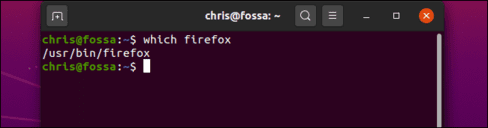
To add a program to startup, you must know the full path address of that program. You can do this with the command which.

For example, if I want to find the path of firefox, I will enter the following command:

which firefox

And here is the path of firefox that I found.
How to manage Startup programs on Ubuntu Linux 7

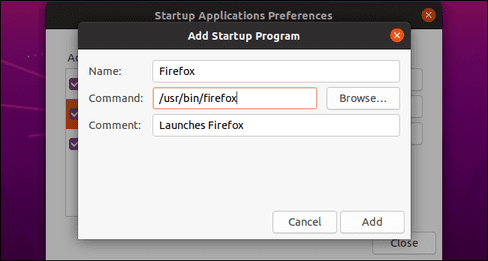
Back in the Startup Applications Preferences window, click the . button “Add” and enter the path you just found in the Command section.

You can also enter a name and description for the program. Both of these items will only be displayed in the Startup Applications Preferences window.
How to manage Startup programs on Ubuntu Linux 8

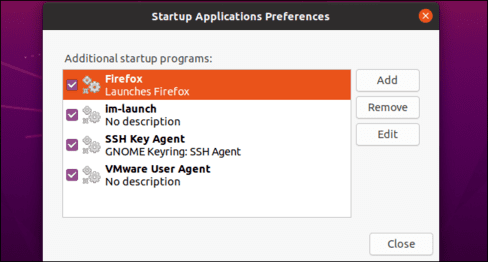
When you’re done, click the “Add“. You will then see your program added to the Startup list. As long as it is enabled, GNOME will launch it every time you log into Ubuntu.
How to manage Startup programs on Ubuntu Linux 9

By the way, you can also prevent many apps that don’t want to launch automatically, like Dropbox for example. The Startup Applications Preferences tool is really cool, you can see and manage the applications in Startup very easily from the GUI interface.


The article achieved: 5/5 – (100 votes)

Tags: LinuxmanageProgramsStartupUbuntu
Previous Post

Lesson 60: How to Plan a Meal in Excel

Next Post

How to See the fastest arrival time to Work/School using Google Maps

AnonyViet

AnonyViet

Related Posts

Save image as Type contains malicious code: Remove immediately before losing money unfairly!
Network

Save image as Type contains malicious code: Remove immediately before losing money unfairly!

March 19, 2026
Instructions on how to register a .co.uk domain name for free for 1 year
Network

Instructions on how to register a .co.uk domain name for free for 1 year

March 12, 2026
How to Setup Paperclip AI: Create a Company for AI Agent
Network

How to Setup Paperclip AI: Create a Company for AI Agent

March 12, 2026
Compilation of free and cheap APIs to run OpenClaw stably
Network

Compilation of free and cheap APIs to run OpenClaw stably

March 10, 2026
3 Services to Determine IP Location for Website (IP Geolocation API)
Network

3 Services to Determine IP Location for Website (IP Geolocation API)

March 10, 2026
How to buy a .STORE domain name for 1 USD (2026): Detailed instructions from A–Z
Network

How to buy a .STORE domain name for 1 USD (2026): Detailed instructions from A–Z

March 3, 2026
Next Post
How to See the fastest arrival time to Work/School using Google Maps

How to See the fastest arrival time to Work/School using Google Maps

0 0 votes
Article Rating
Subscribe
Login
Notify of
guest

guest

0 Comments
Oldest
Newest Most Voted
Inline Feedbacks
View all comments

Recent News

Instructions on how to prevent acquaintances from seeing your Tiktok

Instructions on how to prevent acquaintances from seeing your Tiktok

June 2, 2026
How to record reaction videos with Android phones, no app needed

How to record reaction videos with Android phones, no app needed

June 1, 2026
Instructions on how to get Google AI Pro 1 year for free for new accounts

Instructions on how to get Google AI Pro 1 year for free for new accounts

June 1, 2026
Top free AI tools to help write, test and optimize content

Top free AI tools to help write, test and optimize content

June 1, 2026
Instructions on how to prevent acquaintances from seeing your Tiktok

Instructions on how to prevent acquaintances from seeing your Tiktok

June 2, 2026
How to record reaction videos with Android phones, no app needed

How to record reaction videos with Android phones, no app needed

June 1, 2026
Instructions on how to get Google AI Pro 1 year for free for new accounts

Instructions on how to get Google AI Pro 1 year for free for new accounts

June 1, 2026
AnonyViet - English Version

AnonyViet

AnonyViet is a website share knowledge that you have never learned in school!

We are ready to welcome your comments, as well as your articles sent to AnonyViet.

Follow Us

Contact:

Email: anonyviet.com[@]gmail.com

Main Website: https://anonyviet.com

Recent News

Instructions on how to prevent acquaintances from seeing your Tiktok

Instructions on how to prevent acquaintances from seeing your Tiktok

June 2, 2026
How to record reaction videos with Android phones, no app needed

How to record reaction videos with Android phones, no app needed

June 1, 2026
No Result
View All Result
  • Home
  • News
  • Software
  • Knowledge
  • MMO
  • Tips
  • Security
  • Network
  • Office

wpDiscuz
0
0
Would love your thoughts, please comment.x
()
x
| Reply