Google Forms is a simple way to gather answers from other users, whether for work purposes or research projects. You can limit the replies manually, but you’ll need to install add-ons to limit them automatically. And here’s how.
| Join the channel Telegram of the AnonyViet 👉 Link 👈 |

How to limit replies in Google Forms with a Google account
If you want to limit the answers you receive on Google Forms, you can start by limiting the answers you receive with your Google account. Users who respond to your question will need to sign in with a Google account to answer, with each account being limited to one answer.
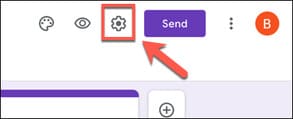
This will help improve the quality of the answers and prevent duplicate answers. To get started, open a Google Forms form in a desktop web browser and click the settings gear icon in the top right corner.
In the “General” tab of the “Settings” menu, click the “Limit to 1 Response” checkbox option to enable it.
Once it is enabled, click “Save” to confirm the change.
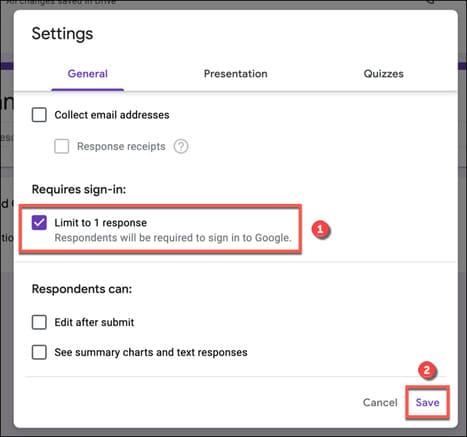
At this time, only logged in Google accounts can respond to your form, and responses are limited to one per account.
Manually limit all replies in Google Forms
Unless you want to leave the Google Forms question open for answers indefinitely, you can turn off responses afterwards. While Google Forms allows you to schedule without installing add-ons, you can manually turn off responses for your forms.
To do this at any time, open the Google Forms form in a web browser on a computer. To see your responses, click the “Responses” tab.
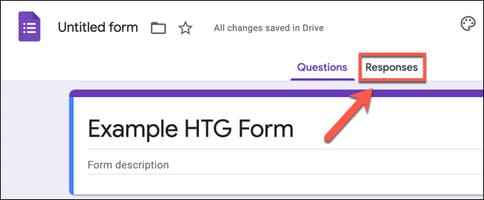
In the “Responses” tab, select the “Accepting Responses” slider to turn off other replies.
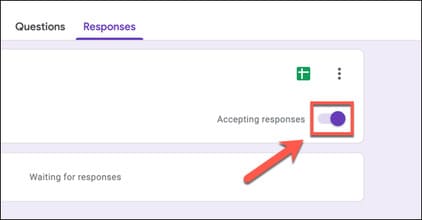
When it is disabled, the slider will turn gray with a red outline. If you want to add a custom message informing potential respondents that the form has been closed for entries, provide a message in the “Message For Respondents” text box.
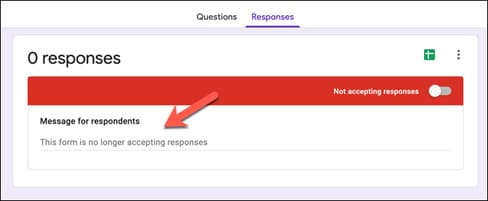
The message you insert will be saved automatically. When new respondents try to access your forms, they will be greeted with this message and will not be able to fill out or submit the form.
Automatically restrict answers by Google Forms
Unfortunately, Google Forms does not have the ability to automatically limit responses based on a preset number of submissions or end dates. If you want this functionality, you need to install a Google Forms add-on called formLimiter first.
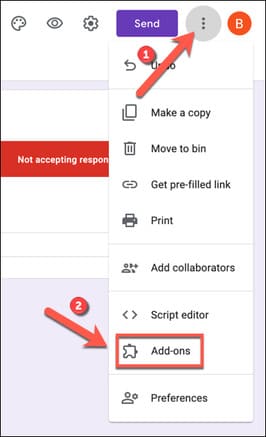
To add the Google Forms add-on to your account, open a Google Forms form in a desktop browser and click the three-dot menu icon in the top right corner.
From the drop-down menu, click the “Add-Ons” option.
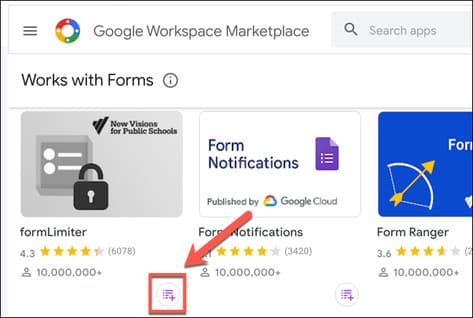
In the “Google Workspace Marketplace” menu, you will see a list of apps available for installation. Use the search bar at the top to search for “formLimiter” to install, or scroll through the list to find it manually.
Once you’ve located the formLimiter, click on the name, tag icon, or info icon to view more information.
In the “formLimiter” info menu, click the install button to install the add-on
Google Forms will need permission to install the add-on. Click the “Continue” option to accept the terms and conditions and continue with the installation.
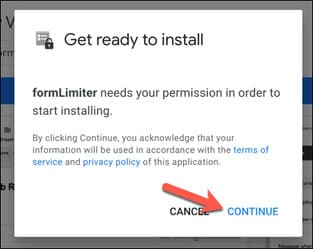
In another window, a list of permissions that formLimiter accesses will be displayed. Confirm that you are happy with these, then click “Allow” to give it access to your Google account.
Once authorized, you can access formLimiter by clicking the add-on icon on your Google Forms page. From the drop-down menu, click the “FormLimiter” option.
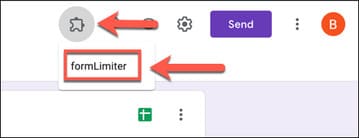
In the “FormLimiter” menu, select the “Set Limit” option.
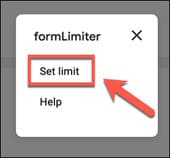
A pop-up menu will appear in the bottom right corner. From the “Limit Type” drop-down menu, you can set answer limits based on the number of responses or by date and time.
Limit answers by number of submissions
To limit responses by number of submissions, select “Number Of Form Responses” from the drop-down menu. In the box below the drop-down, provide a maximum number of submissions (for example, “10” to limit responses to ten submissions).
If you want to change the message that potential respondents see when closing forms, make your changes in the box provided. If you want to receive an email when the form closes, click the “Email form owner when submissions are closed” checkbox.
Click “Save And Enable” to save your settings.
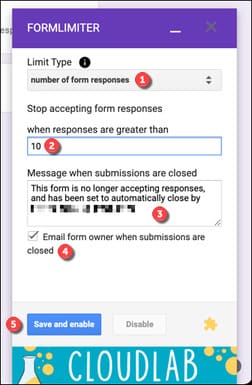
Once the responses to your form pass the set number of times, the form will close and no more submissions can be made.
Limit responses by date and time
If you want to close the reply after a certain date and time, select “Date And Time” from the “Limit Type” menu.
Using the options provided, set the closing date and time to suit your form. Clicking the buttons will allow you to use the built-in calendar window.
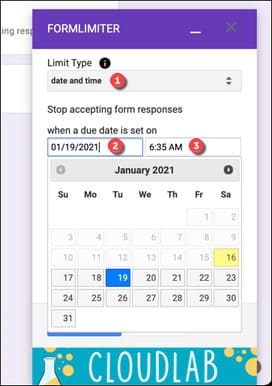
Once the date and time is selected, make changes to the close message using the box provided (or leave it as is if you’re happy with the preset message). If you want to receive an email when the closing date and time have passed, click the “Email form owner when submissions are closed” box.
Click “Save And Enable” to add an end date to your forms.
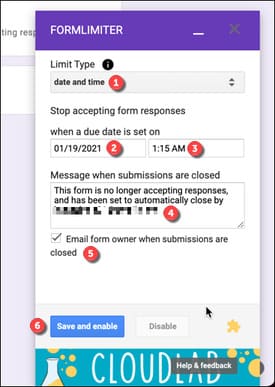
Once saved, you will not be able to submit your submission beyond the end date and time you selected.
Turn off response limit with formLimiter
If you want to disable these limits before the set submission count or end date is reached, click Add-ons > formLimiter, then click “Disable” in the pop-up menu.
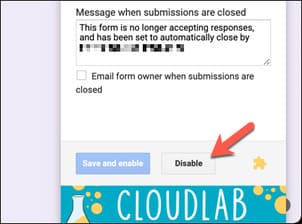
This will ensure that potential respondents can continue to use your forms until you limit answers again.