How to delete the password saved on Chrome Being one of the urgent measures that every user should do immediately. In the era where data attacks take place daily, the habit of saving passwords on the browser because the convenience is accidentally turning you into an attractive goal for hackers. It is time for us to look back and prioritize the safety of our personal information.
| Join the channel Telegram belong to Anonyviet 👉 Link 👈 |
The potential danger when saving passwords on Chrome
The world security world has changed. Today’s hackers no longer have to “break the lock” of the system, instead, they just need to “log in” legally with the information that users accidentally reveal. The habit of using the same password for many different accounts is the critical hole, once the information is leaked in one place, all your other accounts are at risk of being infringed.
Recognizing this serious threat, technology giants like Google and Microsoft is actively recommending users to abandon traditional passwords. They are promoting a safer future with the key code (Passkey) And even, Microsoft has called on billions of users to delete the saved password, a strong move showing the level of risk has reached its peak.

Is Chrome password manager really safe?
In spite of Google Password Manager Bringing undeniable convenience, security experts from prestigious organizations such as Press Freedom Foundation, PC Mag to Android Police all issued a warning: Stop using it. This convenience has to pay a safe price as safe as:
Lack of information (zero-knowledge)
According to Techradar, the manager of Google does not apply this encryption mechanism. This means that, theoretically, Google has the ability to access and view your original text password if they want or be forced to do so.

“Gate” for malware
The integration in the browser makes the password manager of Chrome Become a target that is easily attacked by malicious codes. These software can exploit the browser holes (such as via Javascript) to silently steal your entire password warehouse, a risk that is more unlikely to independent password management applications.
Instructions on how to delete the password saved on Chrome
Step 1: At Chrome’s main interface, click the icon Three dots (⋮) In the top right corner of the screen and select Settings.
Step 2: Select the next item Privacy and security > Press Delete Browsing Data.
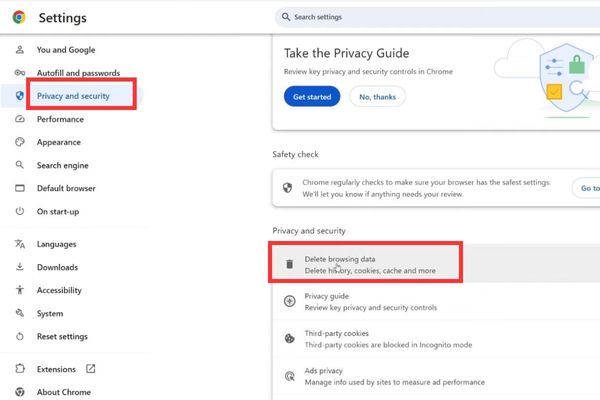
Step 3: Please switch to tab Advanced. At the Time Range section (Time range), please choose All Time (Up to now) to ensure deletion of all the passwords saved.
Scroll down the list below, only in the box Passwords and other sign-in data.
Step 4: After selecting the right item to be deleted, just click the button Delete Data green.
That is done! The entire password has been completely deleted from the browser.
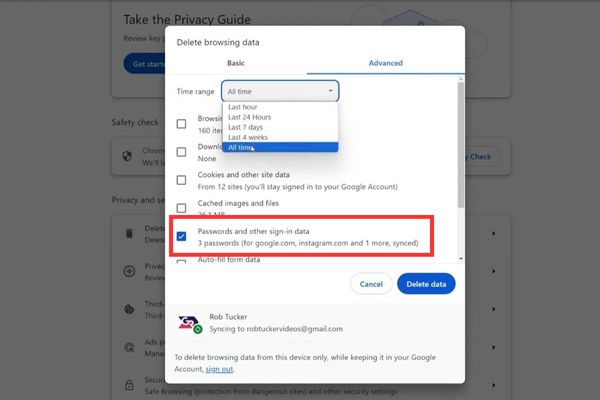
Important note: Because you are logging in to Google account on Chrome, this operation will delete the password not only on this computer but also on all devices (phones, tablets) being synchronized with your Google account.
After deleting the password, what should you do next?
After cleaning up, the next step is to choose a true “safe” safe for your password. Experts recommend prioritizing independent, reputable and paid password managers. Be careful with free, unknown applications because they can potentially have many other security risks.
An ideal password manager needs to meet the following criteria:
- It must provide end-to-end and non-information (zero-knowledge) mechanisms, ensuring that only you can access your data.
- It needs to be verified by many security layers to enhance safety for access.
- It should operate independently, creating a safe distance between sensitive password warehouse and a potential risk of a risk.
- The selection of applications in the ecosystem you trust (like Apple) or reputable paid services will bring superior security levels.
Conclusion
Sacrifice a little convenient in exchange for absolute safety for personal data is a completely worthy investment. By applying How to delete the password saved on Chrome And switching to a professional security solution, you are actively building a solid defensive fence for your digital life.