• Home
  • News
  • Software
  • Knowledge
  • MMO
  • Tips
  • Security
  • Network
  • Office
AnonyViet - English Version
  • Home
  • News
  • Software
  • Knowledge
  • MMO
  • Tips
  • Security
  • Network
  • Office
No Result
View All Result
  • Home
  • News
  • Software
  • Knowledge
  • MMO
  • Tips
  • Security
  • Network
  • Office
No Result
View All Result
AnonyViet - English Version
No Result
View All Result

How to cut YouTube videos into small videos very easily

AnonyViet by AnonyViet
January 27, 2023
in Software
0

Are you looking for the best editing tool to trim YouTube videos? So did you know, YouTube provides a built-in video editor to trim your videos. With the help of trim feature, you can remove unnecessary parts from your video. However, many people still do not know how to cut Youtube videos.

Join the channel Telegram of the AnonyViet 👉 Link 👈

How to cut YouTube videos into small videos very easily

You can trim your video even after it’s posted to YouTube. YouTube editor is a great and simple solution for cutting your videos. But in this article, I will introduce you to the three best editing tools to cut YouTube videos.

How to cut a Video on YouTube

With the help of YouTube’s Trim feature, you can always trim your videos. This is one of the best methods to trim YouTube videos. Most importantly, however, you must follow these steps:

Step 1. Sign in

You must first log in YouTube Studio mine.

Step 2. Select the video you want to cut

After signing in to YouTube Studio, you need to click Nội dung. Select the video you want to trim. Then go to the left sidebar and click Editor.

Step 3. Trim the end or beginning of your video

Can you see the Trim feature next to the video timer? You can trim the beginning or the end of the video with this feature. You will see a blue outline around the video timeline. All you need is to drag them to trim the video. After trimming the video, you can preview (Preview) and Save video (Save) in the top right corner.
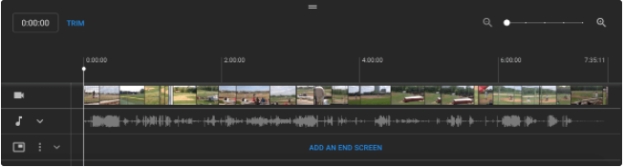
How to cut a Video on YouTube

Step 4. Cut the middle of the video

First of all, you need to select Trim. Then tap Split and cut the segment you want.

3 Tools to Cut the Best Video on YouTube

Filme

iMyFone Filme is one of the best video editors for Windows. It is easy to use software that allows you to edit your videos in many ways. Filme is the ideal video editor for beginners as well as advanced users. If you don’t want to use complicated editing features, then choose Filme to trim the video. In addition, you can also split, trim or add effects to your video.

Step 1. Download and open FilmeFirst of all, you must download iMyFone Filme about computers. After downloading Filme, open the software and import your video.
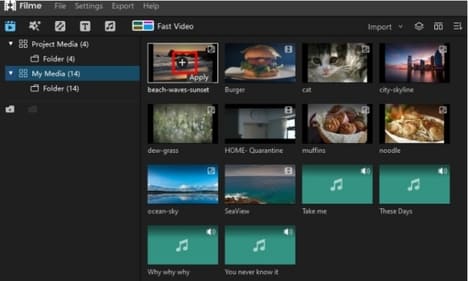
3 Tools to Cut the Best Video on YouTube

Step 2. Cut the videoNext, you need to cut out the unwanted parts of your video. All you need is to drag the translucent white bar in the timeline.
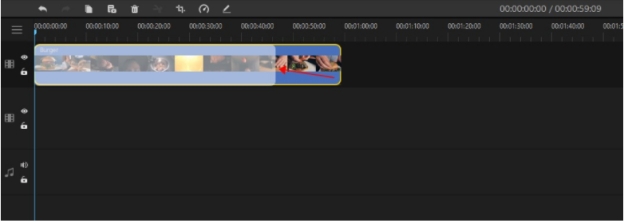
Filme

Step 3. Click the Trim . option

In the timeline, you need to click the trim option on the toolbar at the top.

Step 4. Preview and save the file

After cutting the video, you can preview and save the file.

YouTube Trimmer

YouTube Trimmer is one of the best free online video editors. It is a very easy to use platform, especially for those who do not want to use advanced editing features.

Step 1. Copy and paste your URL

Since YouTube Trimmer is an online video editor, you need to copy and paste the URL of the video you want to trim. All you need is to access the page to the website Youtube Trimmer and paste your URL.

YouTube Trimmer

Step 2 – Cut the video according to the timeline

After you paste your URL, it will take a few seconds for the website to load the timeline. In the timeline, you can delete unwanted segments of the video.

Step 3 – Choose format and quality

After trimming the video, YouTube Trimmer allows you to choose the quality and format of the video to download.

Step 4 – Download the video

After choosing the format and quality, you need to tap the option Download to download videos.

Kapwing

Kapwing is one of the best video editor for cutting YouTube videos. In addition to cutting videos, this website also allows you to add effects, transitions and add subtitles to your videos.

Step 1. Upload your video

Access Kapwing’s website and upload your video.
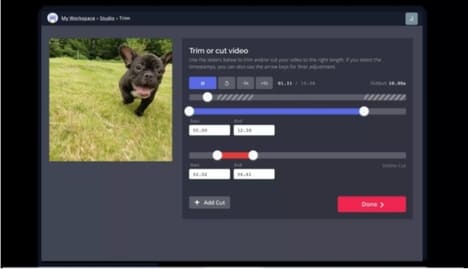
Kapwing

Step 2. Click on Trim

After uploading the video, press the . button Trim and you can cut the parts you don’t want out of the video.

Step 3. Slide the buttons

With the help of Kapwings, you can trim your YouTube videos by sliding the buttons.

Step 4. Download Video

The part that you selected will be deleted and you can download your video.

Conclusion

So you can cut your video already. Filme is the leading video editor that allows you to edit videos the way you want. In addition to video trimming, you can use many other editing features to make your videos more attractive. Also you can block Youtube ads on Android and iOS here.


The article achieved: 5/5 – (100 votes)

Tags: cuteasilysmallvideosYoutube
Previous Post

How to check .NET Framework version on Windows

Next Post

What is GitHub Copilot? Github’s new AI self-coding tool

AnonyViet

AnonyViet

Related Posts

Compact design, durable battery, excellent camera: Review of OPPO Reno 16 Pro 5G
Software

Compact design, durable battery, excellent camera: Review of OPPO Reno 16 Pro 5G

July 12, 2026
Download the free 3D Pinball Space Cadet game on the App Store now
Software

Download the free 3D Pinball Space Cadet game on the App Store now

July 12, 2026
Learn new skills with iPad 11 (A16) 128GB: when is enough, when should you upgrade to a higher level?
Software

Learn new skills with iPad 11 (A16) 128GB: when is enough, when should you upgrade to a higher level?

July 10, 2026
Instructions for taking free buses in Ho Chi Minh City from July 2026
Software

Instructions for taking free buses in Ho Chi Minh City from July 2026

July 9, 2026
3 steps to change Zalo number when sim is revoked
Software

3 steps to change Zalo number when sim is revoked

July 8, 2026
The simplest way to log out of Gmail on Huawei phones
Software

The simplest way to log out of Gmail on Huawei phones

July 5, 2026
Next Post
What is GitHub Copilot?  Github’s new AI self-coding tool

What is GitHub Copilot? Github's new AI self-coding tool

0 0 votes
Article Rating
Subscribe
Login
Notify of
guest

guest

0 Comments
Oldest
Newest Most Voted

Recent News

Instructions on how to create POV product review videos using Flow

Instructions on how to create POV product review videos using Flow

July 13, 2026
How to fix “This PC can’t run Windows 11” error This PC doesn’t meet the minimum system requirements

How to fix “This PC can’t run Windows 11” error This PC doesn’t meet the minimum system requirements

July 13, 2026
Compact design, durable battery, excellent camera: Review of OPPO Reno 16 Pro 5G

Compact design, durable battery, excellent camera: Review of OPPO Reno 16 Pro 5G

July 12, 2026
Download the free 3D Pinball Space Cadet game on the App Store now

Download the free 3D Pinball Space Cadet game on the App Store now

July 12, 2026
Instructions on how to create POV product review videos using Flow

Instructions on how to create POV product review videos using Flow

July 13, 2026
How to fix “This PC can’t run Windows 11” error This PC doesn’t meet the minimum system requirements

How to fix “This PC can’t run Windows 11” error This PC doesn’t meet the minimum system requirements

July 13, 2026
Compact design, durable battery, excellent camera: Review of OPPO Reno 16 Pro 5G

Compact design, durable battery, excellent camera: Review of OPPO Reno 16 Pro 5G

July 12, 2026
AnonyViet - English Version

AnonyViet

AnonyViet is a website share knowledge that you have never learned in school!

We are ready to welcome your comments, as well as your articles sent to AnonyViet.

Follow Us

Contact:

Email: anonyviet.com[@]gmail.com

Main Website: https://anonyviet.com

Recent News

Instructions on how to create POV product review videos using Flow

Instructions on how to create POV product review videos using Flow

July 13, 2026
How to fix “This PC can’t run Windows 11” error This PC doesn’t meet the minimum system requirements

How to fix “This PC can’t run Windows 11” error This PC doesn’t meet the minimum system requirements

July 13, 2026
  • Home
  • Home 2
  • Home 3
  • Home 4
  • Home 5
  • Home 6
  • Next Dest Page
  • Sample Page

say88 tỷ lệ kèo nhà cái kèo nhà cái 5 febet

No Result
View All Result
  • Home
  • News
  • Software
  • Knowledge
  • MMO
  • Tips
  • Security
  • Network
  • Office

say88 tỷ lệ kèo nhà cái kèo nhà cái 5 febet

wpDiscuz
0
0
Would love your thoughts, please comment.x
()
x
| Reply