• Home
  • News
  • Software
  • Knowledge
  • MMO
  • Tips
  • Security
  • Network
  • Office
AnonyViet - English Version
  • Home
  • News
  • Software
  • Knowledge
  • MMO
  • Tips
  • Security
  • Network
  • Office
No Result
View All Result
  • Home
  • News
  • Software
  • Knowledge
  • MMO
  • Tips
  • Security
  • Network
  • Office
No Result
View All Result
AnonyViet - English Version
No Result
View All Result

How to create songs with Riffusion [Miễn phí]

AnonyViet by AnonyViet
February 4, 2025
in Knowledge
0

In the world of modern technology, music is no longer the monopoly field of talented musicians. With the development of artificial intelligence (AI), creating unique music from the text has become easier than ever. One of the prominent names in this field is Riffusion. Let's explore with Anonyviet Riffusion What's special and why it is so popular!

Join the channel Telegram belong to Anonyviet 👉 Link 👈

What is Riffusion?

Riffusion is a platform Create music from text Use advanced AI technology. Similar to Suno, Riffusion allows users to enter the description of the genre, mood, instrument or any other idea to create a complete piece of music. However, Riffusion does not stop there, it also brings more unique and interesting features.
What is Riffusion?
What is Riffusion?

The outstanding features of Riffusion

1. Create music from text

This is the core feature of Riffusion. Just enter a short description, who will analyze and turn your ideas into a lively music. You can ask a vibrant pop song, a gentle jazz, or even a quiet classic music.

2. Use Spectrogram

Riffusion uses Spectrogram (audio frequency chart) to represent and process audio. This helps anyone better understand the music structure and create melodies that match the requirements of the user.

3. Diverse genres

Unlimited in a single genre, Riffusion can create many different music styles, from pop, rock, jazz, electronic to classical music and non -verbal music.

4. Flexible customization

You can adjust parameters such as tempo (Tempo), tone (key) and the length of the music to suit your creative needs.

5. Easy to share

After creating, you can share music on social networks or use for personal purposes such as making background music for videos, podcasts or video games.

Instructions for creating songs with Riffusion

Method 1: Use chatgpt to create lyrics

Step 1: Access Home of Riffusionpress Log in To log in. You can use the Google account to register quickly. Then enter the username arbitrary.
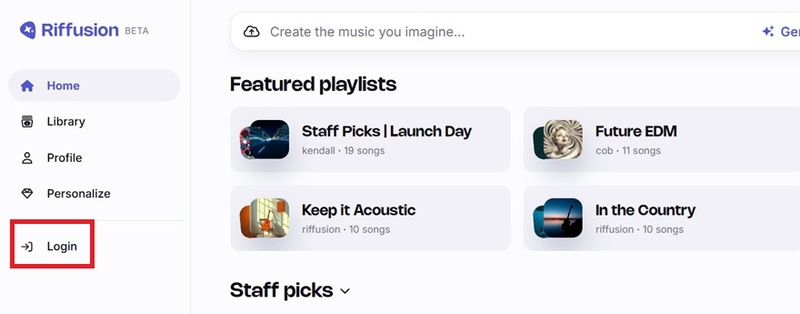
Press log in
Press log in

Step 2: Access chatgpt, enter the command:

Tôi muốn tạo lời bài hát [thể loại] có giai điệu [mô tả]

For example: I want to create lyrics of country music with beautiful love melody.
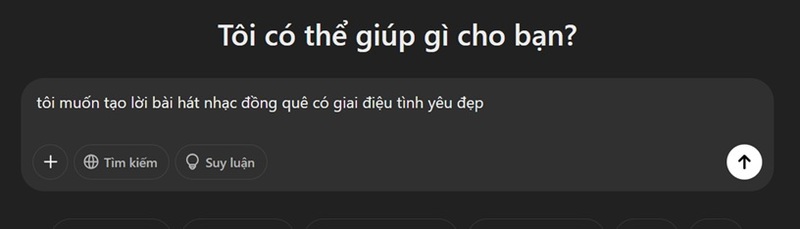
Use chatgpt to create lyrics

Step 3: After getting the lyrics in Vietnamese, you continue:

Dịch sang tiếng Anh

Let the system automatically translate the lyrics into English for you.
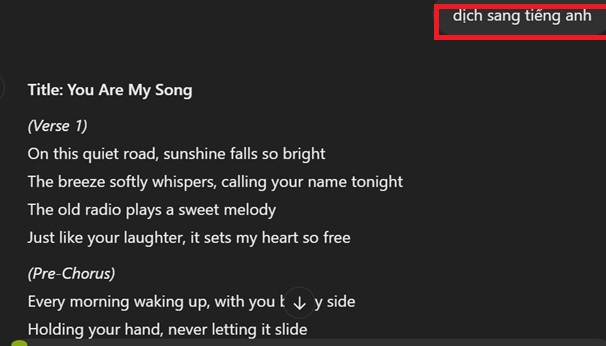
The system automatically translates the lyrics into English

Step 4: Back to the riffusion> click Create the music you image > Choose tab Compose.
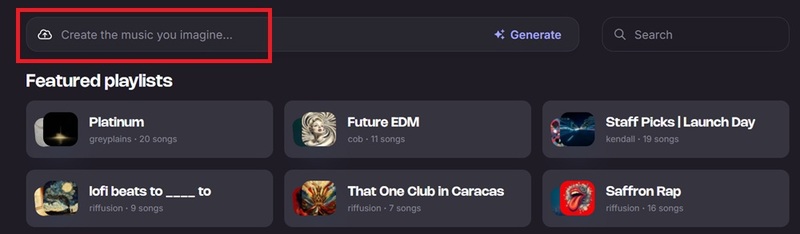
Click on Create The Music You Image
Select the compose tab

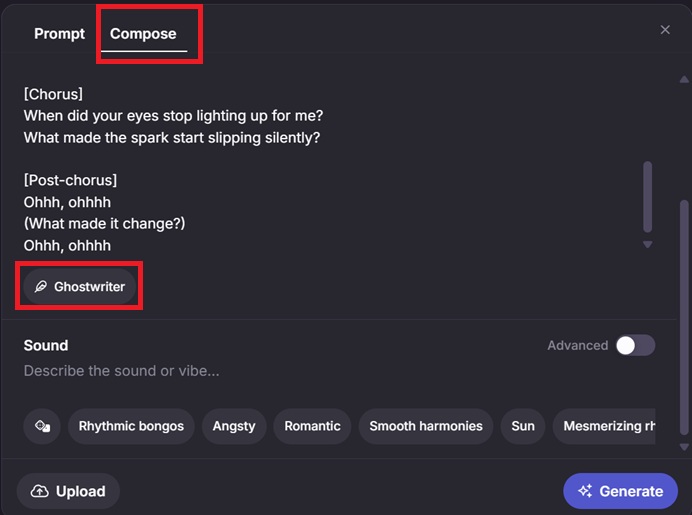
Lyrics: Paste the lyrics into the text frame. If you want, you can press Ghost writerentering the topic, the system will automatically propose appropriate words.

Sound: Enter information about music genre, vocal (male/female), musical instruments, or any element you want in the song.
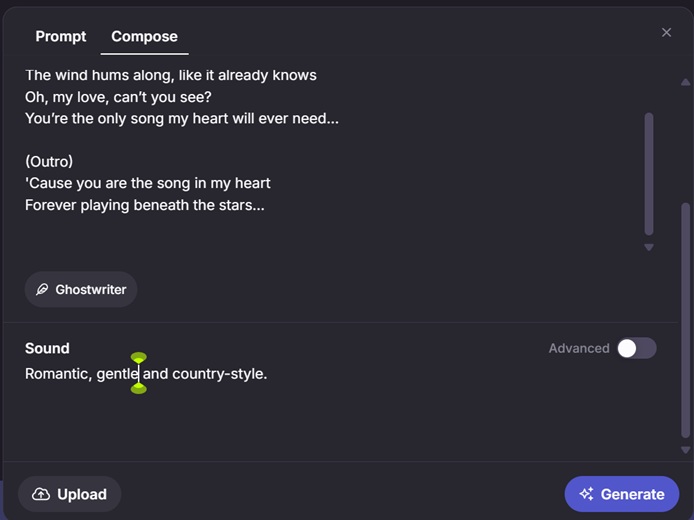
Enter information about music genre

Step 5: Once completed, press Generate To start creating music.

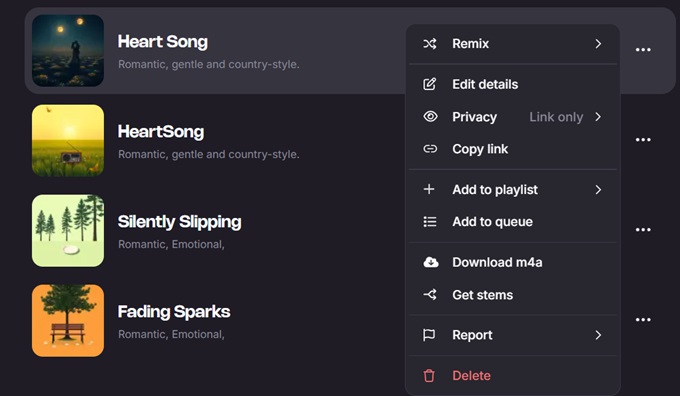
Riffusion will create 2 complete music, each nearly 4 minutes long. You can listen to each post, your favorite mark or click the three -dot button to see more options such as:

  • Remix: Cover with other words, other music styles; Extend expand the song, …
  • Privacy: Establish privacy: Only me (only me), anyone with the link (heard if there is a link), publish (public).
  • Copy link: Copy link
  • Add to Playlist: Add the playlist
  • Add to Queue: Add waiting
  • Download M4A: Download M4A music file to your computer
  • Get Stem: The individual audio files of each component in a music (vocal, instrumental, …)
  • Delete: Delete music.
Riffusion will create 2 complete music

The end result you can listen HERE

Method 2: Enter the lyrics from the available songs

  1. This way, you can paste lyrics from famous songs
  2. Then enter the category you want to go to the Sound> click Generate To create a song.

Please listen to the storm with a whole new melody HERE
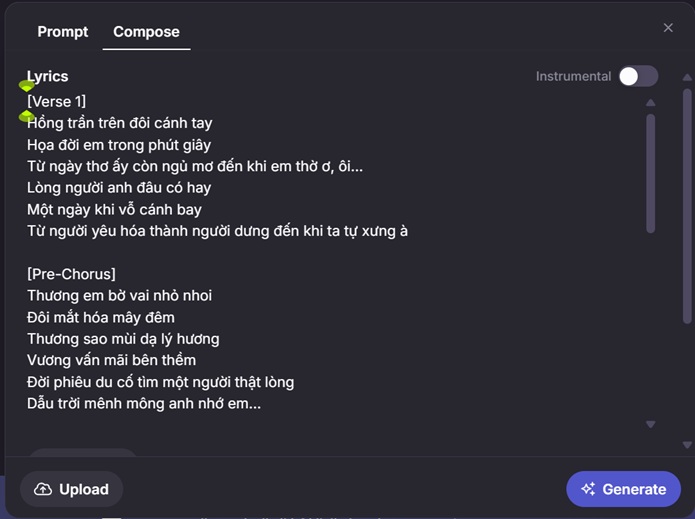
Enter lyrics from the song available

What is different from Suno?

1. Free use

Currently, RiffSION is in the Beta version and is completely free. Meanwhile, Suno only allows creating 10 free music with 50 credits.

2. Level system for users

RiffSION has a Personize feature with a level system from debut to Mythic. Users can complete tasks to increase levels, motivate and cohesion to the platform.

Level system for users

3. Cover and Get Stems features

Riffusion allows users to create a cover and separate separate stem. This is a feature that Suno only provides on the Pro version.

See also: How to use Suno who creates a complete song From A to Z in just 5 minutes

Conclusion

Riffusion As a potential music creative tool, especially with the ability to create music from text and attractive leveling system. This will definitely be the first choice for those who love to explore and create music!


Tags: createmiễnphíRiffusionsongs
Previous Post

How to see which groups of friends participated in Facebook

Next Post

Meta launched Edits to compete with Capcut

AnonyViet

AnonyViet

Related Posts

Instructions on how to view a 3D exhibition about Party history right at home
Knowledge

Instructions on how to view a 3D exhibition about Party history right at home

November 15, 2025
How to create an order on Shopee to send items to relatives
Knowledge

How to create an order on Shopee to send items to relatives

November 12, 2025
Download training materials on Applying AI in teaching and learning in 2025
Knowledge

Download training materials on Applying AI in teaching and learning in 2025

November 8, 2025
How to delete SMS and iMessage in iCloud to free up space
Knowledge

How to delete SMS and iMessage in iCloud to free up space

November 7, 2025
Beware: Using AI to “create found images” of pets/lost items to demand ransom
Knowledge

Beware: Using AI to “create found images” of pets/lost items to demand ransom

October 26, 2025
Instructions for creating your own AI voice in just 10 seconds
Knowledge

Instructions for creating your own AI voice in just 10 seconds

October 24, 2025
Next Post
Meta launched Edits to compete with Capcut

Meta launched Edits to compete with Capcut

0 0 votes
Article Rating
Subscribe
Login
Notify of
guest

guest

0 Comments
Oldest
Newest Most Voted
Inline Feedbacks
View all comments

Recent News

Instructions on how to edit Facebook scheduled posts

Instructions on how to edit Facebook scheduled posts

November 16, 2025
Suggested AI command to create a rustic and charming image of a Ban Lien girl

Suggested AI command to create a rustic and charming image of a Ban Lien girl

November 16, 2025
Windows 10 will have a new, simpler interface

Windows 10 will have a new, simpler interface

November 16, 2025
Share Key Active Visual Studio 2026

Share Key Active Visual Studio 2026

November 15, 2025
Instructions on how to edit Facebook scheduled posts

Instructions on how to edit Facebook scheduled posts

November 16, 2025
Suggested AI command to create a rustic and charming image of a Ban Lien girl

Suggested AI command to create a rustic and charming image of a Ban Lien girl

November 16, 2025
Windows 10 will have a new, simpler interface

Windows 10 will have a new, simpler interface

November 16, 2025
AnonyViet - English Version

AnonyViet

AnonyViet is a website share knowledge that you have never learned in school!

We are ready to welcome your comments, as well as your articles sent to AnonyViet.

Follow Us

Contact:

Email: anonyviet.com[@]gmail.com

Main Website: https://anonyviet.com

Recent News

Instructions on how to edit Facebook scheduled posts

Instructions on how to edit Facebook scheduled posts

November 16, 2025
Suggested AI command to create a rustic and charming image of a Ban Lien girl

Suggested AI command to create a rustic and charming image of a Ban Lien girl

November 16, 2025
  • Home
  • Home 2
  • Home 3
  • Home 4
  • Home 5
  • Home 6
  • Next Dest Page
  • Sample Page

new88 trang chủ shbet trang chủ f168 trang chủ qq88 nhà cái 78win

No Result
View All Result
  • Home
  • News
  • Software
  • Knowledge
  • MMO
  • Tips
  • Security
  • Network
  • Office

new88 trang chủ shbet trang chủ f168 trang chủ qq88 nhà cái 78win

wpDiscuz
0
0
Would love your thoughts, please comment.x
()
x
| Reply