You are looking for a way Create photo editing application with Google Ai Studio Without cost? This breakthrough tool allows anyone, from students to business people, turning ideas into practical applications. Let’s explore the surprisingly simple process to own your own app!
| Join the channel Telegram belong to Anonyviet 👉 Link 👈 |
What is Google Ai Studio so “miraculous”?
This is a free online platform Google Development, allowing you to build simple applications just by ordering in a natural language. You do not need to write code, just describe your ideas in Vietnamese, and artificial intelligence will automatically transform them into a complete application.
- This platform is completely free, helping you save maximum cost.
- You do not need programming knowledge, technical barriers have been completely removed.
- The tool to support Vietnamese is very good, helping you communicate with someone in the most natural way.
- The process of creating applications is extremely fast, usually only takes a few minutes to get the first product.
- The storage and sharing of the application are very convenient, you can send links to your friends to experience.

Steps to create photo editing applications with google ai studio
This process is surprisingly simple, follow these steps to see how to create photo editing applications Google Ai Studio How easy.
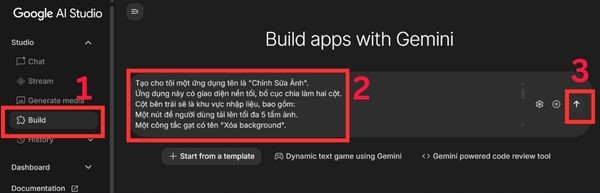
Step 1: First, you need to visit the homepage of Google Ai Studio And log in with your Gmail account. At the main interface, find the item Build to open a conversation window with anyone.
Step 2: Please describe the application details you want. The more detailed, the more anyone understands and creates the product more accurately.
Here is an example:
Tạo cho tôi một ứng dụng tên là "Chỉnh Sửa Ảnh".
Ứng dụng này giúp người dùng sáng tạo hình ảnh nhân vật dựa trên nền tảng Gemini Nano Banana.
Ứng dụng này có giao diện nền tối, bố cục chia làm hai cột.
Cột bên trái sẽ là khu vực nhập liệu, bao gồm:
Một nút để người dùng tải lên tối đa 5 tấm ảnh.
Một công tắc gạt có tên “Remove background" để xóa nền
Một ô văn bản để nhập mô tả về đặc điểm nhân vật.
Một ô văn bản khác để nhập mô tả về bối cảnh mong muốn.
Các tùy chọn để chọn chất lượng ảnh đầu ra: 2K, 4K và 8K.
Một nút lớn tên là "Tạo Ảnh".

Cột bên phải sẽ là nơi hiển thị kết quả:
Khu vực này sẽ hiển thị 7 hình ảnh được tạo ra.
Mỗi hình ảnh sẽ có một nút "Tải Về" đi kèm.
After preparing the request, you just need to press the button Run prompt And waiting for the miracle to happen.
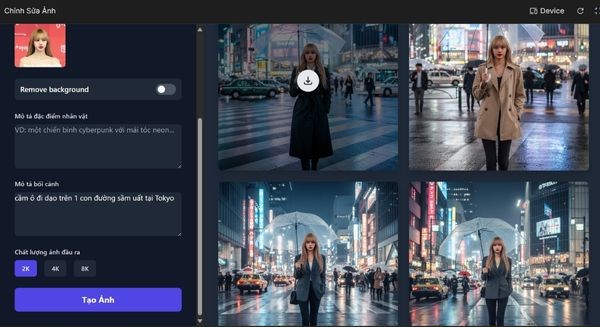
Step 3: After AI finishes, a complete application interface will appear as you describe. The left column (input) for you to download the image and customize, the right column (output) to view and download the results.
Step 4: In about 2-3 minutes, AI will automatically write all the necessary source code. You do not need to understand these complex codes, just wait and your application will be ready to use.

The use of the application just created is also extremely intuitive:
- You just need to upload your portrait photos.
- After that, fill out the character description, context and choose the desired resolution.
- Finally, press the “image creation” button and wait for the results.
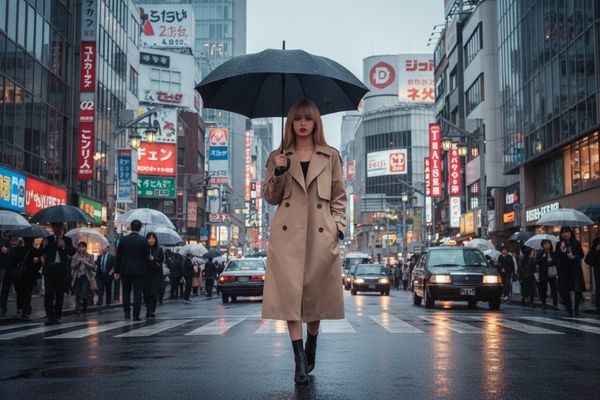
A tip is that you may need to tweak the description several times, because the output image usually has a similarity of about 60-70% of the original image.
Discover advanced features
Don’t just stop at a simple portrait. Your application can do more than that:
- You can upload multiple photos at the same time (up to 5 photos) for anyone to have more data and create more accurate results.
- You can completely put multiple characters into a picture, such as creating a scene of two friends walking in the park.
- You can ask who to change small details, such as adding a glass, changing shirt color, or completely changing the background.
Customize your style application
If you are not satisfied with the interface, do not hesitate to order more for anyone. Just type requires changes to the chat frame, who will automatically update.
For example: “Change the download button to red, with white words with glowing effects.”
How to share your application
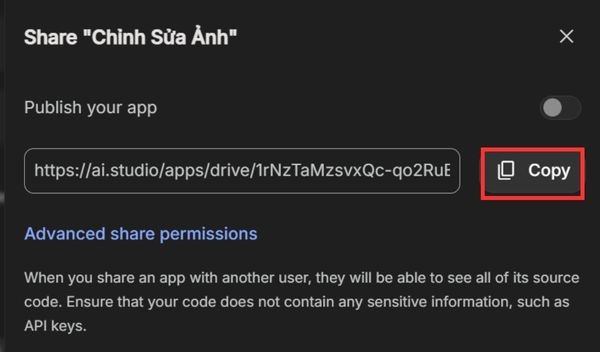
Once the application is completed, click Save To save. Then select Share app and copy links to send to friends and colleagues to use. Next time, you can find your application in the Build section → My Apps.
Unexpected applications in life
This tool is not only for entertainment but also has a great practical value:
- E -commerce: Shop owners can put products into many professional contexts without taking photos.
- Travel: You can create “virtual” check-in photos at any place in the world.
- Fashion: This tool helps you try new costumes and hairstyles quickly.
- Marketing: Creating a unique and eye -catching advertising image becomes easier than ever.
- Personal use: You can create avatars, cover photos of social networks.

A few important notes
- Make sure you have the right to use the legal image, especially if you use the application for commercial purposes.
- AI results may not be 100%perfect, sometimes you need to combine with other editing tools to have the most satisfactory face.
Conclusion
Obviously, Google Ai Studio is not only free, easy to use but also extremely powerful. This is how Create photo editing application with Google Ai Studio The most effective, helping you realize ideas without any technical barriers.