Job Create Mind Map and Flowchart using ChatGPT is opening a new chapter for effectively systematizing ideas. Instead of fiddling with complicated tools or wasting time drawing by hand, you can now turn dry lines of text into intuitive, vivid diagrams in just a few clicks.
| Join the channel Telegram belong to AnonyViet 👉 Link 👈 |
Barriers to traditional diagram creation methods
In the past, turning an idea into a mind map or flow chart was often a challenging journey. We face no small obstacles, turning this thinking support tool into a burden.
- This process is usually consumes a lot of time and effort from sketching by hand to arranging each branch on inflexible software.
- Many tools are usually free Limited features important, such as not allowing high-quality export or limiting the number of diagrams you can create.
- Job Collaborate and synchronize data When working in groups, there are often many difficulties, causing outdated versions and disrupting the flow of work.
These difficulties unintentionally stifle creativity and make us hesitant to use a method that is very useful.

How to create Mind Map and Flowchart using ChatGPT
Now, with the power of AI, you can completely eliminate these troubles. Follow these simple steps to create professional and impressive diagrams.
Step 1: Access ChatGPT > Give a very specific prompt about the topic you want.
For example: To create a diagram about “Causes of climate change”, you can command:
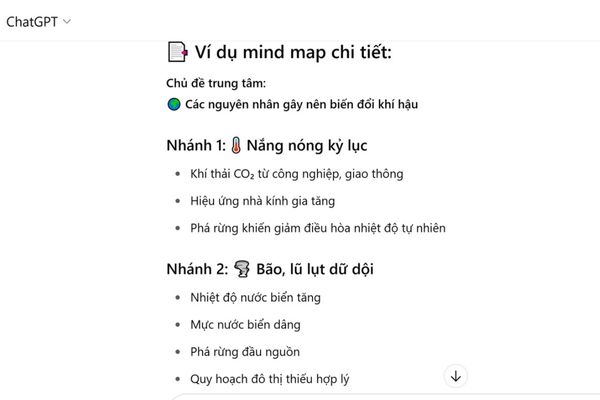
Please help me build a mind map outline on the topic “Main causes of climate change”. The main branch is the recent extreme weather events, while the secondary branches are the underlying causes leading to those phenomena.
In just a few seconds, ChatGPT will give you a logical outline, clear hierarchy, ready to be “visualized”.
Step 2: In the left toolbar of the ChatGPT interface, please access Explore GPTs.
- Type “Whimsical Diagrams” in the search box and select GPT with the purple logo. This is the “magic wand” that helps you turn text into diagrams.

Copy the entire outline that ChatGPT just created in step 1 and paste it into the chat frame of Whimsical Diagrams. Immediately, this tool will automatically analyze and transform your outline into a complete mind map or flow chart.
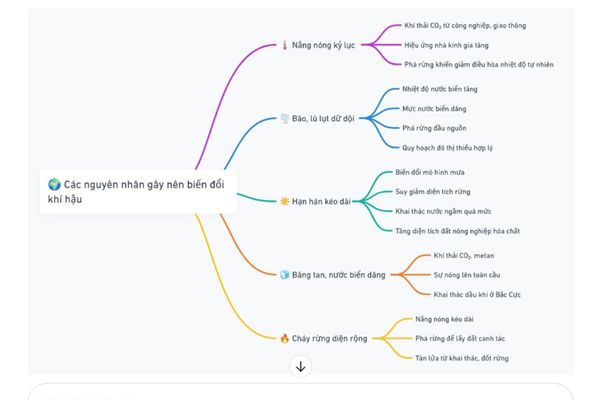
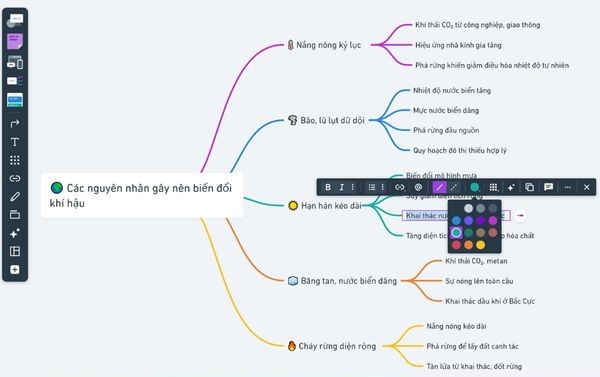
Step 3: Once the diagram is automatically generated, Whimsical will provide a link that takes you to the web workspace. Here, you have full creative freedom to fine-tune your “brainchild” such as:
- Change the color for each branch to distinguish groups of ideas.
- Customize line styles, add symbols, and reformat text to make diagrams more dynamic and easier to read.
- Create a sharing link to invite teammates to view, comment or edit directly, promoting maximum teamwork efficiency.
The same process applies when you want to create a flowchart, helping you visualize every process easily.
Conclusion
By combining the intelligence of chatbots and the flexibility of specialized tools, Create Mind Map and Flowchart using ChatGPT has become simpler than ever. Start experimenting today to turn complex ideas into intuitive and easy to grasp!