• Home
  • News
  • Software
  • Knowledge
  • MMO
  • Tips
  • Security
  • Network
  • Office
AnonyViet - English Version
  • Home
  • News
  • Software
  • Knowledge
  • MMO
  • Tips
  • Security
  • Network
  • Office
No Result
View All Result
  • Home
  • News
  • Software
  • Knowledge
  • MMO
  • Tips
  • Security
  • Network
  • Office
No Result
View All Result
AnonyViet - English Version
No Result
View All Result

How to change the Safari address to the old style on the iPhone

AnonyViet by AnonyViet
September 28, 2025
in Knowledge
0

How to change the Safari address bar to the old style As one of the most popular searches of iPhone users since Apple introduced the new interface. Despite being designed with the optimal purpose of space, the compact address bar at the bottom accidentally hid important function buttons, causing many troubles. Do not worry, with just a few extremely simple steps below, you can completely bring that familiar interface back.

Join the channel Telegram belong to Anonyviet 👉 Link 👈

Why do many people want to change the Safari interface to the old style?

The new interface of Safari may look modern, but it broke the familiar flow of many people. The return to the old layout brings practical benefits such as:

Optimize operations, save every second

With the old interface, important buttons such as Bookmarks, Share (Share), and see all tabs are clearly displayed in the bottom toolbar. You only need one touch to perform the action.

In contrast, the new interface forced you to take one more step: Touch the three -dot button To open the menu, then select the desired function. The difference is small but when repeated many times a day, it will save you a significant time and reduce unnecessary frustration.
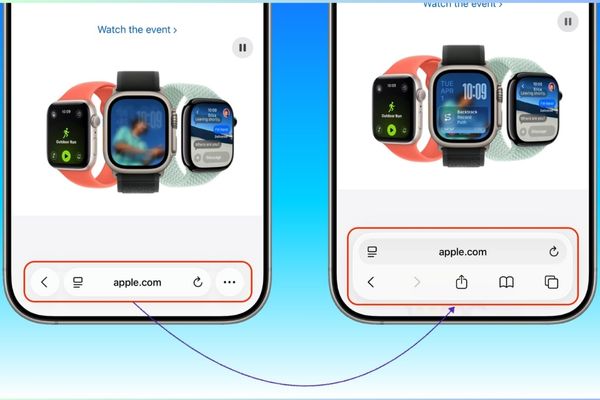
Why do many people want to change the Safari interface to the old style?

Manage the intuitive and easier tab

The button to view all tabs in the form of square grid is a powerful “weapon” to manage dozens of open websites. The old interface places this button in a fixed position, giving you an overview and switch between tabs quickly. Meanwhile, the new interface requires you to swipe up from the address bar and sometimes can be confused with the gesture of returning to the main screen.

Keep the familiar experience

For those who have used iPhone For many years, the address of the address above and the navigation bar below has become part of “muscle memory”. This sudden change forces the brain to re -learn from the beginning, causing awkward feeling and reducing the speed of surfing the web.
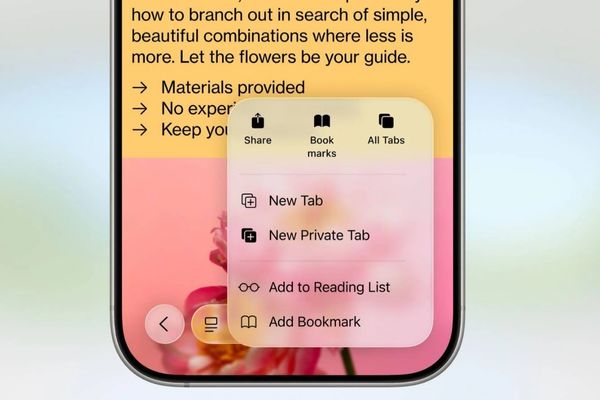
The new interface forces you to take one more step

Instructions on how to change the Safari address bar to the old style

  1. From the main screen of the iPhone, open the application Settings> Apps.
  2. Scroll down the list of applications installed on the machine and search, then touch the Safari section.
  3. Roll down until you see the title section Tabclick on Bottom.
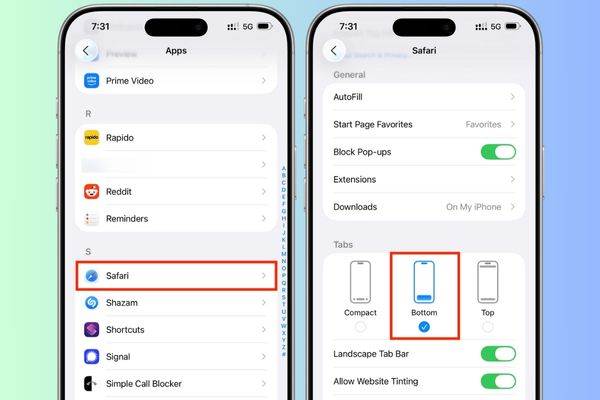
Instructions on how to change the Safari address bar to the old style

That’s it! Please restart the browser Safariyou will immediately see the change: the address bar has returned to the familiar top position, and the toolbar with all the navigation buttons have reappeared at the bottom of the screen.

Conclude

With just a few simple steps, the customization of the browser interface is no longer difficult. Hopefully this article has provided you with clear instructions How to change the Safari address bar to the old stylehelping to experience the web to become more convenient and more effective.


Tags: addresschangeiPhoneSafaristyle
Previous Post

Summarize 8+ orders to create Mid -Autumn Festival for women

Next Post

Copy all Google Drive others about Google Drive

AnonyViet

AnonyViet

Related Posts

Download training materials on Applying AI in teaching and learning in 2025
Knowledge

Download training materials on Applying AI in teaching and learning in 2025

November 8, 2025
How to delete SMS and iMessage in iCloud to free up space
Knowledge

How to delete SMS and iMessage in iCloud to free up space

November 7, 2025
Beware: Using AI to “create found images” of pets/lost items to demand ransom
Knowledge

Beware: Using AI to “create found images” of pets/lost items to demand ransom

October 26, 2025
Instructions for creating your own AI voice in just 10 seconds
Knowledge

Instructions for creating your own AI voice in just 10 seconds

October 24, 2025
How to change color and add icons to iPhone Folders
Knowledge

How to change color and add icons to iPhone Folders

October 20, 2025
What is ChatGPT Agent? How to use?
Knowledge

What is ChatGPT Agent? How to use?

October 18, 2025
Next Post
Copy all Google Drive others about Google Drive

Copy all Google Drive others about Google Drive

0 0 votes
Article Rating
Subscribe
Login
Notify of
guest

guest

0 Comments
Oldest
Newest Most Voted
Inline Feedbacks
View all comments

Recent News

How to install Anh Hai’s Pho Shop on MacBook is super easy

How to install Anh Hai’s Pho Shop on MacBook is super easy

November 11, 2025
How to turn off ads on Yoosee app in just 1 minute

How to turn off ads on Yoosee app in just 1 minute

November 11, 2025
Windows 11 and MS Office 2021 lifetime license, genuine from  during Keysoff’s 11.11 sale

Windows 11 and MS Office 2021 lifetime license, genuine from $14 during Keysoff’s 11.11 sale

November 11, 2025
How to see your email account creation date

How to see your email account creation date

November 11, 2025
How to install Anh Hai’s Pho Shop on MacBook is super easy

How to install Anh Hai’s Pho Shop on MacBook is super easy

November 11, 2025
How to turn off ads on Yoosee app in just 1 minute

How to turn off ads on Yoosee app in just 1 minute

November 11, 2025
Windows 11 and MS Office 2021 lifetime license, genuine from  during Keysoff’s 11.11 sale

Windows 11 and MS Office 2021 lifetime license, genuine from $14 during Keysoff’s 11.11 sale

November 11, 2025
AnonyViet - English Version

AnonyViet

AnonyViet is a website share knowledge that you have never learned in school!

We are ready to welcome your comments, as well as your articles sent to AnonyViet.

Follow Us

Contact:

Email: anonyviet.com[@]gmail.com

Main Website: https://anonyviet.com

Recent News

How to install Anh Hai’s Pho Shop on MacBook is super easy

How to install Anh Hai’s Pho Shop on MacBook is super easy

November 11, 2025
How to turn off ads on Yoosee app in just 1 minute

How to turn off ads on Yoosee app in just 1 minute

November 11, 2025
  • Home
  • Home 2
  • Home 3
  • Home 4
  • Home 5
  • Home 6
  • Next Dest Page
  • Sample Page

new88 trang chủ shbet trang chủ f168 trang chủ qq88 nhà cái 78win

No Result
View All Result
  • Home
  • News
  • Software
  • Knowledge
  • MMO
  • Tips
  • Security
  • Network
  • Office

new88 trang chủ shbet trang chủ f168 trang chủ qq88 nhà cái 78win

wpDiscuz
0
0
Would love your thoughts, please comment.x
()
x
| Reply