• Home
  • News
  • Software
  • Knowledge
  • MMO
  • Tips
  • Security
  • Network
  • Office
AnonyViet - English Version
  • Home
  • News
  • Software
  • Knowledge
  • MMO
  • Tips
  • Security
  • Network
  • Office
No Result
View All Result
  • Home
  • News
  • Software
  • Knowledge
  • MMO
  • Tips
  • Security
  • Network
  • Office
No Result
View All Result
AnonyViet - English Version
No Result
View All Result

How to change Siri voice or language on iPhone

AnonyViet by AnonyViet
March 14, 2024
in Software
0

Way Change Siri voice or language is one of the things that many iPhone or iPad users wonder about. Siri is Apple's smart and useful virtual assistant, helping you do many tasks by voice. But did you know that you can change Siri's voice or language to suit your preferences, needs, and purposes? In this article, AnonyViet will guide you through the steps easily and quickly.

Join the channel Telegram belong to AnonyViet 👉 Link 👈

How to change Siri voice or language on iPhone

How to change Siri voice

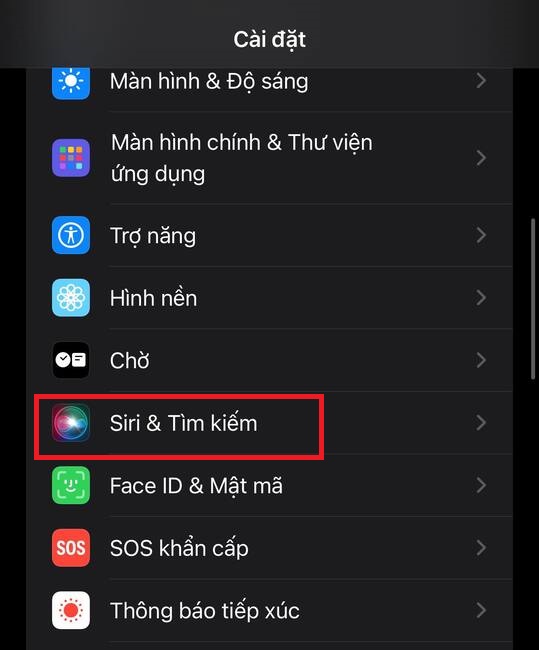
Step 1: Go to Settings > Select 'Siri & search'

This is the first step for you to customize Siri virtual assistant on iPhone. You will see options related to turning Siri on/off, choosing how to activate Siri, as well as changing other settings.
Change Siri voice or language
Select 'Siri & search'

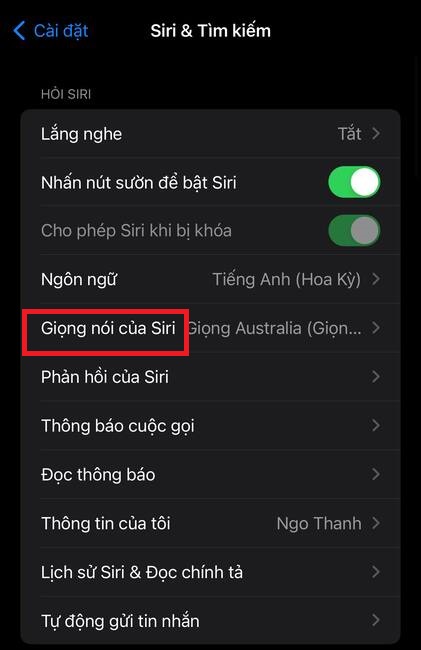
Step 2: Tap 'Siri's voice' > Select the variation and voice quality you like
Change Siri voice or language
Tap on 'Siri Voice'

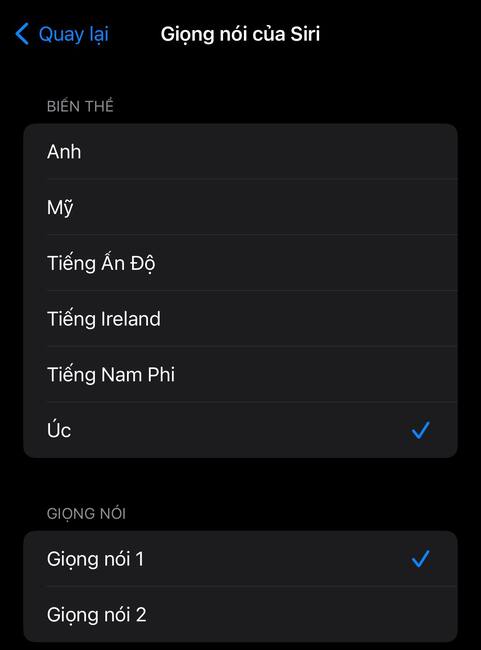
Here, you can choose Siri's voice in different variations and voice qualities. Currently, Siri has 6 language variants, including: English (UK), English (US), English (Australia), English (South Africa), English (India), and English (Ireland).
Change Siri voice or language
Choose the voice you like

Each variant can have different voice options, such as male, female, or neutral voice. You can listen to these voices by clicking on each item.

How to change Siri language

In addition to changing your voice, you can also change Siri's language to match the country in which you live or use your iPhone.

Step 1: Click Settings > Select 'Siri & Search'

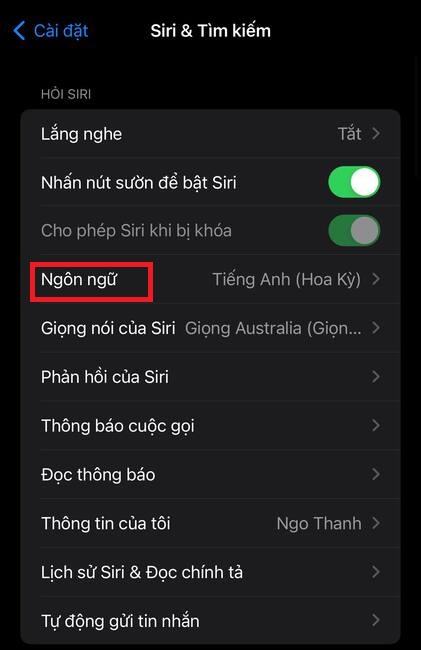
Step 2: Select 'Language'
Change Siri voice or language
Select 'Language'

You can select a language from the available list, which includes: English, Arabic, Danish, German, Dutch, Korean, Chinese, Japanese, French, Finnish, Thai, Turkish, Spanish, Italian, and many other languages.

Change Siri voice or language
Select language from the available list

Once you have changed Siri's voice and language, you should test and test whether Siri works well. You can activate Siri by saying “Hey Siri” or pressing and holding the Home button (or power button on iPhone X or later).

You can ask Siri questions or requests, for example: “Play my music”. You should pay attention to whether Siri understands what you say, whether it emits the voice you selected, and whether it responds correctly.

Epilogue

Those are the steps so you can Change Siri voice or language on iPhone. By doing so, you can customize this virtual assistant to speak the language of each different country, and increase the ability to interact with Siri. However, unfortunately, Siri currently does not support Vietnamese, so Vietnamese users still have to wait for the nearest day when their country's voice will be added to Apple's list.


The article scored: 5/5 – (100 votes)

Tags: changeiPhonelanguageSirivoice
Previous Post

Guinness World Record Contest: Win an All-Inclusive Trip to Vegas to Visit Casino

Next Post

Where to Buy Reputable, Cheap Residential Proxy Right in Vietnam

AnonyViet

AnonyViet

Related Posts

Instructions on how to prevent acquaintances from seeing your Tiktok
Software

Instructions on how to prevent acquaintances from seeing your Tiktok

June 2, 2026
TruyenDrive: Turn Google Drive into a professional manga reader
Software

TruyenDrive: Turn Google Drive into a professional manga reader

May 31, 2026
How to extract text from photos using Zalo is super simple
Software

How to extract text from photos using Zalo is super simple

May 29, 2026
HONOR 600 in hand – High-end design, 200MP camera, not cheap price
Software

HONOR 600 in hand – High-end design, 200MP camera, not cheap price

May 28, 2026
Instructions for getting 4 months of Adobe copyright for free
Software

Instructions for getting 4 months of Adobe copyright for free

May 28, 2026
The truth about the 7,000 mAh battery on Xiaomi 17T Pro: What benefits do users get?
Software

The truth about the 7,000 mAh battery on Xiaomi 17T Pro: What benefits do users get?

May 28, 2026
Next Post
Where to Buy Reputable, Cheap Residential Proxy Right in Vietnam

Where to Buy Reputable, Cheap Residential Proxy Right in Vietnam

0 0 votes
Article Rating
Subscribe
Login
Notify of
guest

guest

0 Comments
Oldest
Newest Most Voted
Inline Feedbacks
View all comments

Recent News

Instructions on how to prevent acquaintances from seeing your Tiktok

Instructions on how to prevent acquaintances from seeing your Tiktok

June 2, 2026
How to record reaction videos with Android phones, no app needed

How to record reaction videos with Android phones, no app needed

June 1, 2026
Instructions on how to get Google AI Pro 1 year for free for new accounts

Instructions on how to get Google AI Pro 1 year for free for new accounts

June 1, 2026
Top free AI tools to help write, test and optimize content

Top free AI tools to help write, test and optimize content

June 1, 2026
Instructions on how to prevent acquaintances from seeing your Tiktok

Instructions on how to prevent acquaintances from seeing your Tiktok

June 2, 2026
How to record reaction videos with Android phones, no app needed

How to record reaction videos with Android phones, no app needed

June 1, 2026
Instructions on how to get Google AI Pro 1 year for free for new accounts

Instructions on how to get Google AI Pro 1 year for free for new accounts

June 1, 2026
AnonyViet - English Version

AnonyViet

AnonyViet is a website share knowledge that you have never learned in school!

We are ready to welcome your comments, as well as your articles sent to AnonyViet.

Follow Us

Contact:

Email: anonyviet.com[@]gmail.com

Main Website: https://anonyviet.com

Recent News

Instructions on how to prevent acquaintances from seeing your Tiktok

Instructions on how to prevent acquaintances from seeing your Tiktok

June 2, 2026
How to record reaction videos with Android phones, no app needed

How to record reaction videos with Android phones, no app needed

June 1, 2026
No Result
View All Result
  • Home
  • News
  • Software
  • Knowledge
  • MMO
  • Tips
  • Security
  • Network
  • Office

wpDiscuz
0
0
Would love your thoughts, please comment.x
()
x
| Reply