• Home
  • News
  • Software
  • Knowledge
  • MMO
  • Tips
  • Security
  • Network
  • Office
AnonyViet - English Version
  • Home
  • News
  • Software
  • Knowledge
  • MMO
  • Tips
  • Security
  • Network
  • Office
No Result
View All Result
  • Home
  • News
  • Software
  • Knowledge
  • MMO
  • Tips
  • Security
  • Network
  • Office
No Result
View All Result
AnonyViet - English Version
No Result
View All Result

How is Copilot Pro different from the Free version? Should I upgrade?

AnonyViet by AnonyViet
January 24, 2024
in News
0

Copilot Pro is the paid version of the cross-platform AI assistant – Copilot. It can help you create content, learn to use Office apps, create AI images, and more. In this article, AnonyViet will compare Copilot Pro with the free version and whether it is worth upgrading or not?

Join the channel Telegram belong to AnonyViet 👉 Link 👈

What is Microsoft Copilot?

Copilot is a free AI assistant for everyone that can help you find information, create content, and work more efficiently. You can use Copilot on the web, or download the Copilot app for Windows, macOS, iPadOS, Android and iOS. You can also interact with Copilot in the Microsoft Edge browser, by enabling the Copilot feature in Edge.

Copilot Pro
Copilot – Microsoft's versatile AI assistant

Key features of Copilot Free

Search for information on the web

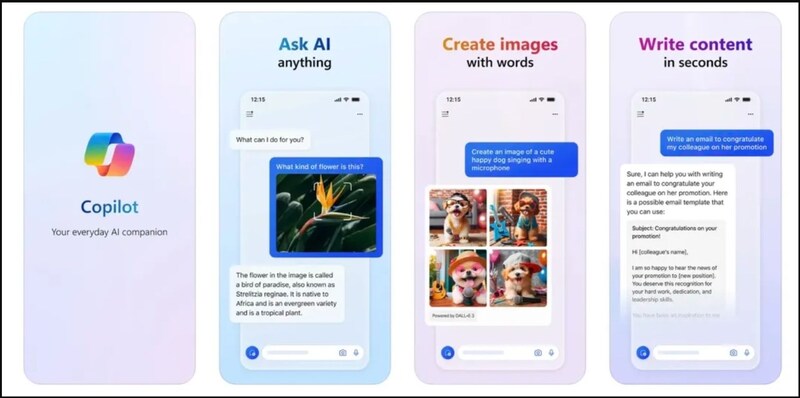
You can chat with Copilot, and ask questions about any topic you're interested in. It will answer your questions using trusted sources on the web, as well as provide you with related links. You can use text, voice, or images to chat with Copilot.

Create content

You can ask Copilot to create content for you, like text, images, or code. Copilot will use advanced AI models, such as GPT-4 and DALL-E 3, to create content according to your needs. You can create content for different purposes, like writing articles, doing homework, creating memes, studying, etc.
Copilot Pro
You can use Copilot to search for information

Increase work productivity

You can use Copilot to increase your productivity, by having it perform tasks that AI can do for you, as well as get new ideas from Copilot. You can also use Copilot's plug-ins and GPT, to take advantage of various support tools, like creating chatbots, creating presentations, or creating spreadsheets.

How is Copilot Pro different from Copilot Free?

Copilot Pro is an advanced version of Copilot, designed for advanced users, such as creators, workers, or learners.

Copilot Pro includes all the features of the free version above, plus:

Integrate AI into Office

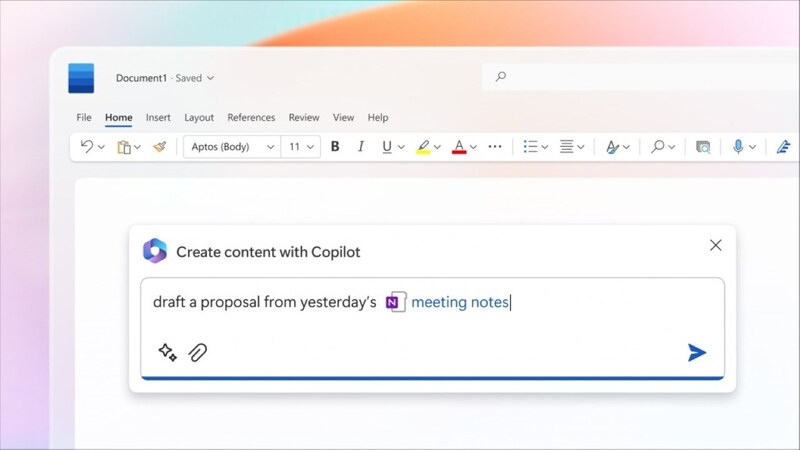
The Pro version lets you use Copilot in Microsoft apps, like Word, Excel, Outlook, PowerPoint, and OneNote. You can have Copilot draft, summarize, rewrite, or edit your content. You can also ask to create presentations, compose emails, or compile data. You can use text or voice to give Copilot commands.
Copilot Pro
Integrate AI into Office

Create chatbots

Copilot Pro gives you the ability to create your own chatbot with Copilot GPT Builder. You can create chatbots for different purposes, such as customer support, entertainment, or education, and can customize the chatbot as you wish, by setting parameters, questions, and answers for they.

Increase AI access speed

Copilot Pro gives you priority access to GPT-4 and GPT-4 Turbo during peak times. This helps you speed up content creation and question answering with AI, as well as ensuring higher content quality.
Copilot Pro
Increase AI access speed

Create better images

You are given 100 instant image creations per day, which also allows you to create horizontal AI images. You can use Copilot Designer (formerly Bing Image Creator) to create images using DALL-E 3, an AI model that can generate images from text descriptions.

To use, you need to pay to use Copilot Pro, at a price of 20 USD a month (about 492 thousand VND).

Copilot Pro is currently available for purchase in the markets below:

  • Shirt
  • Australia
  • Brazil
  • Canada
  • Switzerland
  • Virtue
  • Spain
  • France
  • UK
  • India
  • IDEA
  • Japan
  • Mexico
  • New Zealand
  • USA

Epilogue

In short, Copilot Pro Is it worth upgrading? That depends on your needs and preferences. If you only use Copilot for simple content creation and don't care about the AI ​​features in Office, you may be happy with the Free version. But if you want to take full advantage of Copilot's capabilities, especially in applications like PowerPoint, Excel, and Outlook, you may want to invest in Copilot Pro for a faster, smoother, and smarter experience. than.


The article scored: 5/5 – (100 votes)

Tags: CopilotfreeProupgradeversion
Previous Post

Nổ Hũ Online Ta88 – Đập Hũ Ảo Trúng Tiền Thật

Next Post

How to connect images from the phone screen to the computer screen

AnonyViet

AnonyViet

Related Posts

Windows 11 and MS Office 2021 lifetime license, genuine from  during Keysoff’s 11.11 sale
News

Windows 11 and MS Office 2021 lifetime license, genuine from $14 during Keysoff’s 11.11 sale

November 11, 2025
Get 25,000 free Viettel points very easily on your 25th birthday
News

Get 25,000 free Viettel points very easily on your 25th birthday

October 20, 2025
Update iPhone 17 Pro price and extremely hot PreOrder incentives 2025
News

Update iPhone 17 Pro price and extremely hot PreOrder incentives 2025

September 17, 2025
[Cẩm nang cho người mới] 5 simple steps to conquer golf
News

[Cẩm nang cho người mới] 5 simple steps to conquer golf

September 12, 2025
How to go for free Metro on National Day 2/9
News

How to go for free Metro on National Day 2/9

August 30, 2025
Instructions for receiving 80GB Data Mobifone for only 34k
News

Instructions for receiving 80GB Data Mobifone for only 34k

August 24, 2025
Next Post
How to connect images from the phone screen to the computer screen

How to connect images from the phone screen to the computer screen

0 0 votes
Article Rating
Subscribe
Login
Notify of
guest

guest

0 Comments
Oldest
Newest Most Voted
Inline Feedbacks
View all comments

Recent News

Suggested AI command to create a rustic and charming image of a Ban Lien girl

Suggested AI command to create a rustic and charming image of a Ban Lien girl

November 16, 2025
Windows 10 will have a new, simpler interface

Windows 10 will have a new, simpler interface

November 16, 2025
Share Key Active Visual Studio 2026

Share Key Active Visual Studio 2026

November 15, 2025
Instructions for using the online number-to-word conversion tool for accountants and offices

Instructions for using the online number-to-word conversion tool for accountants and offices

November 15, 2025
Suggested AI command to create a rustic and charming image of a Ban Lien girl

Suggested AI command to create a rustic and charming image of a Ban Lien girl

November 16, 2025
Windows 10 will have a new, simpler interface

Windows 10 will have a new, simpler interface

November 16, 2025
Share Key Active Visual Studio 2026

Share Key Active Visual Studio 2026

November 15, 2025
AnonyViet - English Version

AnonyViet

AnonyViet is a website share knowledge that you have never learned in school!

We are ready to welcome your comments, as well as your articles sent to AnonyViet.

Follow Us

Contact:

Email: anonyviet.com[@]gmail.com

Main Website: https://anonyviet.com

Recent News

Suggested AI command to create a rustic and charming image of a Ban Lien girl

Suggested AI command to create a rustic and charming image of a Ban Lien girl

November 16, 2025
Windows 10 will have a new, simpler interface

Windows 10 will have a new, simpler interface

November 16, 2025
  • Home
  • Home 2
  • Home 3
  • Home 4
  • Home 5
  • Home 6
  • Next Dest Page
  • Sample Page

new88 trang chủ shbet trang chủ f168 trang chủ qq88 nhà cái 78win

No Result
View All Result
  • Home
  • News
  • Software
  • Knowledge
  • MMO
  • Tips
  • Security
  • Network
  • Office

new88 trang chủ shbet trang chủ f168 trang chủ qq88 nhà cái 78win

wpDiscuz
0
0
Would love your thoughts, please comment.x
()
x
| Reply