iPhone flight tracking is an extremely useful feature deeply integrated into the iOS operating system, helping users accurately grasp travel schedules at no cost. Especially during peak travel days such as Christmas or Tet, checking takeoff and landing times becomes more important than ever. Instead of having to download additional heavy applications, you can fully take advantage of this available tool to manage your journey with just a few simple steps.
| Join the channel Telegram belong to AnonyViet 👉 Link 👈 |
Benefits of using features available on iOS
Usually, the common mentality of users is to look for specialized applications from third parties to look up aviation information. However, Apple has equipped its devices with extremely powerful intelligent data recognition capabilities.
Taking advantage of default tools brings maximum convenience, helps save memory space and avoid annoying ads often found on free applications. Furthermore, data is updated in real time to help users stay proactive in every situation.

Instructions for using iPhone to track flights without installing an app
To look up flight information quickly and accurately, users can apply the two simple methods below right on their device.
Method 1: Check in iMessage messages
The Messages application (iMessage) is not only a place to exchange text but also an extremely effective information lookup tool.
- When you receive a flight code from a relative or friend (eg VN254 or VJ123), the iOS operating system will automatically activate the smart recognition feature.
- The system automatically detects and underlines flight numbers, turning them into an interactive link. Users should include the airline name along with the flight code in a message to increase the accuracy of the device’s identification ability.
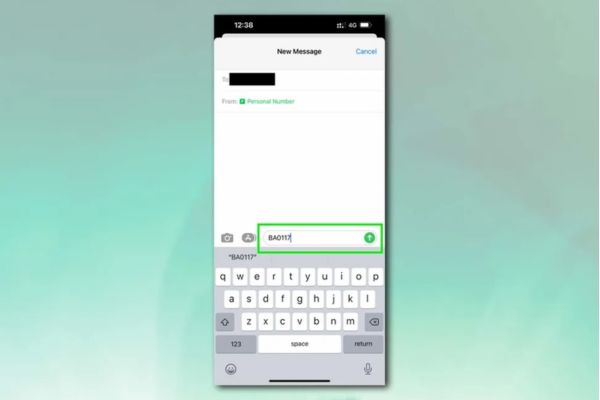
- You just need to press and hold on the underlined code to activate the hidden feature menu.
- The screen will display the option “Flight preview“, which provides a visual map of the actual location of the moving aircraft.
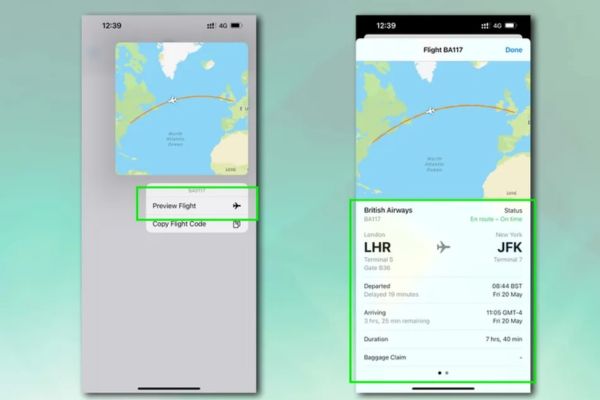
The detailed information panel will include departure time, expected landing time, delay status and even the baggage carousel number at the arrival airport.
Method 2: Look up using Spotlight
In case you do not receive a message or want to proactively check your own schedule, Search (Spotlight) on iPhone and iPad is the perfect alternative. This is the fastest way to retrieve data without opening any application.
- On the device’s home screen, users just need to swipe down from the middle of the screen to activate the search bar.
- You enter the flight code you want to look up directly into the blank box and wait for the system to process it in a split second.
- The returned result will be a flight information card at the top of the list with all the necessary data.
- When clicking on this tab, the interface will expand similar to the Messages section, allowing you to view flight progress and estimated arrival time.
The system also provides direct links to the airline’s home page or opens Apple Maps for directions to the airport.

How to track flights on Mac
The power of the ecosystem Apple lies in seamless synchronization, and flight tracking is no exception. If you are working on a computer and it is not convenient to hold the phone, the user macOS You can still capture trip information easily. The data recognition mechanism on Mac computers works similarly to that on the iPhone, helping the workflow to be uninterrupted.
- Users quickly activate the Spotlight search bar by pressing a key combination Command + Spacebar (Spacebar).
- You enter the flight code into the search bar and the system will display results immediately.
- A small window will appear containing a live trajectory map along with important time parameters such as departure and arrival times.
This utility helps you easily plan to pick up relatives at the airport without having to open a web browser or interrupt unfinished work.

Conclusion
Taking advantage of available features helps the user experience iPhone flight tracking become much smoother, faster and smarter. This is definitely an indispensable pocket trick for anyone who owns Apple devices in the upcoming 2025 holiday season. Try applying it today to always control your time and have the most convenient trips!