YouTube Shopping aka Youtube Shopping is a groundbreaking feature that makes the online shopping experience more convenient and enjoyable than ever. Users can now make purchases directly while watching videos without leaving the YouTube platform. This feature not only provides an intuitive, easy shopping experience, but also creates income opportunities for content creators. Let's explore how to use YouTube Shopping and the benefits it brings through the article below!
| Join the channel Telegram belong to AnonyViet 👉 Link 👈 |
Introducing YouTube Affiliate – YouTube Shopping
YouTube is not only an entertainment platform but also an effective product marketing channel. With the YouTube Affiliate – YouTube Shopping feature, users can shop while watching videos, turning the entertainment experience into a convenient and fast shopping trip. When watching a video, users can view the attached product, click on it, and proceed to purchase immediately without switching to another platform.
This feature has officially launched in Vietnam, helping content creators attach products to their videos. This is a big step forward in promoting e-commerce on YouTube, promising to bring benefits to both sellers and buyers.
See more: Tarot with YouTube: Watch card fortune telling right on Youtube
Instructions for using YouTube Shopping on your computer
Step 1: Once you're on YouTube, you need to find a video from a channel that has the YouTube Shopping feature.
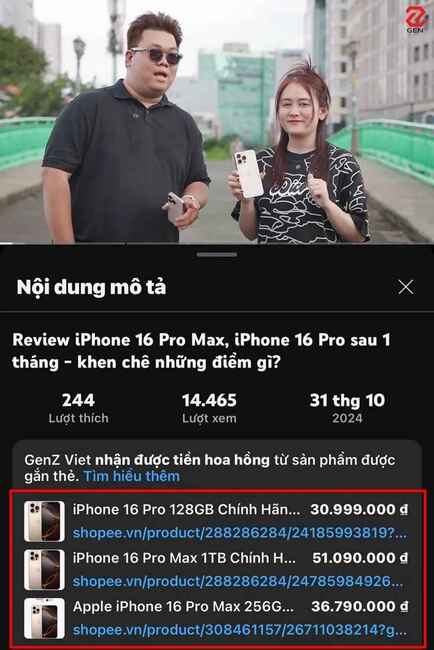
Step 2: After selecting the desired video, scroll down to the section Describe and click the button More to expand. A list of related products will appear here, and you just need to click on the product name to see details.
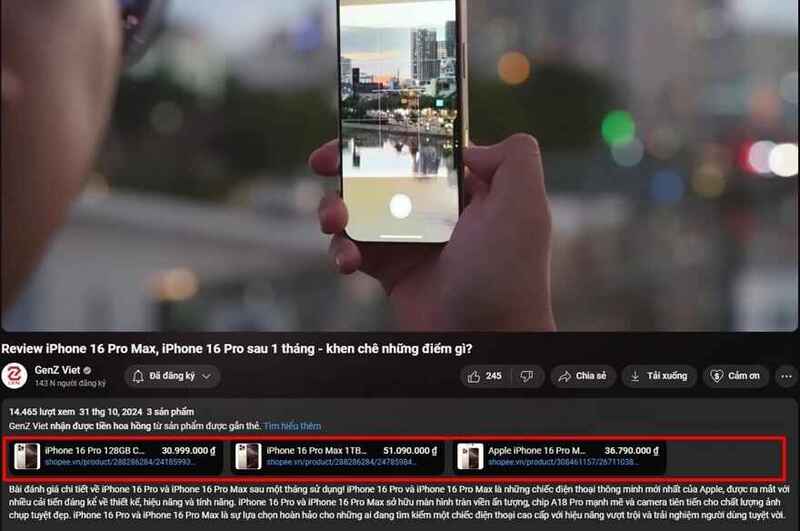
Step 3: Once you have chosen the product, click on the link and you will be redirected to the official sales page such as partner platforms such as Shopee, Lazada, Tiki,… Here, you can perform the purchasing steps one by one. safe and convenient way.
Instructions for using YouTube Shopping on Video Shorts
Besides regular videos, YouTube Shopping is also available on YouTube Shorts – a very popular short video format. This creates an opportunity for creators to share products through concise, direct content. Here's how:
- Find the Shorts video of the channel you want to buy the product from.
- Right above your channel's profile picture, you'll see a button View products.
- Click this button to see the attached product list.
- Similar to regular videos, you can click on the product and proceed with the transaction directly.
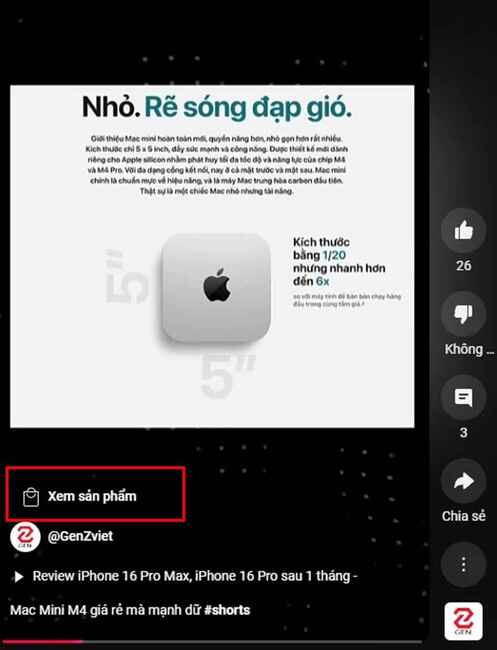
With this feature, users can experience quick shopping right in short videos, making the purchasing process more interesting and intuitive.
Instructions for using YouTube Shopping on your phone
YouTube Shopping is not only supported on computers but also works smoothly on the YouTube app on phones. This brings convenience to those who frequently use mobile devices.
Step 1: Find a video or channel with YouTube Shopping integrated. Once in the correct video, click on the section title of videos to expand product portfolio.
Step 2: At this point, the product list will appear below. You can choose any product you want to buy and proceed to payment.
Step 3: Attached products will lead you to reputable shopping sites where you can complete the transaction.
Benefits of YouTube Affiliate – YouTube Shopping
YouTube Shopping is an outstanding feature for people who love online shopping. Here are some notable benefits:
Increase your intuitive shopping experience
When watching videos, users can easily see the product and have a direct picture of how to use the product, thanks to the content shared by the creators. This helps buyers make more confident purchasing decisions than just looking at traditional product photos and information.
Simplify the purchasing process
The direct shopping feature helps shorten the purchasing steps, from viewing products to ordering with just a few clicks. This brings convenience and saves time for users.
Brings passive income to content creators
Content creators can take advantage of YouTube Shopping to tag products and earn commissions from orders. This creates a passive income source, motivating creators to create more valuable content for the community.
See more: Tips for watching Youtube without ads, without installing software or extensions
Conclusion
YouTube Affiliate – YouTube Shopping Bringing an easy and convenient online shopping experience to Vietnamese users. Not only does it help viewers own the product right while enjoying the video, but it also provides opportunities to increase income for content creators. With the simple instructions above, you can easily take full advantage of this feature today.




![[Lập Trình Game] Lesson 13: Collect items in Godot Engine](https://anonyviet.com/wp-content/uploads/2020/06/image007-1.png "[Lập Trình Game] Lesson 13: Collect items in Godot Engine")