ET Optimizer is the ideal solution for those who want to tweak and optimize their Windows 10/11 system easily and effectively. Developed from many open sources on the Internet, ET Optimizer is a collection of scripts that are thoroughly tested and continuously updated to be compatible with many different Windows versions.
| Join the channel Telegram belong to AnonyViet 👉 Link 👈 |
What is ET Optimizer?
ET Optimizer is a script that collects many tools and commands, helping users customize the Windows operating system through settings such as Command Prompt, PowerShell, and registry editing. This tool is especially useful for users who want to minimize unnecessary applications, increase system processing speed, and improve privacy.
With high compatibility with both Windows 10 and Windows 11, ET Optimizer not only stops at optimization but also helps users remove unwanted applications that the system installs by default.
See more: Mouse Tooltip Translator: Translate text by hovering the mouse
Outstanding features of ET Optimizer
ET Optimizer provides a comprehensive system optimization solution with outstanding features such as:
Fine-tune system performance
One of the outstanding advantages of ET Optimizer is its ability to improve computer performance through power plan optimization, startup management, and network configuration fine-tuning. Users can customize the system to minimize unnecessary processes, helping the machine operate smoother.
Remove unnecessary default applications
Windows 10/11 often comes with many unnecessary applications that users have no need to use, such as Microsoft3DViewer, Print3D XboxApp and ScreenSketch. With ET Optimizer, you can easily remove these applications, freeing up space and improving system speed.
Configure security and privacy
ET Optimizer also provides privacy-related customizations, helping you control Microsoft's data collection services. You can turn off tracking features, turn off unnecessary services, and improve the security of your system.
Supports system backup and restore
ET Optimizer has built-in system backup and restore features, giving users peace of mind when making major changes. Before performing fine-tuning, you can backup the original settings, and if you encounter any problems, simply restore the previous state easily.
Instructions for using ET Optimizer
Step 1: First, you need to download ET Optimizer from a trustworthy source on GitHub. You can visit the link HERE to download the latest version
Step 2: After downloading, you need to run the script with administrator rights.
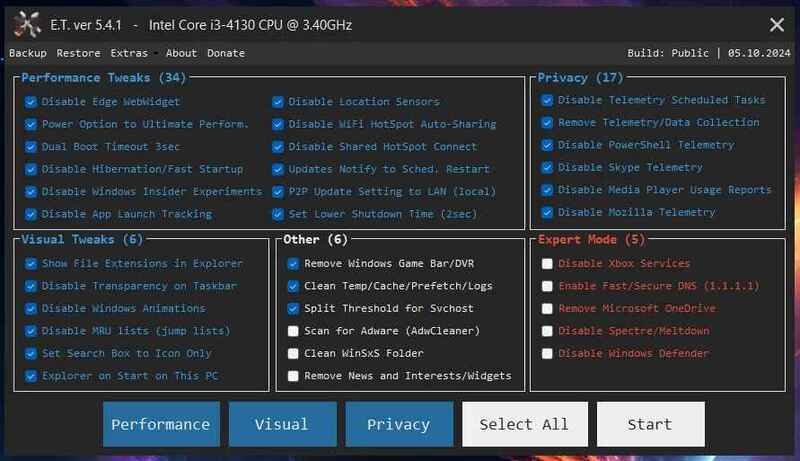
To do this, simply right-click on the file and select Run as administrator. ET Optimizer will display a simple interface with configuration options for performance, appearance, privacy, and many other factors.
Step 3: In the ET Optimizer interface, the default options are pre-selected. However, you can customize it by unchecking the items you don't want to change. A few useful options include:
- Optimize power plan: Adjust to save energy or maximize performance.
- Uninstall unnecessary applications: Remove default applications such as Microsoft3DViewer, Print3D, or XboxApp.
- Turn off data collection services: Increase security and privacy by disabling Windows tracking services.
Step 4: Before applying changes, ET Optimizer allows you to backup your current system. This is important to ensure that you can return to your original state if something goes wrong. Once backed up, you can apply tweaks and watch for improvements in system performance.
New changes in ET Optimizer version 5.4.1
The latest version brings many notable improvements, including:
- New GUI interface style, more intuitive and easier to use.
- EXE file size is reduced, lighter and easier to download.
- Code execution speed is significantly improved, optimizing performance.
- Supports integration into USB/ISO to install Windows 10/11, more convenient for users who have just installed the operating system.
- Supports Windows 11 24H2, compatible with the latest Windows versions.
See more: Surf the web without worrying about ads with AdGuard DNS
Conclusion
If you are looking for an optimized solution for Windows 10/11, ET Optimizer Definitely a choice not to be missed. With many powerful and easy-to-use features, this tool will help you improve system performance, optimize resources and secure personal information.