• Home
  • News
  • Software
  • Knowledge
  • MMO
  • Tips
  • Security
  • Network
  • Office
AnonyViet - English Version
  • Home
  • News
  • Software
  • Knowledge
  • MMO
  • Tips
  • Security
  • Network
  • Office
No Result
View All Result
  • Home
  • News
  • Software
  • Knowledge
  • MMO
  • Tips
  • Security
  • Network
  • Office
No Result
View All Result
AnonyViet - English Version
No Result
View All Result

DoNotSpy10 Protect Privacy on Windows 10

AnonyViet by AnonyViet
February 4, 2023
in Software
0

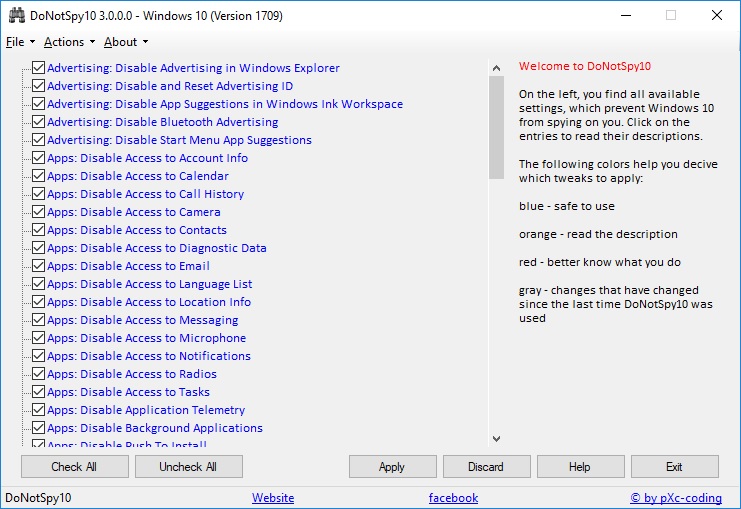
DoNotSpy10 is the world’s first Anti Spy tool for Windows 10. The software interface provides functions that allow you to manage privacy on Windows 10. Microsoft introduces many new “diagnostic” features with Windows 10 These services help Microsoft collect usage data and thus provide a better service.

Join the channel Telegram belong to AnonyViet 👉 Link 👈

However, collecting and sharing your data with one of the world’s leading technology companies puts your privacy at risk. There are services that can record your keystrokes, your voice, and any other user actions. Others share your WiFi credentials with your contacts or connect you to networks shared by your contacts.

DoNotSpy10 gives you features to easily manage what you want to share and what not. While many of the settings show what you can configure using Settings and other apps, there are also tweaks that aren’t easily accessible through the apps Windows provides.

DoNotSpy10 all in one app – it’s time to protect your privacy, let’s get started!
DoNotSpy10 Protect Privacy on Windows 10

main function

Function List
Advertisement
  • Disable Ads in Windows Explorer
  • Disable and Reset Advertising ID
  • Disable App Suggestions in Windows Ink Workspace
  • Disable Bluetooth Advertising
  • Disable Start Menu App Suggestions
Apps
  • Disable Account Access Information
  • Disable access to Calendar
  • If you disable access, call History
  • Disable access to photo gallery
  • Disable access to Contacts
  • Disable access to diagnostic data
  • Disable access to email
  • Disable access to the Language list
  • Disable Access to Location Information
  • Disable access to Messages
  • Disable access to Microphone
  • Disable access to Notifications
  • Disable access to Radios
  • Disable access to Quests
  • Disable App Notifications
  • Disable the Telemetry app
  • Disable background apps
  • Disable Push To Install (Fall Creation Update)
  • Disable Apps Silent Install
  • Disable Sync With Device
Defender
  • Disable Cloud Protection’s Windows Defender
  • Disable Windows Defender Notification Template
  • Disable Windows Defender
  • Enable Protection Network (Exploit Guard) (Fall Create Update)
Edge
  • Disable Adobe Flash Player software
  • Disable the Prediction page
  • Disable Search Suggestions
  • Enable Do Not Track
Private
  • Disable Message Service Cloud Sync (Fall Created Update)
  • Disable Auto Map Download
  • Disable Biometrics
  • Disable Lock Screen Enable Camera
  • Disable Experiment
  • Disable your Screen Lock Events, Tips, Ticks and More Info
  • Disable handwriting data sharing
  • Error Reporting Disable handwriting
  • Disable Collector Inventory
  • Disable Validation KMS online customers
  • Disable Address
  • Disable network traffic Pre account login
  • Disable onedrive
  • Disable Password Reveal Button
  • Disable Get Device Metadata
  • Disable Send Writing Information
  • Disable Sensor
  • Disable Set Sync
  • Disable SmartScreen-Filter for URL
  • Disable Steps Recorder
  • Disable Tailored Experience using diagnostic data
  • Disable Telemetry
  • Disable Windows Tips
  • Disable WiFi Sense
  • Disable the Windows Customer Improvement Experience Program
  • Disable Windows Response Requests
  • Disable Windows Media DRM internet access
  • Disable Windows welcome experience
  • Show Detailed Data Usage
Search
  • Disable and Reset Cortana
  • Disable Cloud Search (Fall Created Update)
  • Disable Get to know me
  • Disable Search Web
Start up
  • Not showing recently opened apps
  • Don’t show the opened file
Update
  • Disable Windows Update
  • Disable Update Driver Automatically
  • Disable Speech Automatic Updates sample (Fall Created Updates)
  • Disable automatic Windows Store updates
  • Disable automatic Windows Updates
  • Disable Malicious Software Removal Tool through Windows Update
  • Disable Windows Update for other products
  • Disable Windows Update Sharing

DoNotSpy10’s security information

  • Installer MD5: 6F3812E499EE6B1D4DA8B94E8191DF04
  • Installer SHA1: A90FC45BEFF0648B9EB7E232C965F5C96151CB5E

Request

Download

Download DoNotSpy10

The article achieved: 5/5 – (100 votes)

Tags: DoNotSpy10privacyProtectWindows
Previous Post

How to make a color profile on personal Facebook and colored characters

Next Post

The most detailed way to make money from Facebook’s Ad Breaks

AnonyViet

AnonyViet

Related Posts

Compare Poco X8 Pro and Poco X7 Pro: A new step for the “king” of mid-range performance
Software

Compare Poco X8 Pro and Poco X7 Pro: A new step for the “king” of mid-range performance

April 24, 2026
Top 5 apps to view good days 2026 for free on iOS and Android
Software

Top 5 apps to view good days 2026 for free on iOS and Android

April 23, 2026
Top 5+ utilities to install for Gmail to speed up work processing
Software

Top 5+ utilities to install for Gmail to speed up work processing

April 22, 2026
Decoding the problem of 4GB RAM and processing performance
Software

Decoding the problem of 4GB RAM and processing performance

April 21, 2026
4K Video Downloader Plus – Tool to download YouTube videos on macOS
Software

4K Video Downloader Plus – Tool to download YouTube videos on macOS

April 20, 2026
How to authenticate the owner’s SIM on VNeID from April 15
Software

How to authenticate the owner’s SIM on VNeID from April 15

April 15, 2026
Next Post
The most detailed way to make money from Facebook’s Ad Breaks

The most detailed way to make money from Facebook's Ad Breaks

0 0 votes
Article Rating
Subscribe
Login
Notify of
guest

guest

0 Comments
Oldest
Newest Most Voted
Inline Feedbacks
View all comments

Recent News

Tips to completely turn off CAPTCHA codes on iPhone and Mac are super simple

Tips to completely turn off CAPTCHA codes on iPhone and Mac are super simple

April 25, 2026
Compare Poco X8 Pro and Poco X7 Pro: A new step for the “king” of mid-range performance

Compare Poco X8 Pro and Poco X7 Pro: A new step for the “king” of mid-range performance

April 24, 2026
How to compress online videos for free without losing quality

How to compress online videos for free without losing quality

April 24, 2026
Top 5 apps to view good days 2026 for free on iOS and Android

Top 5 apps to view good days 2026 for free on iOS and Android

April 23, 2026
Tips to completely turn off CAPTCHA codes on iPhone and Mac are super simple

Tips to completely turn off CAPTCHA codes on iPhone and Mac are super simple

April 25, 2026
Compare Poco X8 Pro and Poco X7 Pro: A new step for the “king” of mid-range performance

Compare Poco X8 Pro and Poco X7 Pro: A new step for the “king” of mid-range performance

April 24, 2026
How to compress online videos for free without losing quality

How to compress online videos for free without losing quality

April 24, 2026
AnonyViet - English Version

AnonyViet

AnonyViet is a website share knowledge that you have never learned in school!

We are ready to welcome your comments, as well as your articles sent to AnonyViet.

Follow Us

Contact:

Email: anonyviet.com[@]gmail.com

Main Website: https://anonyviet.com

Recent News

Tips to completely turn off CAPTCHA codes on iPhone and Mac are super simple

Tips to completely turn off CAPTCHA codes on iPhone and Mac are super simple

April 25, 2026
Compare Poco X8 Pro and Poco X7 Pro: A new step for the “king” of mid-range performance

Compare Poco X8 Pro and Poco X7 Pro: A new step for the “king” of mid-range performance

April 24, 2026
No Result
View All Result
  • Home
  • News
  • Software
  • Knowledge
  • MMO
  • Tips
  • Security
  • Network
  • Office

wpDiscuz
0
0
Would love your thoughts, please comment.x
()
x
| Reply