• Home
  • News
  • Software
  • Knowledge
  • MMO
  • Tips
  • Security
  • Network
  • Office
AnonyViet - English Version
  • Home
  • News
  • Software
  • Knowledge
  • MMO
  • Tips
  • Security
  • Network
  • Office
No Result
View All Result
  • Home
  • News
  • Software
  • Knowledge
  • MMO
  • Tips
  • Security
  • Network
  • Office
No Result
View All Result
AnonyViet - English Version
No Result
View All Result

Gihosoft – The best data recovery software for iPhone

AnonyViet by AnonyViet
February 3, 2023
in Software
0

The problem of losing important data is always the biggest threat to all of us. Have you ever accidentally deleted important data on your computer? Or on the phone or not? And if the data is lost, how will you find a way to recover the data? Today, I would like to introduce to you the software Gihosoft.

Join the channel Telegram of the AnonyViet 👉 Link 👈

This is the most advanced computer data recovery software available today. I tried the experience Gihosoft on 2 operating system platforms Windows and Mac. In fact, the results it brings are better than my expectations. Therefore, today I write a software sharing article to introduce to you.

About Gihosoft

The staff of over 30 professionals includes software development, technical support, Marketing team and UI improvement design team. In order to bring the best products to users and always ready to support users at all times.

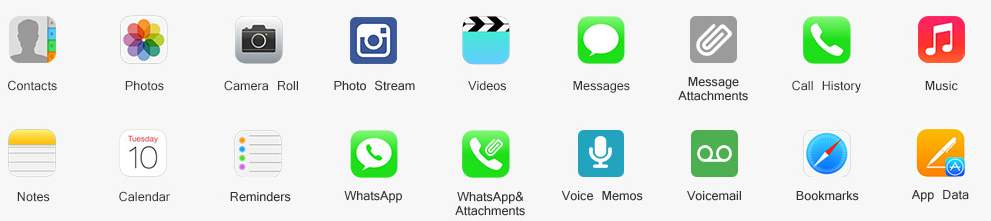
The main function of this software is to help users recover lost data safely. It can recover many different types of deleted data. Eg Photo files, Document files, Contacts, SMS messages, WhatsApp content, Viber and notes…

List of data types supported by Gihosoft to recover

  • Photos and videos: Roll Photo, Photo Stream, In-App Photos and Video formats.
  • Call and message logs: Messages, Message Attachments, Contacts, Call History, Voicemail, WhatsApp/Viber messages and attachments
  • Some other types: Notes, Calendar, Reminders, Safari Bookmark, Voice Memos.
Gihosoft - The best iPhone data recovery software 9

Features of Gihosoft

  • Supports recovery on 12+ device data types (I have listed above).
  • Directly recover lost data or rely on File Back-Up on icloud and iTunes.
  • Recover data lost due to iOS update or device Jailbreak.
  • Supports the majority of current iPhone, iPad and iPod Touch models.

List of supported iPhone, iPad and iPod devices

  • Iphone: iPhone 7/7 Plus, SE, iPhone 6S/6S Plus, iPhone 6/6 Plus, iPhone 5S/5C/5, iPhone 4S/4, iPhone 3GS
  • iPads: iPad Pro, iPad Air 2, iPad Air, iPad Mini 4/3/2, the New iPad, iPad/iPad 2/3/4
  • iPod Touch: iPod touch 6/5/4

Review Gihosoft experience

This is a review of my own personal experience after using the software. As for the interface, I think it’s great. I’m a pretty picky person when it comes to aesthetics. But feel extremely satisfied with Gihosoft’s beautifully designed and convenient interface.

Simple operation for data recovery

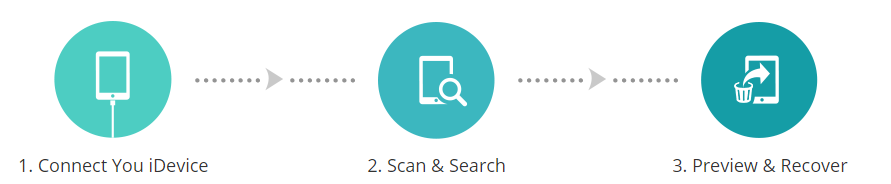
The easy-to-use interface is designed to guide any computer user to recovery. Data recovery process for iPhone devices in 3 steps:

  1. Instant connection.
  2. Quick scan and search.
  3. Users get a preview and can proceed with the restore immediately.
Gihosoft - The best data recovery software for iPhone 10

Instructions on how to restore data through iTunes Backup

This mode will allow you to restore files from iPhone/iPad/iPod touch directly or from iTunes backup.

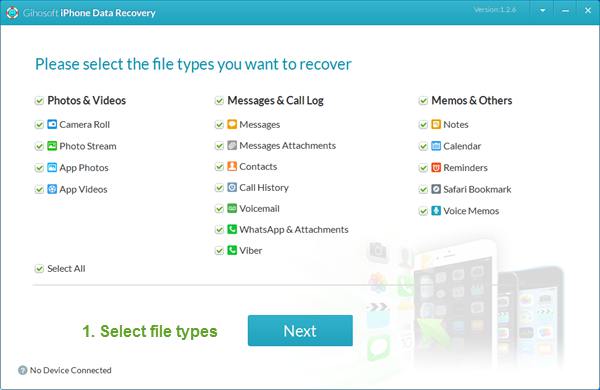
Step 1 – Select the type of data you need to recover

KYLaunch the program, then select the file types that you want to recover. All file types are selected by default, but you can also uncheck those you don’t need.Gihosoft - The best iPhone data recovery software 11
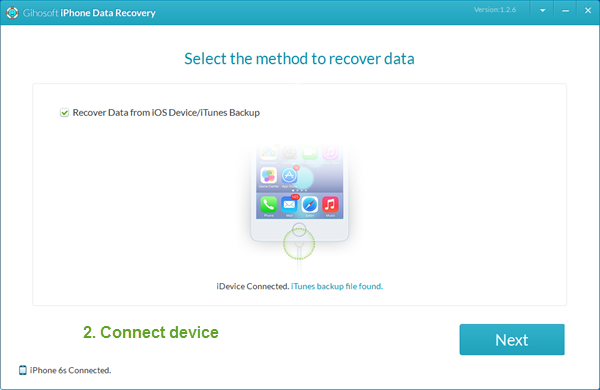
Step 2 – Connect the device and select the recovery method

Connect your device to the computer and click next to select recovery mode. The default mode will be “Data recovery from iOS device / iTunes backup“. The file in your device and the iTunes backup file that matches it will be selected as the source to scan for lost data.
Gihosoft - The best iPhone data recovery software 12

You can also skip the device connection step.
Then press next to select an iTunes backup file to extract data from.

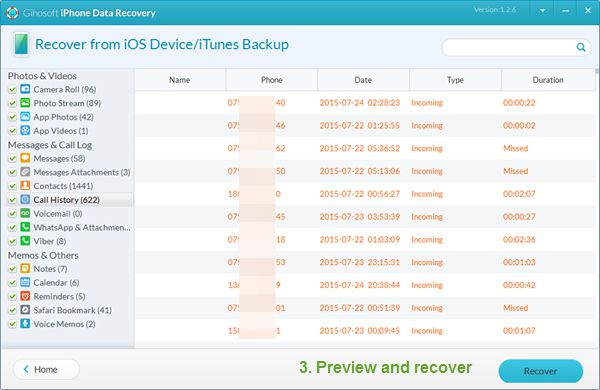
Step 3 – Scan, preview and recover data

All scanned files will be listed specifically and clearly in a list. You can click on each category to preview the File before proceeding with the recovery. Check the files you want to recover, then click the . button Recover to restore and export files to the computer.
Gihosoft - The best data recovery software for iPhone 13

Download software

You can consult more information and download the software for use at the homepage by following the link below.


The article achieved: 5/5 – (100 votes)

Tags: dataGihosoftiPhoneRecoverysoftware
Previous Post

Những việc cần làm để bảo vệ quyền riêng tư trên Windows 10

Next Post

How to Update Windows 10 19H2 manually without waiting for Microsoft

AnonyViet

AnonyViet

Related Posts

PDF editing application on Android worth 199k is free
Software

PDF editing application on Android worth 199k is free

June 10, 2026
How to buy in-game items for free on iPhone
Software

How to buy in-game items for free on iPhone

June 8, 2026
Practical use of Xiaomi 17T Pro: This is a good phone in 2026
Software

Practical use of Xiaomi 17T Pro: This is a good phone in 2026

June 8, 2026
Instructions to receive 6 months of IObit Malware Fighter 13 Pro for free
Software

Instructions to receive 6 months of IObit Malware Fighter 13 Pro for free

June 7, 2026
Instructions on how to prevent acquaintances from seeing your Tiktok
Software

Instructions on how to prevent acquaintances from seeing your Tiktok

June 2, 2026
TruyenDrive: Turn Google Drive into a professional manga reader
Software

TruyenDrive: Turn Google Drive into a professional manga reader

May 31, 2026
Next Post
How to Update Windows 10 19H2 manually without waiting for Microsoft

How to Update Windows 10 19H2 manually without waiting for Microsoft

0 0 votes
Article Rating
Subscribe
Login
Notify of
guest

guest

0 Comments
Oldest
Newest Most Voted
Inline Feedbacks
View all comments

Recent News

Cách làm mờ khuôn mặt trên iPhone, không cần tải app

Cách làm mờ khuôn mặt trên iPhone, không cần tải app

June 11, 2026
Website to check the World Cup 2026 match schedule intuitively, with automatic calendar synchronization

Website to check the World Cup 2026 match schedule intuitively, with automatic calendar synchronization

June 11, 2026
PDF editing application on Android worth 199k is free

PDF editing application on Android worth 199k is free

June 10, 2026
Instructions for creating Minecraft-style food photos

Instructions for creating Minecraft-style food photos

June 9, 2026
Cách làm mờ khuôn mặt trên iPhone, không cần tải app

Cách làm mờ khuôn mặt trên iPhone, không cần tải app

June 11, 2026
Website to check the World Cup 2026 match schedule intuitively, with automatic calendar synchronization

Website to check the World Cup 2026 match schedule intuitively, with automatic calendar synchronization

June 11, 2026
PDF editing application on Android worth 199k is free

PDF editing application on Android worth 199k is free

June 10, 2026
AnonyViet - English Version

AnonyViet

AnonyViet is a website share knowledge that you have never learned in school!

We are ready to welcome your comments, as well as your articles sent to AnonyViet.

Follow Us

Contact:

Email: anonyviet.com[@]gmail.com

Main Website: https://anonyviet.com

Recent News

Cách làm mờ khuôn mặt trên iPhone, không cần tải app

Cách làm mờ khuôn mặt trên iPhone, không cần tải app

June 11, 2026
Website to check the World Cup 2026 match schedule intuitively, with automatic calendar synchronization

Website to check the World Cup 2026 match schedule intuitively, with automatic calendar synchronization

June 11, 2026
  • Home
  • Home 2
  • Home 3
  • Home 4
  • Home 5
  • Home 6
  • Next Dest Page
  • Sample Page

6789 kv999

No Result
View All Result
  • Home
  • News
  • Software
  • Knowledge
  • MMO
  • Tips
  • Security
  • Network
  • Office

6789 kv999

wpDiscuz
0
0
Would love your thoughts, please comment.x
()
x
| Reply