• Home
  • News
  • Software
  • Knowledge
  • MMO
  • Tips
  • Security
  • Network
  • Office
AnonyViet - English Version
  • Home
  • News
  • Software
  • Knowledge
  • MMO
  • Tips
  • Security
  • Network
  • Office
No Result
View All Result
  • Home
  • News
  • Software
  • Knowledge
  • MMO
  • Tips
  • Security
  • Network
  • Office
No Result
View All Result
AnonyViet - English Version
No Result
View All Result

How to use the SFC command to check and fix Windows errors

AnonyViet by AnonyViet
January 27, 2023
in Tips
0

System File Checker (sfc) is a little-known Windows command using CMD. Its job is to confirm whether the Windows system files are damaged or not.

Join the channel Telegram of the AnonyViet 👉 Link 👈

How to use the SFC command to check and fix Windows errors

To prevent malware from entering critical system components, Windows makes every effort to maintain the integrity of the file system. If you try to replace a “protected” file, you may receive an error message. That’s Windows File Protection, now known as Windows Resource Protection.

System File Protection: protect system files

The principle behind System file protection (sfp) is that Windows keeps information about important files, which may include, file date/time, size, and Password hash. When files are updated “officially”, this information is also updated to reflect the new files.

Windows will regularly check all those files to make sure they’re still safe, and that the data, size, and hashes all match what was before. If something goes wrong, Windows may display an error message.

Unusual problems include:

  • Malware is the main reason for System file protection to exist. Malware can get into the system by itself by modifying Windows’ own files. System file protection detects errors and repairs damage.
  • Other programs will often replace components of the system, sometimes breaking things.
  • Other accidental failures.

So, what happens when a problem is found?

Repair damaged files

If you’ve ever searched for system files on Windows, it’s not uncommon for you to find some of the following:

  • The original file, used by Windows.
  • Previous versions of files are saved by Windows Update, so you can uninstall these updates if needed.
  • Copies of the File are cached, as a performance enhancement measure to load files faster when needed.
  • File backup.

When system file protection needs to restore a certain file, it usually tries to use the original file first.

Also, many systems will have a copy on the recovery partition, and when all else fails, the original Windows can be used to repair the system.

In any case, the repair process also checks to see if the copy it is restoring is correct. If it is incorrect, it will be ignored. Because these copies are on your hard disk, malware authors will try to replace or damage them all to prevent you from repairing the system.

SFC: Command to check System File

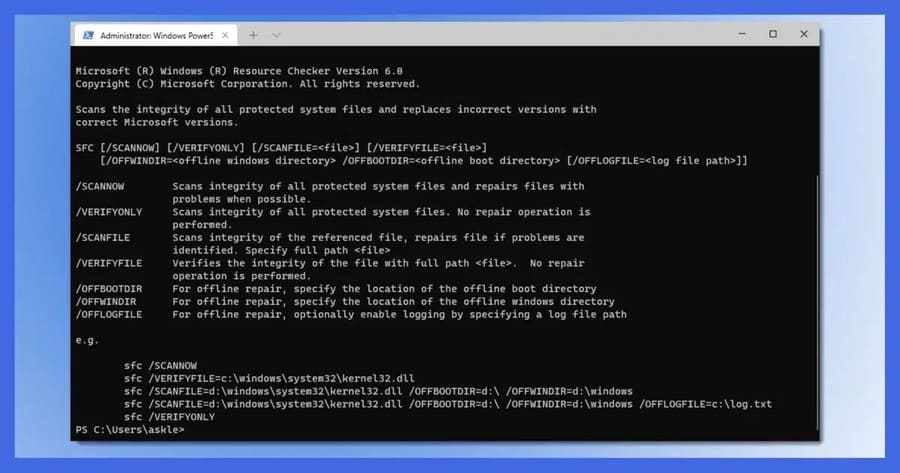
SFC is a command line tool that checks if all the files protected by the system are correct and tries to repair the unprotected ones. It’s a great tool when you suspect system files have been corrupted or if you just think there’s something wrong with your system.

SFC requires administrative rights. Right click on the button Start and choose Command Prompt (Admin), Windows PowerShell (Admin) or Windows Terminal (Admin).
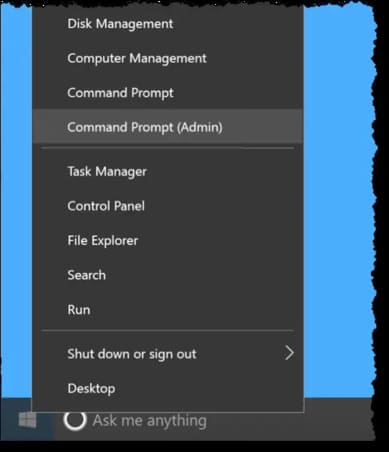
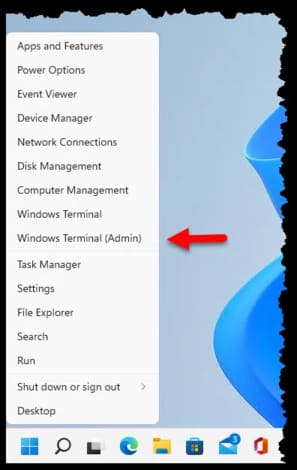
How to use the SFC command to check and fix Windows 4 errors

How to use the SFC command to check and fix Windows 5 errors

After confirming any UAC prompts, type sfc /scannow and press Enter.
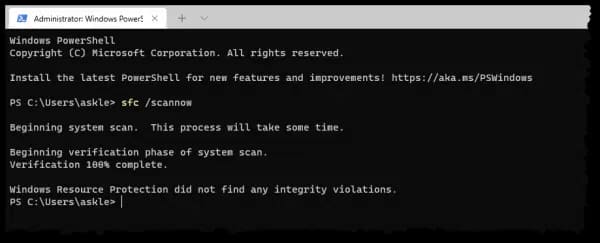
How to use the SFC command to check and fix Windows 6 errors

SFC will scan your system immediately. It may take a few minutes to run.

If you have installation devices, such as DVD, USB, then you can use it in case SFC needs it to replace corrupted System Files.

Although it is not considered necessary, you need to restart the machine if SFC replaces any system files.

Microsoft has more detailed SFC documentationwith more options to check at startup, how to control the size of the system file protection cache, and more. There is also a Windows resource protection document, which covers the mechanism by which Windows use to try to keep your system files (and a few other things) safe.

In addition, you can also use the 4 best Windows debugging tools here.

The article achieved: 5/5 – (100 votes)

Tags: checkCommanderrorsfixSFCWindows
Previous Post

This is the command on Windows 10 that causes the hard drive to fail

Next Post

Instructions to adjust DNS to 1.1.1.1 to speed up web surfing

AnonyViet

AnonyViet

Related Posts

Windows 7/8.1/10 users will be upgraded to Windows 11 for free
Tips

Windows 7/8.1/10 users will be upgraded to Windows 11 for free

July 30, 2026
Instructions for receiving ChatGPT Plus for 1 month for free in 2026
Tips

Instructions for receiving ChatGPT Plus for 1 month for free in 2026

July 28, 2026
Some reasons I don’t like Windows 11
Tips

Some reasons I don’t like Windows 11

July 27, 2026
Instructions on how to get free Facebook white ticks
Tips

Instructions on how to get free Facebook white ticks

July 27, 2026
Collection of Windows 11 wallpapers for computers and phones
Tips

Collection of Windows 11 wallpapers for computers and phones

July 26, 2026
Don’t install leaked Windows 11
Tips

Don’t install leaked Windows 11

July 25, 2026
Next Post
Instructions to adjust DNS to 1.1.1.1 to speed up web surfing

Instructions to adjust DNS to 1.1.1.1 to speed up web surfing

0 0 votes
Article Rating
Subscribe
Login
Notify of
guest

guest

0 Comments
Oldest
Newest Most Voted

Recent News

Windows 7/8.1/10 users will be upgraded to Windows 11 for free

Windows 7/8.1/10 users will be upgraded to Windows 11 for free

July 30, 2026
Instructions for receiving the free Certified LLM Security Expert certificate

Instructions for receiving the free Certified LLM Security Expert certificate

July 30, 2026
MSI laptops are not just for gamers: Which line is suitable for students, office workers and creative people?

MSI laptops are not just for gamers: Which line is suitable for students, office workers and creative people?

July 29, 2026
What is quantum resistant cryptography? Why must the Internet change?

What is quantum resistant cryptography? Why must the Internet change?

July 29, 2026
Windows 7/8.1/10 users will be upgraded to Windows 11 for free

Windows 7/8.1/10 users will be upgraded to Windows 11 for free

July 30, 2026
Instructions for receiving the free Certified LLM Security Expert certificate

Instructions for receiving the free Certified LLM Security Expert certificate

July 30, 2026
MSI laptops are not just for gamers: Which line is suitable for students, office workers and creative people?

MSI laptops are not just for gamers: Which line is suitable for students, office workers and creative people?

July 29, 2026
AnonyViet - English Version

AnonyViet

AnonyViet is a website share knowledge that you have never learned in school!

We are ready to welcome your comments, as well as your articles sent to AnonyViet.

Follow Us

Contact:

Email: anonyviet.com[@]gmail.com

Main Website: https://anonyviet.com

Recent News

Windows 7/8.1/10 users will be upgraded to Windows 11 for free

Windows 7/8.1/10 users will be upgraded to Windows 11 for free

July 30, 2026
Instructions for receiving the free Certified LLM Security Expert certificate

Instructions for receiving the free Certified LLM Security Expert certificate

July 30, 2026
  • Home
  • Home 2
  • Home 3
  • Home 4
  • Home 5
  • Home 6
  • Next Dest Page
  • Sample Page

say88 tỷ lệ kèo nhà cái kèo nhà cái 5 febet

No Result
View All Result
  • Home
  • News
  • Software
  • Knowledge
  • MMO
  • Tips
  • Security
  • Network
  • Office

say88 tỷ lệ kèo nhà cái kèo nhà cái 5 febet

wpDiscuz
0
0
Would love your thoughts, please comment.x
()
x
| Reply