• Home
  • News
  • Software
  • Knowledge
  • MMO
  • Tips
  • Security
  • Network
  • Office
AnonyViet - English Version
  • Home
  • News
  • Software
  • Knowledge
  • MMO
  • Tips
  • Security
  • Network
  • Office
No Result
View All Result
  • Home
  • News
  • Software
  • Knowledge
  • MMO
  • Tips
  • Security
  • Network
  • Office
No Result
View All Result
AnonyViet - English Version
No Result
View All Result

How to quickly take attendance with Google Meet for teachers

AnonyViet by AnonyViet
January 27, 2023
in Software
0

Due to the increasingly complex epidemic, affecting many professions in society, but I think the most affected industry is still the education industry. All pupils, students and teachers in epidemic areas must switch to online learning. Therefore, it will be very inconvenient for both students and teachers, both in terms of conditions and technology.

Join the channel Telegram of the AnonyViet 👉 Link 👈

Understanding the difficulty of teachers, so in this article, I will guide teachers on how to quickly take attendance on Google Meet, which is extremely simple to help teachers know who is participating in online learning the easiest. Please.

How to quickly take attendance with Google Meet for teachers

How to quickly take attendance with Google Meet for teachers

Google Meet is a free online learning application from Google. With the advantage of Google products, it is popular with many teachers and students. There is a great feature that helps teachers quickly take attendance of students who have joined the class using the Google Meet Attendance List utility.

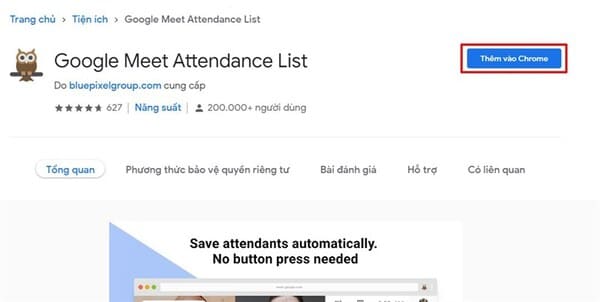
Step 1: First, you press come in to install the extension Google Meet Attendance List before starting the meeting.
How to quickly take attendance with Google Meet for teachers 4

Step 2: Next, you just need to hold a normal meeting on Google Meet stop.

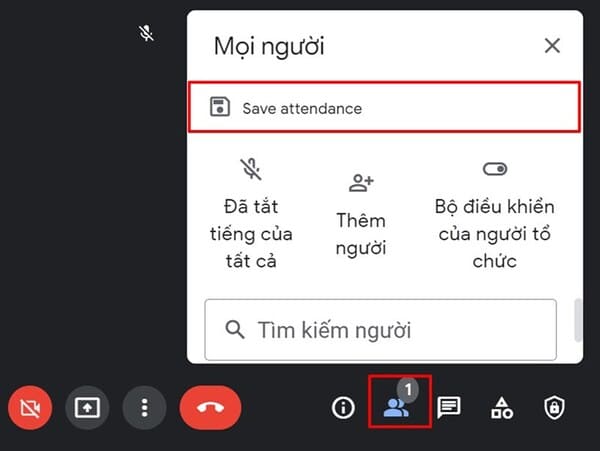
Step 3: When you want to take attendance of the people who attended the meeting, you just need to click on the human icon at the bottom of the screen, next to the messaging icon and select Save Attendance.
How to quickly take attendance using Google Meet for teachers 5

So you already have a list of meeting participants, if you want to download it, just click Export as CSV done.

How to quickly take attendance with Google Meet for teachers 6

With just these extremely simple steps, teachers can take attendance of all students in their class. But I think the teacher can still call each student for oral attendance to be sure. In addition, you can also create virtual rooms on zoom using Immersive View here.


The article achieved: 5/5 – (100 votes)

Tags: attendanceGoogleMeetQuicklyteachers
Previous Post

How to use RAT without opening PORT with Ngrok

Next Post

How to Create a Simple DDOS Botnet Using Py-Botnet

AnonyViet

AnonyViet

Related Posts

Samsung Galaxy Z Fold 8 Ultra and Z Fold 7: Is it worth upgrading?
Software

Samsung Galaxy Z Fold 8 Ultra and Z Fold 7: Is it worth upgrading?

July 28, 2026
Instructions on how to get 1 year of VIP Hidely VPN for free
Software

Instructions on how to get 1 year of VIP Hidely VPN for free

July 25, 2026
Instructions on how to block strange devices from accessing your home Wifi
Software

Instructions on how to block strange devices from accessing your home Wifi

July 25, 2026
Instructions on how to get Norton 360 Deluxe for 1 year for free
Software

Instructions on how to get Norton 360 Deluxe for 1 year for free

July 19, 2026
Is Xiaomi Redmi A7 a valuable choice in the popular smartphone segment?
Software

Is Xiaomi Redmi A7 a valuable choice in the popular smartphone segment?

July 14, 2026
Compact design, durable battery, excellent camera: Review of OPPO Reno 16 Pro 5G
Software

Compact design, durable battery, excellent camera: Review of OPPO Reno 16 Pro 5G

July 12, 2026
Next Post
How to Create a Simple DDOS Botnet Using Py-Botnet

How to Create a Simple DDOS Botnet Using Py-Botnet

0 0 votes
Article Rating
Subscribe
Login
Notify of
guest

guest

0 Comments
Oldest
Newest Most Voted

Recent News

Instructions for receiving ChatGPT Plus for 1 month for free in 2026

Instructions for receiving ChatGPT Plus for 1 month for free in 2026

July 28, 2026
Samsung Galaxy Z Fold 8 Ultra and Z Fold 7: Is it worth upgrading?

Samsung Galaxy Z Fold 8 Ultra and Z Fold 7: Is it worth upgrading?

July 28, 2026
Some reasons I don’t like Windows 11

Some reasons I don’t like Windows 11

July 27, 2026
Instructions on how to get free Facebook white ticks

Instructions on how to get free Facebook white ticks

July 27, 2026
Instructions for receiving ChatGPT Plus for 1 month for free in 2026

Instructions for receiving ChatGPT Plus for 1 month for free in 2026

July 28, 2026
Samsung Galaxy Z Fold 8 Ultra and Z Fold 7: Is it worth upgrading?

Samsung Galaxy Z Fold 8 Ultra and Z Fold 7: Is it worth upgrading?

July 28, 2026
Some reasons I don’t like Windows 11

Some reasons I don’t like Windows 11

July 27, 2026
AnonyViet - English Version

AnonyViet

AnonyViet is a website share knowledge that you have never learned in school!

We are ready to welcome your comments, as well as your articles sent to AnonyViet.

Follow Us

Contact:

Email: anonyviet.com[@]gmail.com

Main Website: https://anonyviet.com

Recent News

Instructions for receiving ChatGPT Plus for 1 month for free in 2026

Instructions for receiving ChatGPT Plus for 1 month for free in 2026

July 28, 2026
Samsung Galaxy Z Fold 8 Ultra and Z Fold 7: Is it worth upgrading?

Samsung Galaxy Z Fold 8 Ultra and Z Fold 7: Is it worth upgrading?

July 28, 2026
  • Home
  • Home 2
  • Home 3
  • Home 4
  • Home 5
  • Home 6
  • Next Dest Page
  • Sample Page

say88 tỷ lệ kèo nhà cái kèo nhà cái 5 febet

No Result
View All Result
  • Home
  • News
  • Software
  • Knowledge
  • MMO
  • Tips
  • Security
  • Network
  • Office

say88 tỷ lệ kèo nhà cái kèo nhà cái 5 febet

wpDiscuz
0
0
Would love your thoughts, please comment.x
()
x
| Reply