• Home
  • News
  • Software
  • Knowledge
  • MMO
  • Tips
  • Security
  • Network
  • Office
AnonyViet - English Version
  • Home
  • News
  • Software
  • Knowledge
  • MMO
  • Tips
  • Security
  • Network
  • Office
No Result
View All Result
  • Home
  • News
  • Software
  • Knowledge
  • MMO
  • Tips
  • Security
  • Network
  • Office
No Result
View All Result
AnonyViet - English Version
No Result
View All Result

How to create amazing flash effects for photos on Instagram

AnonyViet by AnonyViet
May 21, 2026
in Software
0

How to create flash effects for photos with AI technology of Instagram will surprise you with its convenience. No need to master complicated editing software, you can still own stories with millions of views. With just a few touches, light and color will be perfectly optimized. Let’s find out how to do it right away with AnonyViet!

📢 Join the channel Telegram belong to AnonyViet


👉 Go to Telegram AnonyViet

Update new articles, cool tools and IT tips fastest

What is flash light effect?

Recently, the online community is passing along an extremely unique image editing trick, helping photos posted on social networks become more sparkling and stylish. To better understand how to create flash effects for photos, we need to know that this is essentially a smart feature with built-in artificial intelligence (Meta AI).

Instead of having to manually drag each toolbar, the AI ​​system will automatically scan and analyze your entire photo composition. Then, it will automatically fine-tune a series of important factors such as contrast, color saturation level and especially light intensity. The result is a work of photography that looks extremely modern, has depth, is much more vibrant and eye-catching than the original photo.

How to create amazing flash effects for photos on Instagram
What is flash light effect?

Compare how to create flash effects for photos using AI and manually

Before going into details on how to create flash effects for photos, let’s take a look at the evaluation table below to see the superiority of the newly updated AI technology compared to the traditional color pulling method:

Comparison factor Instagram Meta AI Tool Manual Editing (Color Pulling)
Processing speed Complete instantly in just 1-2 seconds It takes a lot of time to fine-tune each parameter
Requires skills Basic operations, suitable for all subjects Requires users to be knowledgeable about photography (ISO, Exposure…)
Aesthetic effect The lighting is harmonious, maintaining the authenticity of the photo Risk of damaging the photo (burnt light, washed out colors) if inexperienced
Platform used Operate directly right on the IG application Depends on third-party software (Lightroom, Snapseed…)

Instructions on how to create flash effects for photos

If you are too eager to catch up with this “hot” trend, please follow the correct order below. Guaranteed that after just a few minutes, you will have an extremely impressive story to show off to your friends.

Step 1: First, start up Instagram app on your smartphone. At the home page interface, click on “Your news” (Story). Next, browse and choose the best photo from your photo library that you want to highlight.
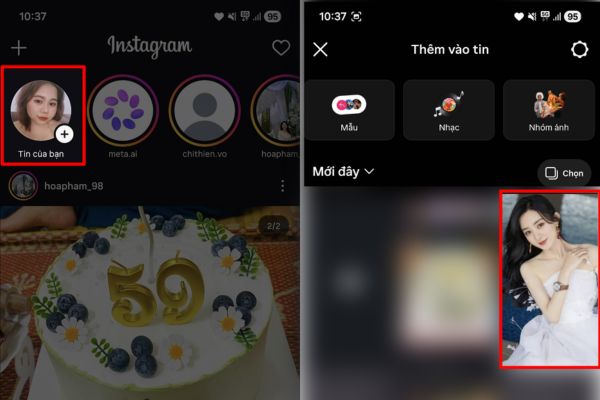
Click on the item "Your news"
Click on “Your News”

Step 2: After the photo has been uploaded to the screen, look to the right edge and click the arrow icon to switch to advanced editing mode. Next, touch three-dot icon to enable the feature Label AI.

(Small note: If your interface already displays the AI ​​effect icon, you can completely skip this step).
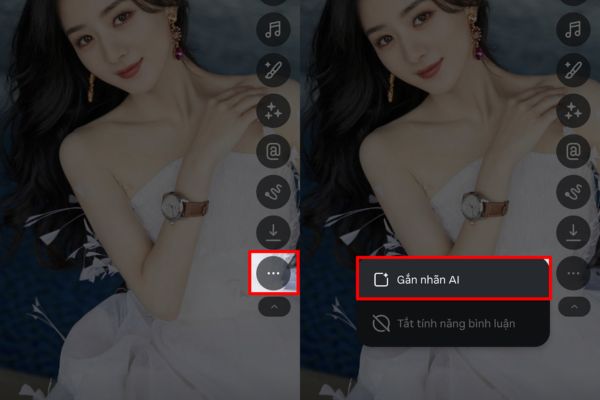
Enable AI Labeling
Enable AI Labeling

Step 3: Now, find and click on the icons as shown in the image below.
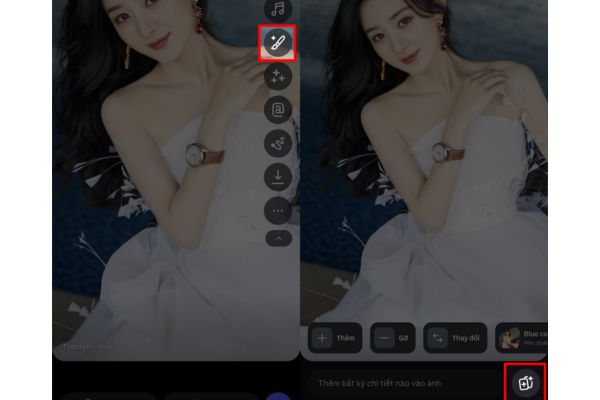
Click on the icons as shown

Step 4: Here, you surf and select the flash effect for photos that the system suggests to apply the filter to your work. Please wait patiently for a few seconds for the Meta AI system to analyze and overlay the new light.

In case you feel that the color tone or brightness is not really satisfactory, don’t worry, just press the button “Recreate” to let the AI ​​give you more suitable alternative versions.
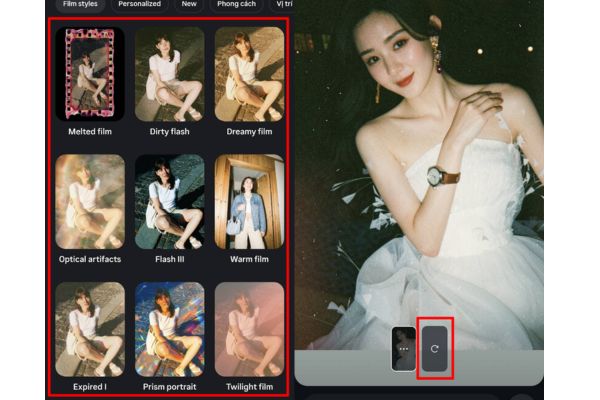
Choose the flash effect for photos that the system suggests

Step 5: When you are completely satisfied with your work, just click on the word “Finished” to finish the editing process. Finally, you can select the save icon to download this beautiful photo to your device memory, or click share directly to Story for everyone to admire.
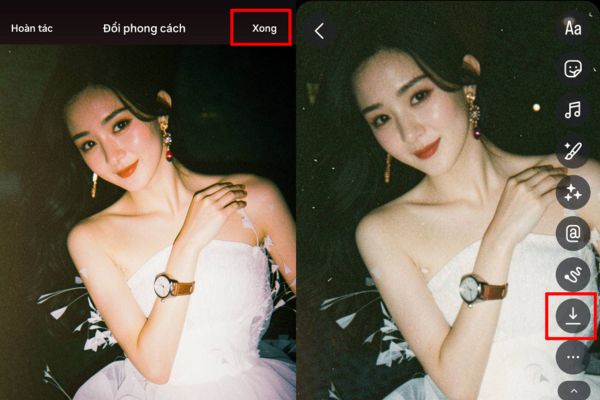
Instructions on how to create flash effects for photos

Conclusion

Hopefully through this article, you have mastered it How to create flash effect for photos on the phone. Don’t hesitate to experiment with many different shooting angles to let AI maximize its power. Please share your sparkling results with your friends.

Frequently Asked Questions (Q&A)

1. Does this feature require downloading any other photo editing applications?

No, this feature uses Meta AI integrated directly inside the Instagram application, you do not need to install any additional software.

2. What if I don’t like the results generated by AI?

Very simple, in the step of applying the effect, you just need to click the “Recreate” button, the AI ​​system will automatically process and provide other light versions for you to choose from.

3. Can photos be saved to the phone after editing?

Absolutely. In the final step, you can select the save icon to download the photo to your device library, or choose to post directly to your Story.


Tags: amazingcreateEffectsFlashInstagramphotos
Previous Post

How to create beautiful studio-like preschool graduation photos for your child

Next Post

If I forget something on the Metro train, what should I do to get it back?

AnonyViet

AnonyViet

Related Posts

Samsung Galaxy Z Fold 8 Ultra and Z Fold 7: Is it worth upgrading?
Software

Samsung Galaxy Z Fold 8 Ultra and Z Fold 7: Is it worth upgrading?

July 28, 2026
Instructions on how to get 1 year of VIP Hidely VPN for free
Software

Instructions on how to get 1 year of VIP Hidely VPN for free

July 25, 2026
Instructions on how to block strange devices from accessing your home Wifi
Software

Instructions on how to block strange devices from accessing your home Wifi

July 25, 2026
Instructions on how to get Norton 360 Deluxe for 1 year for free
Software

Instructions on how to get Norton 360 Deluxe for 1 year for free

July 19, 2026
Is Xiaomi Redmi A7 a valuable choice in the popular smartphone segment?
Software

Is Xiaomi Redmi A7 a valuable choice in the popular smartphone segment?

July 14, 2026
Compact design, durable battery, excellent camera: Review of OPPO Reno 16 Pro 5G
Software

Compact design, durable battery, excellent camera: Review of OPPO Reno 16 Pro 5G

July 12, 2026
Next Post
If I forget something on the Metro train, what should I do to get it back?

If I forget something on the Metro train, what should I do to get it back?

0 0 votes
Article Rating
Subscribe
Login
Notify of
guest

guest

0 Comments
Oldest
Newest Most Voted

Recent News

Windows 7/8.1/10 users will be upgraded to Windows 11 for free

Windows 7/8.1/10 users will be upgraded to Windows 11 for free

July 30, 2026
Instructions for receiving the free Certified LLM Security Expert certificate

Instructions for receiving the free Certified LLM Security Expert certificate

July 30, 2026
MSI laptops are not just for gamers: Which line is suitable for students, office workers and creative people?

MSI laptops are not just for gamers: Which line is suitable for students, office workers and creative people?

July 29, 2026
What is quantum resistant cryptography? Why must the Internet change?

What is quantum resistant cryptography? Why must the Internet change?

July 29, 2026
Windows 7/8.1/10 users will be upgraded to Windows 11 for free

Windows 7/8.1/10 users will be upgraded to Windows 11 for free

July 30, 2026
Instructions for receiving the free Certified LLM Security Expert certificate

Instructions for receiving the free Certified LLM Security Expert certificate

July 30, 2026
MSI laptops are not just for gamers: Which line is suitable for students, office workers and creative people?

MSI laptops are not just for gamers: Which line is suitable for students, office workers and creative people?

July 29, 2026
AnonyViet - English Version

AnonyViet

AnonyViet is a website share knowledge that you have never learned in school!

We are ready to welcome your comments, as well as your articles sent to AnonyViet.

Follow Us

Contact:

Email: anonyviet.com[@]gmail.com

Main Website: https://anonyviet.com

Recent News

Windows 7/8.1/10 users will be upgraded to Windows 11 for free

Windows 7/8.1/10 users will be upgraded to Windows 11 for free

July 30, 2026
Instructions for receiving the free Certified LLM Security Expert certificate

Instructions for receiving the free Certified LLM Security Expert certificate

July 30, 2026
  • Home
  • Home 2
  • Home 3
  • Home 4
  • Home 5
  • Home 6
  • Next Dest Page
  • Sample Page

say88 tỷ lệ kèo nhà cái kèo nhà cái 5 febet

No Result
View All Result
  • Home
  • News
  • Software
  • Knowledge
  • MMO
  • Tips
  • Security
  • Network
  • Office

say88 tỷ lệ kèo nhà cái kèo nhà cái 5 febet

wpDiscuz
0
0
Would love your thoughts, please comment.x
()
x
| Reply