What to do if you forget something on the Metro train is a question that confuses many passengers during crowded rush hours. Fortunately, the HCMC Metro application has now integrated an extremely convenient property search support feature. With just a few taps on your phone, you can completely look up information quickly. Let’s explore with AnonyViet in detail how to do it!
📢 Join the channel Telegram belong to AnonyViet
Update new articles, cool tools and IT tips fastest
What to do if you forget something on the Metro train?
When traveling on the crowded urban railway in Ho Chi Minh City, the incident of luggage falling is entirely possible. If you are wondering if you forgot the above items Metro train What to do, below is a specific process to help you look up information:
Step 1: Download the application HCMC Metro to your mobile device. Currently, this software is fully available on both of the most popular operating system platforms. You just need to visit App Store (for iOS ecosystem users) or Google Play (for Android users) to download and install completely free.
Step 2: Proceed to log in to the application system. To save operation time, the system allows you to link and choose to log in directly through your personal Google account. This method is extremely fast and ensures high security for users.
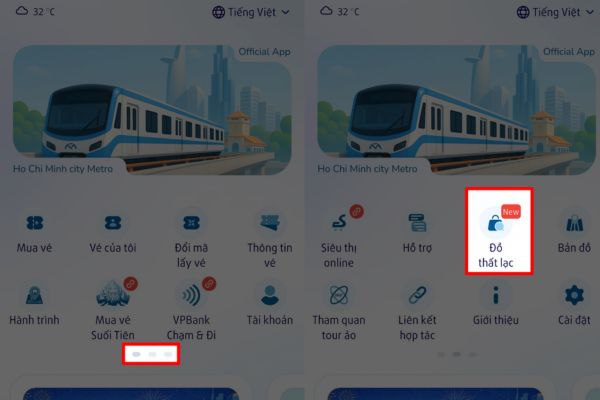
Step 3: At the function’s main screen interface, browse and click on “Lost items“.
At this time, a blank box will appear asking you to enter the exact name of the item you dropped, such as: wallet, handbag, key chain, etc. Immediately, the data system will scan and display a detailed message if the management board is temporarily holding an item with similar characteristics.
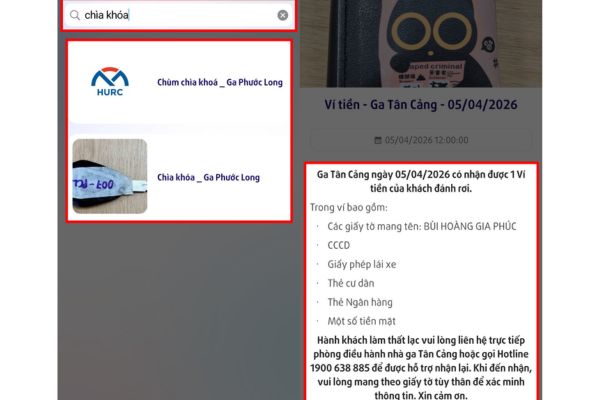
Step 4: If the app confirms that your items are being kept safely, read the location information carefully (for example: Ben Thanh station, Ba Son station…). After that, you just need to move to the correct station address, contact directly with the management or staff on duty to complete the procedure to receive your belongings.
Pocket the core notes when searching for lost items
In order for the process of identity verification and property return to go smoothly, without wasting both parties’ time, you need to remember the following important principles:
- Open the app immediately when you discover something is lost: Data on the system is often refreshed continuously in real time, helping you quickly locate the current status of the item.
- Describe the item’s characteristics in as much detail as possible: When searching on the app or reporting to staff, please clearly state the color, size, brand, or scratches, and attach a separate identification label. This helps management accurately classify your item among thousands of other items.
- Carefully read the storage location on the application: The Ho Chi Minh City Metro line has many stops in succession. Identifying the correct station name (such as Ben Thanh station or Ba Son station) will help you get to the right place, avoiding having to move around many times causing fatigue.
- Proactively speak up for support: If you search on the app and don’t see any information, don’t be discouraged. Please notify the nearest management or security staff immediately, because it is very possible that your item is on the way to be delivered and has not yet had time to enter data into the system.
- Have your identification documents ready: When you come to reclaim property, especially sensitive items such as wallets or important documents, you are required to bring your ID card/ID card or open the application. VNeID authenticated for comparison. This step helps the verification process take place transparently and smoothly.
- Provide evidence for high-value assets: If you lose your laptop or expensive phone, bring the purchase receipt, pictures taken with the item or read the correct password to unlock the device to prove legal ownership.
- Be absolutely wary of scams: Only look up information on official applications. If there is an unfamiliar source or unclear link sent asking for personal information to receive items, ignore it immediately to avoid being scammed.

Conclusion
Now, the worry about What to do if you forget something on the Metro train has been thoroughly resolved thanks to a modern management system. Just follow the correct search steps and bring all the documents, getting your property back will be extremely convenient. Don’t forget to share this useful information with relatives and friends.
Frequently Asked Questions (Q&A)
1. Which application supports finding lost items on Metro Ho Chi Minh City?
You need to download the official application called “HCMC Metro” which is currently available on both the App Store (iOS) and Google Play (Android).
2. What should I bring when going to the station to pick up lost items?
You are required to bring identification documents (CCCD/ID card) or use an authenticated VNeID account. For high-value items, additional photos or invoices are needed to prove ownership.
3. What should I do if I look up on the app and don’t see the lost item?
Please proactively contact the security staff or management board directly at the nearest station, because it is possible that the object has just been picked up and has not yet been updated to the system.