Love days counting application is the perfect solution to help couples accurately track their time together. With Been in Love, every beautiful memory and important milestone is cherished and kept safe. Let’s go together AnonyViet Find out what’s special about this software.
📢 Join the channel Telegram belong to AnonyViet
Update new articles, cool tools and IT tips fastest
Overview of Been in Love software
Been in Love is a romantic and sophisticated platform, specially designed to help couples cherish every moment together. From the first day together to every important milestone in the future, this software will help keep your love story alive. Using a quality love days counting application not only helps you know the exact time of your relationship but is also a place to store priceless images and emotions.

Outstanding features of this love day counting application
The software is integrated with many useful tools, fully meeting the needs of people in love. Below are the core features you will experience:
- Real time counting system helps you keep track of the exact number of days spent together by year, month, week and day.
- The smart reminder feature ensures you will never forget your anniversaries or special moments together.
- The love diary allows you to take notes and keep beautiful memories 365 days a year.
- The visual timeline helps you two easily look back on your journey together and relive the sweet emotions day by day.
- Tools Widgets and Badge Counter Supports displaying love days extremely conveniently right on the phone’s main screen.
- The password security lock system helps absolutely protect the privacy of your secret diary entries.
- Customization allows you to change background image The couple fits the screen size and renames as desired.
- Smart connectivity helps two devices quickly synchronize data via QR code or shared link.
- Function Dynamic Icons Supports users to flexibly change the software icon right on the phone screen.
If you are a busy and forgetful person, the Been in Love love day counting application will completely solve that problem thanks to its extremely accurate notification system.
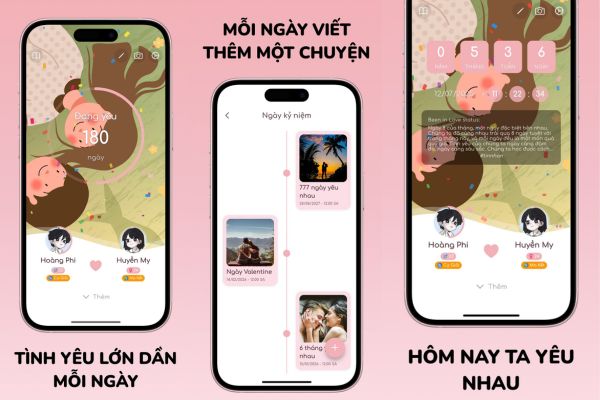
Table comparing traditional memorization methods and using apps
To clearly see the convenience, let’s take a look at the comparison table below:
| Criteria | Traditional memorization (Notebook, memory) | Use Been in Love |
| Accuracy | It’s easy to get confused with the number of days or forget the time. | Real-time automatic counting (year, month, week, day). |
| Remind | Must set alarms yourself or take notes manually. | Automatically send notifications when important anniversaries arrive. |
| Synchronize | Only one person keeps the book or remembers it individually. | Connect two people via QR/Link, view the same data. |
| Security | It’s easy for someone else to read the book if you forget it. | Absolutely safe with password locking system. |
Instructions for installing the love day counting application
To start saving wonderful memories, you just need to install this love days counter application right on your smartphone with a few simple steps:
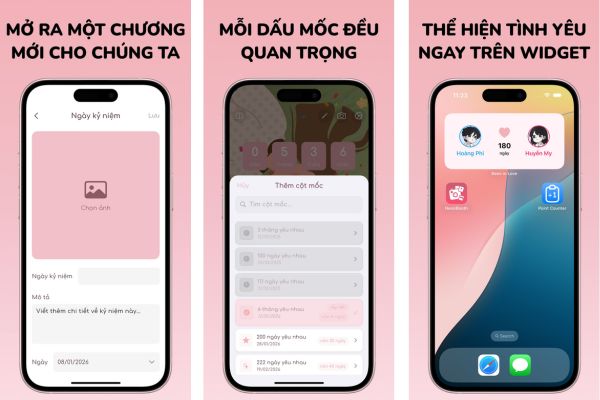
Step 1: Visit the App Store (for iOS) or Google Play (for Android) and search for the software name Been in Love to download for free.
Step 2: Open the software, enter the first day you two officially met each other for the system to start the countdown.
Step 3: Use the QR code scanning feature or send a shared link to your other half to synchronize data between two devices.
Step 4: Start customizing the background image, change the display name and set up password protection to perfect your private space.
With a beautiful interface and gentle effects, this love days counter application will definitely make each passing day of the two of you extremely meaningful.
Frequently asked questions
1. Does Been in Love software charge user fees?
Currently, the software is being released completely free on both the App Store (for iOS) and Google Play (for Android).
2. How can two people view the same data?
The two of you can easily synchronize data with each other by scanning the QR code directly or sending a sharing link created within the software.
3. Is log data kept secure?
Yes, the software provides a password security lock feature, helping to absolutely protect the privacy of your memories and notes.
Conclusion
Owning one love days counting application like Been in Love will help make your love journey more meaningful. All happy and sad memories are safely stored and reminded at the right time so you don’t miss any important occasions. Don’t hesitate to experience this extremely cute software right away.