See today’s gas prices is an essential need of many people in the context of continuously fluctuating markets. With just an iPhone connected to the internet, you can completely look up this information right at home without wasting much time. Let’s explore with AnonyViet the simplest ways to do it!
📢 Join the channel Telegram belong to AnonyViet
Update new articles, cool tools and IT tips fastest
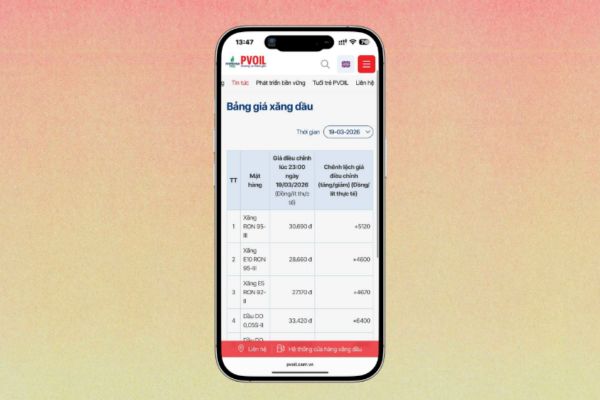
Instructions on how to view today’s gas prices via PVOIL website
PVOIL has long been known as one of the most reputable and widely covered fuel distribution systems. The official website of this business provides full market-related information, helping consumers easily see today’s gasoline prices in a transparent way.
To perform a lookup on an iOS device, simply follow these steps:
Step 1: Open browser Safari on your iPhone and visit the official homepage of PVOIL.
Step 2: At the main screen interface, look at the top right corner and click on the menu icon (3 dashes).
Step 3: A list of options will appear. Click on the small arrow next to “News“.
Step 4: Finally, select the category “News of gasoline prices“.
At this time, the system will display a detailed statistics table for each fuel item. According to notification from the system, this price is usually adjusted and updated at 11:00 p.m. every day, along with the difference compared to the previous adjustment period.
Look up retail fuel prices on the Petrolimex platform
Besides PVOIL, Petrolimex is also the top choice of the majority of people. If you are a regular customer of the company, you can download Petrolimex’s own application to your device. However, using the app requires users to create an identification account and verify it with a Citizen Identification Card (CCCD) image. This sometimes causes a loss of time for those who just want to see today’s gas prices quickly.
The most optimal solution is to use the company’s website version directly. The operations are as follows:
Step 1: Start the web browser on iPhone and visit the home page Petrolimex.
Step 2: Similar to PVOIL, you find and click on the icon 3 dashes in the upper right corner of the screen.
Step 3: In the drop-down menu bar, just click on “Retail price of gasoline“. The latest reference price list will immediately appear on your phone screen.
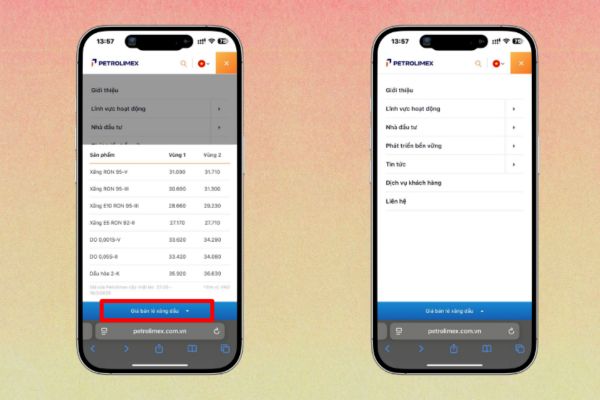
Table comparing two online lookup methods
To help you easily choose the right platform when you need to see today’s gas prices, below is a summary of the outstanding features of both websites:
| Criteria | PVOIL website | Petrolimex website |
| Access operations | Via menu > News > Gasoline price news | Via menu > Retail price of gasoline |
| Update time | Usually at 11:00 p.m. every day | After price management periods |
| Requires login | Not required | Not required (Web version) |
| Detail level | The price difference is displayed | Displays prices in zone 1 and zone 2 |
Be careful when consulting gasoline prices online
While online platforms offer great convenience, users need to understand the nature of this data. Viewing today’s gasoline prices on the websites of large businesses is mainly for reference purposes.
In some cases, due to traffic overload or technical problems in the system, the price list on the website may be updated slower than in reality. Therefore, to get absolutely accurate numbers, you should combine tracking news reports from official media agencies.
Or the most practical way is to directly observe the electronic signage at pumping stations and gas stations when you take your car to the dump. Actively viewing today’s gas prices through many different channels will help you not be surprised by fluctuations in the fuel market.

Conclusion
In short, viewing today’s gas prices via phone brings maximum convenience to users. You only need to spend a few seconds accessing the website to grasp the market situation. Wishing you success and always have smooth trips.
Frequently Asked Questions (Q&A)
1. Why are gas prices on the website sometimes different from the actual price at the pump?
Due to delays in updating data of the website system or sometimes network technical errors, prices displayed on the website are often for reference only. The most accurate price is always listed directly at the gas station.
2. Do I have to download the Petrolimex app to look up prices?
Optional. You can completely look up directly on Petrolimex’s website through the Safari browser to save time and avoid the complicated CCCD authentication step on the application.
3. What time does the PVOIL system usually update the gasoline price list?
According to statistical information on the company’s system, the price list of PVOIL’s fuel products is often adjusted and updated at 11:00 p.m. every day.