• Home
  • News
  • Software
  • Knowledge
  • MMO
  • Tips
  • Security
  • Network
  • Office
AnonyViet - English Version
  • Home
  • News
  • Software
  • Knowledge
  • MMO
  • Tips
  • Security
  • Network
  • Office
No Result
View All Result
  • Home
  • News
  • Software
  • Knowledge
  • MMO
  • Tips
  • Security
  • Network
  • Office
No Result
View All Result
AnonyViet - English Version
No Result
View All Result

Instructions for receiving Shodan Academic Membership for free

AnonyViet by AnonyViet
December 11, 2025
in Knowledge
0

Shodan Academic Membership Free is a gift for students or those who are passionate about studying network security but have a limited budget. This account package opens up many great benefits that normally have to be paid to get. However, to upgrade successfully, a few tricks and careful preparation are required.

Join the channel Telegram belong to AnonyViet 👉 Link 👈

What is Shodan and the benefits of the Academic package

Before going into the registration tips, it is necessary to clearly understand why this tool is so sought after. Shodan is considered the “Google of the Internet (IoT) world”, allowing users to search for servers, webcams, traffic lights, and many other internet-connected devices. For the Academic package, users will enjoy superior privileges compared to regular accounts, including:

  • Maximum tracking 16 IP addresses to detect security vulnerabilities.
  • Granted 100 credits per month to perform deep scan commands.
  • Unlock full API access, providing great support for integration into automation tools.
What is Shodan and the benefits of the Academic package

Instructions on how to receive Shodan Academic Membership for free

Step 1: Prerequisites of Shodan The user must belong to the educational sector. If you are a student and have an email issued by your school, use it immediately because this is the safest option.

In case you don’t have the owner’s email, you can access it EduMailFree or eTempmail to quickly get an email address for the next step.

Step 2: Once you have the “raw material” which is email, visit the official registration page at https://account.shodan.io/register

In the account registration form, please fill out all information and use the required address .edu email just prepared. After pressing the button Createthe system will send an authentication link to the mailbox, you need to click on it to activate the account for it to be valid.
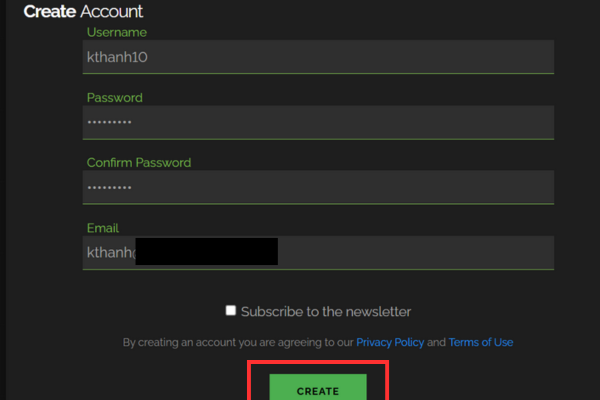
Instructions on how to receive Shodan Academic Membership for free

Once activated, log back into Shodan and navigate to the section Account (Account).

Find the Account section

Here, observe the membership status in section Member. If the system displays as Nomeaning the account has not yet been automatically upgraded.
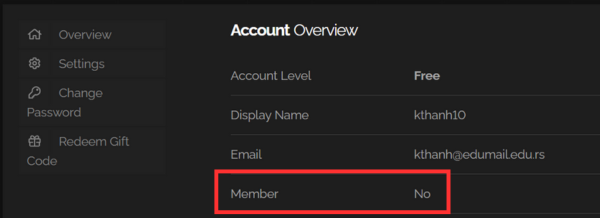
Observe the member status in the Member section

At this point, please perform the “manual activation” step by sending an email to the support team.

  • Send to: [email protected]
  • Title: Academic Upgrade Request
  • Sample content: “Hi, I registered with my university email. Please upgrade me to Academic membership. Thank you.”

Note that this manual review may take some time, so please be patient!

Conclusion

To sum up, opportunity Get Shodan Academic Membership for free Completely within reach if you follow the right steps and have a valid educational email. This is a great stepping stone for those who want to go deeper into the field of information security. However, carefully weigh the immediate convenience of virtual email against the long-term stability for the best experience.

Tags: AcademicfreeInstructionsMembershipreceivingShodan
Previous Post

5+ Websites to create special character names for the newest gamers in 2026

Next Post

How to Turn off “Seen” mode on Messenger 2021

AnonyViet

AnonyViet

Related Posts

How to create Mind Map and Flowchart using ChatGPT is super simple
Knowledge

How to create Mind Map and Flowchart using ChatGPT is super simple

December 7, 2025
Free Gemini Google certification exam guide and Answers
Knowledge

Free Gemini Google certification exam guide and Answers

December 6, 2025
Instructions on how to set a recording file as a ringtone for iOS 26
Knowledge

Instructions on how to set a recording file as a ringtone for iOS 26

December 5, 2025
Instructions for creating Gemini Enterprise for free for 30 days
Knowledge

Instructions for creating Gemini Enterprise for free for 30 days

December 2, 2025
Instructions for turning on fall detection on Apple Watch
Knowledge

Instructions for turning on fall detection on Apple Watch

December 2, 2025
How to get 10TB TeleBox storage for free
Knowledge

How to get 10TB TeleBox storage for free

November 30, 2025
Next Post
How to Turn off “Seen” mode on Messenger 2021

How to Turn off "Seen" mode on Messenger 2021

0 0 votes
Article Rating
Subscribe
Login
Notify of
guest

guest

0 Comments
Oldest
Newest Most Voted
Inline Feedbacks
View all comments

Recent News

App MonokaiToolkit 6 – Facebook utility toolkit on Android and iOS

App MonokaiToolkit 6 – Facebook utility toolkit on Android and iOS

December 12, 2025
Instructions for receiving CapCut Pro for 30 days for free

Instructions for receiving CapCut Pro for 30 days for free

December 12, 2025
How to Turn off “Seen” mode on Messenger 2021

How to Turn off “Seen” mode on Messenger 2021

December 11, 2025
Instructions for receiving Shodan Academic Membership for free

Instructions for receiving Shodan Academic Membership for free

December 11, 2025
App MonokaiToolkit 6 – Facebook utility toolkit on Android and iOS

App MonokaiToolkit 6 – Facebook utility toolkit on Android and iOS

December 12, 2025
Instructions for receiving CapCut Pro for 30 days for free

Instructions for receiving CapCut Pro for 30 days for free

December 12, 2025
How to Turn off “Seen” mode on Messenger 2021

How to Turn off “Seen” mode on Messenger 2021

December 11, 2025
AnonyViet - English Version

AnonyViet

AnonyViet is a website share knowledge that you have never learned in school!

We are ready to welcome your comments, as well as your articles sent to AnonyViet.

Follow Us

Contact:

Email: anonyviet.com[@]gmail.com

Main Website: https://anonyviet.com

Recent News

App MonokaiToolkit 6 – Facebook utility toolkit on Android and iOS

App MonokaiToolkit 6 – Facebook utility toolkit on Android and iOS

December 12, 2025
Instructions for receiving CapCut Pro for 30 days for free

Instructions for receiving CapCut Pro for 30 days for free

December 12, 2025
  • Home
  • Home 2
  • Home 3
  • Home 4
  • Home 5
  • Home 6
  • Next Dest Page
  • Sample Page

trang chủ f168 nhà cái 78win https://www.qq8827.com/ https://go99.ae.org/ https://nohu90.bid/

No Result
View All Result
  • Home
  • News
  • Software
  • Knowledge
  • MMO
  • Tips
  • Security
  • Network
  • Office

trang chủ f168 nhà cái 78win https://www.qq8827.com/ https://go99.ae.org/ https://nohu90.bid/

wpDiscuz
0
0
Would love your thoughts, please comment.x
()
x
| Reply