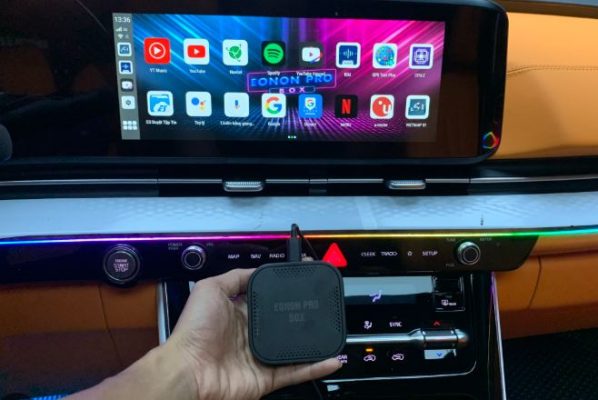
Apple Playcar is quite convenient but limiting features like watching YouTube, so you need to equip Android Box Car to be able to install the desired app. This is the top app should be installed on Android Box Car
| Join the channel Telegram belong to Anonyviet 👉 Link 👈 |
1. Why do you need to install the app for Android Box in cars?
- Android Box Turn the original screen into a smart entertainment center.
- Proactively choose the appropriate application: map, listen to music, watch TV, social networks, support driving.
- Meet the needs of personalization, connect 4.0, increase comfort and safety when moving.
2.
| Stt | Application | Classify | Main features | Free/pay |
|---|---|---|---|---|
| 1 | Google Maps | Guide | Map, guide, warning | Free of charge |
| 2 | Vietmap s1/s2 | Guide | Guide, speed warning, cold penalties | Fee/crack |
| 3 | Navitel | Guide | Offline map, warning, 3D | Free of charge |
| 4 | Zing mp3/spotify | Listening to music | Online music store, voice control | Free of charge |
| 5 | YouTube vanced | Entertainment | Watch Video without advertising | Free of charge |
| 6 | VTV GO, FPT Play, K+ | Watch TV | Watch TV, Movie, Sports | Free/pay |
| 7 | Zalo, Facebook Lite, Messenger Lite | Social network | Texting, calling, surfing the network | Free of charge |
| 8 | Kiki, Google Assistant | Voice | Control, look up order | Free of charge |
| 9 | TPMS, Camera 360 … | Vehicle support | Tire sensor, cruise camera, 360 | Free/pay |
| 10 | File management, extract | System | Browse files, extract, output USB | Free of charge |
3. Classification of applications and instructions for use
3.1. Navigation application: Safe on all journeys
- Google Maps: Free, continuous update, guide, traffic warning, finding locations, evaluation.
- Vietmap s1/s2: Detailed navigation, speed warning, cold penalties, 3D, can use the crack or pay the fee to ensure the update.
- Navitel: Offline map, suitable for remote areas, intuitive interface.
3.2. Music & Entertainment Application
- Zing mp3, spotify: Vietnamese, international music store, constantly updated, voice order.
- YouTube vanced: Watch non -advertising videos, playlist, watch and do other things.
- FPT Play, VTV Go, K+: Watch online TV, copyrighted films, sports, channel diversity.
3.3. Social network application
- Zalo: Call, text, send photos to relatives and colleagues.
- Facebook Lite, Messenger Lite: Light version, resource saving, still full features.
Comparison of Lite and full version features:
| Application | Capacity | Speed | Main features |
|---|---|---|---|
| Zalo | Short | Fast | Text, call, share |
| FB Lite | Very low | Fast | Surfing, texting, calling |
| Messenger Lite | Short | Fast | Text, call, share |
3.4. Driving support application: Safe and comfortable increase
- TPMS: Tire pressure monitoring.
- Dashcam, 360 camera, reversing camera: Observe around the car, prevent collision.
- Extract, file management: Easy to install the app, access data from USB, memory card.
3.5. Voice order application
- Kiki, Google Assistant: Ordering the way, opening music, calling, checking cold penalties, without hand operation.
- Suitable for all regions: Supporting the North, Central and Southern accent.
3.6. Application of other systems & utilities
- File management, extract rar/zip: Help install the external app, process diverse data.
- CH Play, Google LLC: Make sure the application update, download the new app easily.
- USB image export application: Share images from the screen to other devices.
4. Instructions for installing the app for Android Box
4.1. Install via chplay
- Wifi/4G connection for Android Box.
- Go to Chplay, find applications, click download and install.
4.2. Install the external APK file
- Download APK file from reputable source (according to the introduction link of community articles).
- Go to “file management” on Android Box, select the downloaded APK file, click the settings.
- Allow installation from unknown source if required.
4.3. Common problems & how to fix it
- Error is not compatible with Android version: Find the right APK version, update Android Box.
- Can’t access Chplay: Use the Google LLC APK file or download Chplay appropriately.
- YouTube error cannot be seen: Use YouTube Vanced or the latest APK version.
5. Note when choosing the app for Android Box
- Always choose a genuine app or a reputable community source to avoid malicious code and virus.
- Priority is light, optimal for car screens.
- Should backup data before installation or update.
- Read the instructions carefully, watch the Demo video before operation.
6. Proposal from Anonyviet: Technology & Tips
- Category Phone software: Constantly update the app or for Android Box.
- Category Trick: Tips to accelerate, optimize Android Box.
- Information lookup Tools: Support for cold punishment, car positioning, sim card management.
7. Video & Reference (Placeholder)
-
- Video Demo Install Vietmap, Zalo, YouTube Vanced on Android Box
- Photos of apps when running actual on car screen
- Photo of popular Android Box lines: Vietmap, Zestech, Gotech, Oledpro, Utour, Elliviview …
8. Frequently asked questions (FAQ)
1. Android box how many apps can be installed?
Depending on the memory capacity, usually from 16GB to 128GB, should prioritize the App lightweight and necessary.
2. Should I install the App outside Chplay?
Yes, but should only be installed from a reputable technical community source (such as Anonyviet or car forums).
3. Which app helps drive the safest?
Map applications (Vietmap, Google Maps, Navitel), TPMS Tire sensor, Camera 360, Cold Penalty lookup.
4. How to update the latest app?
Should regularly check the update on CHPLAY, or go to the software item on Anonyviet.
9. Conclusion
The selection and installation of App for Android Box Car not only brings entertainment experience but also helps increase the level of safety and comfort on all roads. Refer to the article, choose the appropriate app, and always update the latest tricks with Anonyviet!