• Home
  • News
  • Software
  • Knowledge
  • MMO
  • Tips
  • Security
  • Network
  • Office
AnonyViet - English Version
  • Home
  • News
  • Software
  • Knowledge
  • MMO
  • Tips
  • Security
  • Network
  • Office
No Result
View All Result
  • Home
  • News
  • Software
  • Knowledge
  • MMO
  • Tips
  • Security
  • Network
  • Office
No Result
View All Result
AnonyViet - English Version
No Result
View All Result

How to link bank accounts to VnEID to receive social benefits

AnonyViet by AnonyViet
August 28, 2025
in Software
0

How to link bank accounts to vneid Currently, it is a information that many people are interested in after the Ministry of Public Security officially implemented this useful feature. Now, receiving social security benefits such as pensions, people with meritorious services will become faster, transparent and safer than ever. Please join Anonyviet Find out the details of the steps in the article below!


Join the channel Telegram belong to Anonyviet 👉 Link 👈

What is the benefit of linking bank accounts with VNEID?

The integration of bank accounts into VNEID electronic identification app has brought a great step in the reform of administrative procedures. Instead of waiting or carrying out complicated cash receipt procedures, people can receive social security payments directly and conveniently.

  • Get money quickly: Pensioners and pensions will be transferred directly to your bank account, which saves maximum time.
  • Transparency and clear: All transactions are recorded on the system, making it easy to monitor and manage the amounts received.
  • Safety and security: Transactions are made on the platform Vneid managed by the Ministry of Public Security, ensuring high security for personal and financial information of citizens.

What is the benefit of linking bank accounts with VNEID?

Instructions on how to link bank accounts to vneid

To register to receive social security via bank accounts on VNEID, you only need to follow the following 4 simple steps:

Step 1: First, you need to open VNEID application And log in to your electronic identification account. At the main screen, find the section “Social security“And continue to choose”Social security benefit account“.
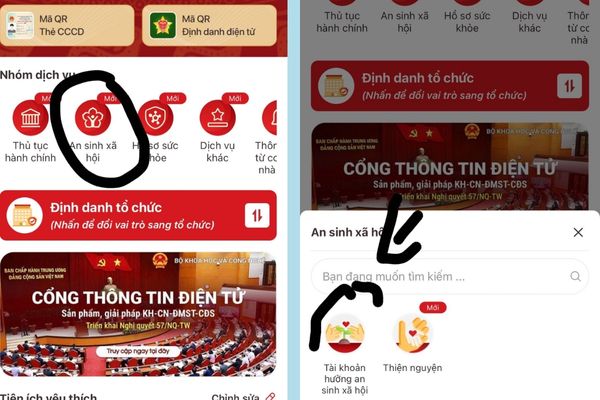
Select "Social security benefit account"
Select “Social Security Enjoy Account”

Step 2: The system will display a list of linked banks. Find and choose the right bank name you are using to receive money.

Step 3: You proceed to enter correctly Bank account number mine in the box. Then, read carefully and mark the box “Agree to share data“Then click”Continue“
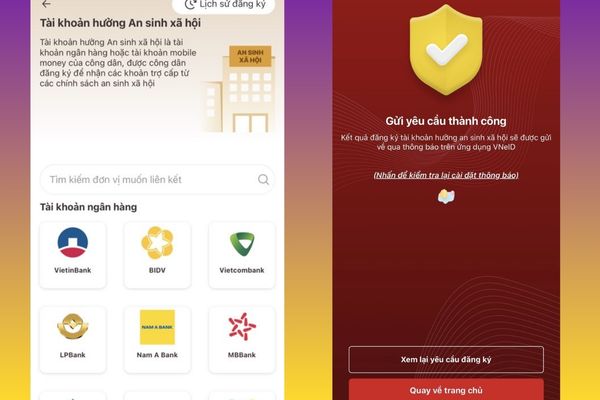
Instructions on how to link bank accounts to vneid

Step 4: After completing the above steps, your link requirements will be sent. The remaining is waiting for VNEID’s system to process and send a notice of confirmation.

Some important notes you need to know when performing

In order for the linkage to go smoothly and successfully, you need to ensure the following conditions:

  • The bank account that you use to link must be a Vietnamese dong payment account (VND).
  • Information owner information must match the information on your VNEID electronic identification account.
  • You need to make sure the bank account is in a normal operating state, not locked or encountered any transaction restrictions.

Some important notes you need to know when performing

Currently, it is not clear that 100k of independent Tet from the government will receive any form, but you should also link the bank with VNEID first to make sure.

Conclusion

Hopefully the article has helped you understand How to link bank accounts to vneid Easy and accurate. Active updating this feature not only helps you receive convenient social security, but also contributes to the national digital transformation.


Tags: accountsbankbenefitslinkreceivesocialVNeID
Previous Post

Share professional Microsoft Office course

Next Post

How to view more time zones on Mac with multitimeinmenubar

AnonyViet

AnonyViet

Related Posts

Receive copyright for 3 Halloween software worth 0
Software

Receive copyright for 3 Halloween software worth $150

October 23, 2026
Instructions for receiving 3 months of MultCloud Premium for free with 200GB data
Software

Instructions for receiving 3 months of MultCloud Premium for free with 200GB data

October 17, 2026
Instructions for receiving pension through VNeID without going to the ward
Software

Instructions for receiving pension through VNeID without going to the ward

October 16, 2026
Record first, choose focus later: how to use 4K 60 fps Cinema mode on iPhone 18 Pro
Software

Record first, choose focus later: how to use 4K 60 fps Cinema mode on iPhone 18 Pro

October 15, 2026
How to receive 22k from Viettel Tammi on the occasion of 22nd birthday
Software

How to receive 22k from Viettel Tammi on the occasion of 22nd birthday

October 15, 2026
3 valuable upgrades on Samsung Galaxy A08 compared to its predecessor A07
Software

3 valuable upgrades on Samsung Galaxy A08 compared to its predecessor A07

October 12, 2026
Next Post
How to view more time zones on Mac with multitimeinmenubar

How to view more time zones on Mac with multitimeinmenubar

0 0 votes
Article Rating
Subscribe
Login
Notify of
guest

guest

0 Comments
Oldest
Newest Most Voted

Recent News

Receive copyright for 3 Halloween software worth 0

Receive copyright for 3 Halloween software worth $150

October 23, 2026
How to use Messenger without a Facebook account

How to use Messenger without a Facebook account

October 22, 2026
Instructions on how to exit iOS 27 Beta and update to the official version

Instructions on how to exit iOS 27 Beta and update to the official version

October 22, 2026
Instructions for updating PHP to avoid PHP2Shell

Instructions for updating PHP to avoid PHP2Shell

October 22, 2026
Receive copyright for 3 Halloween software worth 0

Receive copyright for 3 Halloween software worth $150

October 23, 2026
How to use Messenger without a Facebook account

How to use Messenger without a Facebook account

October 22, 2026
Instructions on how to exit iOS 27 Beta and update to the official version

Instructions on how to exit iOS 27 Beta and update to the official version

October 22, 2026
AnonyViet - English Version

AnonyViet

AnonyViet is a website share knowledge that you have never learned in school!

We are ready to welcome your comments, as well as your articles sent to AnonyViet.

Follow Us

Contact:

Email: anonyviet.com[@]gmail.com

Main Website: https://anonyviet.com

Recent News

Receive copyright for 3 Halloween software worth 0

Receive copyright for 3 Halloween software worth $150

October 23, 2026
How to use Messenger without a Facebook account

How to use Messenger without a Facebook account

October 22, 2026
  • Home
  • Home 2
  • Home 3
  • Home 4
  • Home 5
  • Home 6
  • Next Dest Page
  • Sample Page

say88 tỷ lệ kèo nhà cái kèo nhà cái 5 febet

No Result
View All Result
  • Home
  • News
  • Software
  • Knowledge
  • MMO
  • Tips
  • Security
  • Network
  • Office

say88 tỷ lệ kèo nhà cái kèo nhà cái 5 febet

wpDiscuz
0
0
Would love your thoughts, please comment.x
()
x
| Reply