The adjustment of settings on Windows often makes many people bored, because options are hidden in confused menu or requires technical knowledge. Minitoggle Born as a new breeze, bringing solutions to simplify all operations. Let’s explore how Minitoggle makes Windows management a smooth, convenient experience!
| Join the channel Telegram belong to Anonyviet 👉 Link 👈 |
Why is Minitoggle is the perfect choice?
This tool helps you perform the installation tasks with just one click, eliminating the troubles when you have to glide through a series of complex control panels. From displaying hidden files, cleaning the trash, to the dark mode, Minitoggle brings maximum comfort. With non -advertising design, light and sophisticated, this is an effective assistant to enhance your Windows experience.
Delicate interface, friendly with everyone
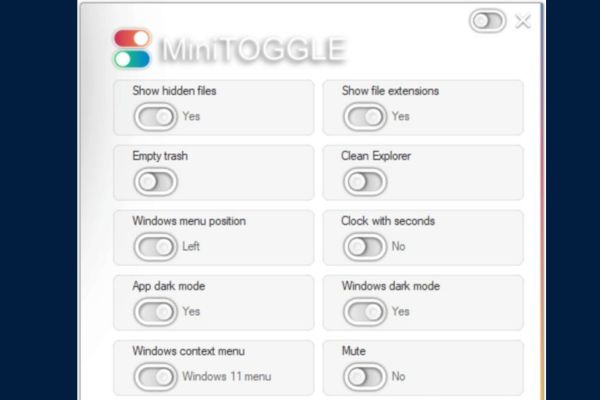
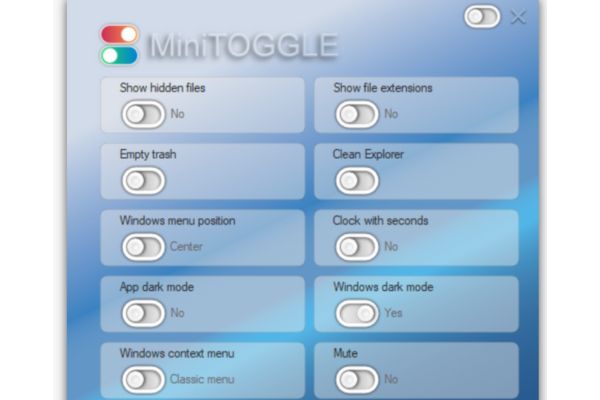
Upon booting, Minitoggle welcomes you with a minimal but attractive interface. The control panel is scientifically arranged, with the turn/off buttons that are labeled clearly, making it easy to recognize the function at first sight.
This design is not only intuitive but also eliminates all barriers, allowing both people who are not familiar with technology and experts feel comfortable. Minitoggle is the perfect testament to simplification while retaining strong, bringing an easy -to -use and effective experience.
Power from smart features
The button system is on/off, allowing you to adjust Windows settings in a snap. Here are outstanding features:
- Show hidden files: Turn on or off the hidden file view in the Explorer file, effectively supports the system file processing.
- File extension: Activate the extension to manage the file easier.
- Garbage cleaning: Delete the trash with just one click, helping the system always neat.
- Refresh the Explorer File: Delete the recent file history, the command has run and the address bar to have a clean Explorer interface.
- Align the Start menu: Customize the position of the Start menu in your style (only Windows 11).
- Detailed clock: Add seconds to the system clock, ideal for those who need high accuracy (only Windows 11).
- Application mode: Convert Minitoggle interface to luxurious, pleasant eye.
- Dark mode: Turn on/off the dark Windows mode, creating a homogeneous interface (only Windows 11).
- Modern context menu: The option to use a new or classic context menu (only Windows 11).
- Quick sound turning off: Turn on or off the system sound in a snap.
These features turn minitoggle into an outstanding productivity increase tool, saving you time and avoiding trouble when having to rummage through Windows settings.
How to customize minitoggle
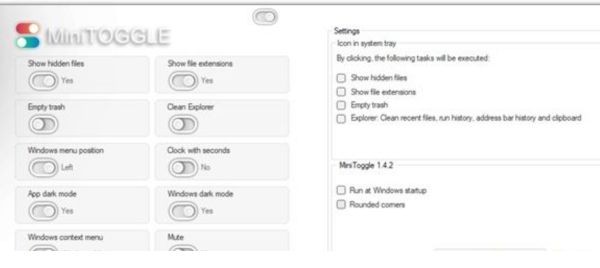
Minitoggle not only provides powerful features, but also allows you to customize to suit your own style. Just click the small button in the upper right corner, you will open the installation board with attractive options:
- Integrated system tray: Pin your favorite turn/off button to the system tray, allowing instant access without opening the application.
- Round corner: Activate the rounded corner design, bringing a modern and sophisticated appearance.
- Start with the system: Install minitoggle to run on Windows, always ready to serve you.
These customization help minitoggle perfectly integrate into your work process. In particular, the system tray feature is a highlight, making the screen always neat but still ensuring everything at hand.
Minitoggle: Small but martial
What makes the difference of minitoggle is the balance between simplicity and strength. Unlike many other management tools with messy interface or annoying advertising, the tool brings a smooth, non -distracting experience. Whether you are looking to optimize Windows for work, gaming or personal use, Minitoggle always responds perfectly.
Download minitoggle now HERE
This tool is completely free, no hidden fee or cumbersome registration, suitable for all users. Just download, boot and immediately discover smart features. Once you have experienced Minitoggle, you will wonder why you used to spend too much time for complex settings.
Conclude
Minitoggle Not only is a tool, but a companion, saving you time, improving performance and bringing unprecedented comfort on Windows. With sophisticated interface, intelligent features and flexible customization, this is an option not to be missed for all Windows 10 or 11 users.