• Home
  • News
  • Software
  • Knowledge
  • MMO
  • Tips
  • Security
  • Network
  • Office
AnonyViet - English Version
  • Home
  • News
  • Software
  • Knowledge
  • MMO
  • Tips
  • Security
  • Network
  • Office
No Result
View All Result
  • Home
  • News
  • Software
  • Knowledge
  • MMO
  • Tips
  • Security
  • Network
  • Office
No Result
View All Result
AnonyViet - English Version
No Result
View All Result

Instructions on how to use Perplexity on WhatsApp

AnonyViet by AnonyViet
May 4, 2025
in Software
0

Perplexity AI is an artificial intelligence assistant that helps you look up information, summarize content, create images and more. In particular, the integration of Perplexity on WhatsApp brings great convenience, allowing you to use AI in the messaging app without registering or converting between platforms. In this article, we will explore How to use Perplexity on WhatsApp effectively, from simple installation steps to optimal tips.

Join the channel Telegram belong to Anonyviet 👉 Link 👈

Benefits of using Perplexity on WhatsApp

Use Perplexity above WhatsApp Help you save time and effort. Instead of opening a browser or downloading its own application, you can:

  • Look up information quickly, receive answers directly to questions about events, knowledge, or latest data.
  • Ask AI to summarize the article, research documents, or any documents.
  • Create custom images with just one statement, like “drawing sunset on the mountain”.
  • Receive travel suggestions, recipes, or personal schedules.
  • Start now without registering or logging in.

This feature is especially useful for those who regularly use WhatsApp to contact, work, or manage daily work.

How to add Perplexity to WhatsApp by phone number

This method works on Android, iPhone and WhatsApp version on the computer.

Step 1: Save +1 (833) 436-3285 Go to your contacts. Easy to identify, for example, “Perplexity AI”. This helps you quickly find contact in WhatsApp.
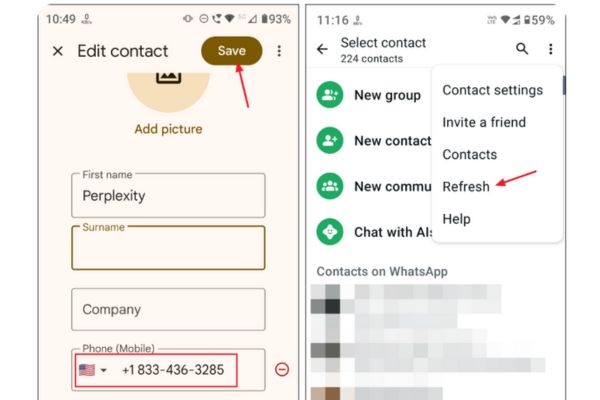
How to add Perplexity to WhatsApp by phone number

Step 2: Open WhatsApp and make sure the contacts are updated. Normally, WhatsApp will automatically refresh, but if you do not see a new contact, you can click on Pet 3 dots > Refresh.

Step 3: Find the “Perplexity AI” contact in the WhatsApp’s conversation list. Click to open a new chat window.

Step 4: Type your question or request directly into the chat window. For example:

  • “Summary of the latest climate change article”
  • “Create images of a future city”
  • “Compare electric vehicles and hybrid cars”

Perplexity will respond quickly to information, images, or source links (if required).
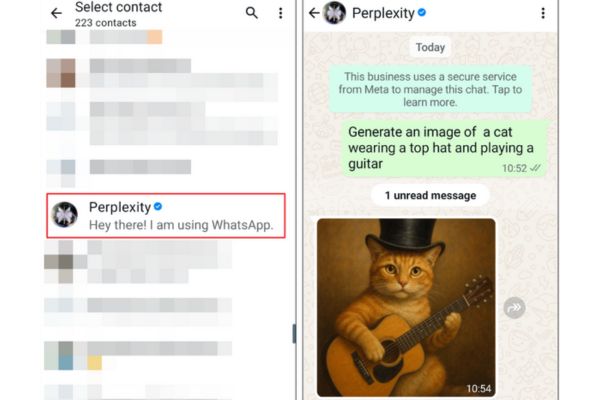
Type questions or requests

How to use Perplexity on WhatsApp by link

If you do not want to save contact, you can use short links to access Perplexity on WhatsApp. This is an ideal way for those who want to test quickly or use WhatsApp on the web/computer.

Step 1: Open the browser or click on the link: https://wa.me 18334363285

Step 2: Links will redirect you to WhatsApp. Press Open To start a new conversation with Perplexity AI.
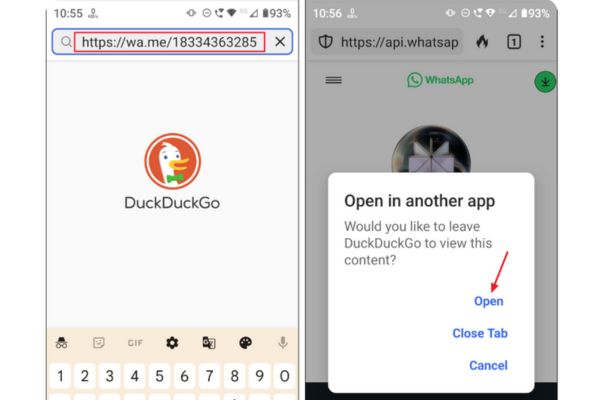
How to use Perplexity on WhatsApp by link

Step 3: Type your question or request in the chat window. Perplexity will immediately respond to the answer or image depending on your request.

This method is very convenient, especially when you only need to use Perplexity once or do not want to add a new contact.
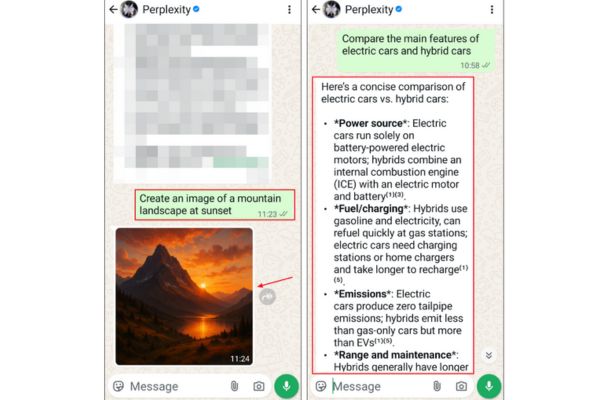
What Perplexity Ai can do on WhatsApp

What Perplexity Ai can do on WhatsApp

Perplexity AI on WhatsApp acts as a versatile assistant, supporting many different tasks:

  • Provide updated information about news, science, history, or any topic.
  • Shorten articles, research, or long text into easy -to -understand main ideas.
  • Create images based on description, like “drawing a dragon flying in the night sky”.
  • Suggest recipes, travel schedules, or study plans.
  • Requires “Source Display” to receive links to reference materials.

Unlike traditional search engines that only list links, Perplexity provides direct, concise and easy -to -read answers. The image creation feature is very useful for creative projects, presentations, or social network content.

Conclusion

How to use Perplexity on WhatsApp Very simple: Just save +1 (833) 436-3285 or use short links to start chatting with whom. From answering questions, summarizing content, to creating images, Perplexity brings a strong AI experience right in WhatsApp. Please experience today!


Tags: InstructionsPerplexityWhatsApp
Previous Post

Download the sound effect for YouTube – Ultimate YouTuber SFX Pack

Next Post

Interesting Google search tips that you should know

AnonyViet

AnonyViet

Related Posts

SafeKid – AI video blocking utility, helps children watch YouTube safely
Software

SafeKid – AI video blocking utility, helps children watch YouTube safely

May 14, 2026
Key Smart Call Blocker Premium 1 year – Block spam calls
Software

Key Smart Call Blocker Premium 1 year – Block spam calls

May 13, 2026
How to use multiple Zalo on one computer for business people
Software

How to use multiple Zalo on one computer for business people

May 13, 2026
Compare vivo X300 Ultra and vivo X200 Ultra: A comprehensive leap forward for the photography “monster”
Software

Compare vivo X300 Ultra and vivo X200 Ultra: A comprehensive leap forward for the photography “monster”

May 12, 2026
How to turn off call recording notifications on iPhone using EnsWilde
Software

How to turn off call recording notifications on iPhone using EnsWilde

May 12, 2026
Experience OPPO Find X9 Ultra: 3600 nits screen and 7050 mAh battery break all limits
Software

Experience OPPO Find X9 Ultra: 3600 nits screen and 7050 mAh battery break all limits

May 11, 2026
Next Post
Interesting Google search tips that you should know

Interesting Google search tips that you should know

0 0 votes
Article Rating
Subscribe
Login
Notify of
guest

guest

0 Comments
Oldest
Newest Most Voted
Inline Feedbacks
View all comments

Recent News

SafeKid – AI video blocking utility, helps children watch YouTube safely

SafeKid – AI video blocking utility, helps children watch YouTube safely

May 14, 2026
Key Smart Call Blocker Premium 1 year – Block spam calls

Key Smart Call Blocker Premium 1 year – Block spam calls

May 13, 2026
How to use multiple Zalo on one computer for business people

How to use multiple Zalo on one computer for business people

May 13, 2026
Compare vivo X300 Ultra and vivo X200 Ultra: A comprehensive leap forward for the photography “monster”

Compare vivo X300 Ultra and vivo X200 Ultra: A comprehensive leap forward for the photography “monster”

May 12, 2026
SafeKid – AI video blocking utility, helps children watch YouTube safely

SafeKid – AI video blocking utility, helps children watch YouTube safely

May 14, 2026
Key Smart Call Blocker Premium 1 year – Block spam calls

Key Smart Call Blocker Premium 1 year – Block spam calls

May 13, 2026
How to use multiple Zalo on one computer for business people

How to use multiple Zalo on one computer for business people

May 13, 2026
AnonyViet - English Version

AnonyViet

AnonyViet is a website share knowledge that you have never learned in school!

We are ready to welcome your comments, as well as your articles sent to AnonyViet.

Follow Us

Contact:

Email: anonyviet.com[@]gmail.com

Main Website: https://anonyviet.com

Recent News

SafeKid – AI video blocking utility, helps children watch YouTube safely

SafeKid – AI video blocking utility, helps children watch YouTube safely

May 14, 2026
Key Smart Call Blocker Premium 1 year – Block spam calls

Key Smart Call Blocker Premium 1 year – Block spam calls

May 13, 2026
No Result
View All Result
  • Home
  • News
  • Software
  • Knowledge
  • MMO
  • Tips
  • Security
  • Network
  • Office

wpDiscuz
0
0
Would love your thoughts, please comment.x
()
x
| Reply