• Home
  • News
  • Software
  • Knowledge
  • MMO
  • Tips
  • Security
  • Network
  • Office
AnonyViet - English Version
  • Home
  • News
  • Software
  • Knowledge
  • MMO
  • Tips
  • Security
  • Network
  • Office
No Result
View All Result
  • Home
  • News
  • Software
  • Knowledge
  • MMO
  • Tips
  • Security
  • Network
  • Office
No Result
View All Result
AnonyViet - English Version
No Result
View All Result

Learn how to share clean links simply and effectively

AnonyViet by AnonyViet
October 17, 2024
in Tips
0

In today's digital age, link sharing has become an indispensable part of life. However, not everyone knows how to share a “clean” link – an important factor that contributes to improving user experience and SEO effectiveness. This article will teach you how to identify, create and Share clean links easily and effectively.

Join the channel Telegram belong to AnonyViet 👉 Link 👈

What are clean links?

A clean link (Clean URL) is a shortened website link that removes unnecessary information, helping users easily understand the website content without having to click on the link.

The structure of a clean link includes:

  • Domain name: Website introduction, for example: https://www.example.com/
  • Path: Part that represents the website's location on the website, for example: /bai-viet/

Example of clean link: https://www.example.com/bai-viet/cach-tao-lien-ket-sach

What are clean links?

See more: How to add RGB LED effect Make the Samsung keyboard more vivid

What does an “unclean” link contain?

Unclean links often contain additional information after the link, making the link long and confusing, including:

  • Tracking parameters: Information added to the link to track the effectiveness of a marketing campaign, for example: ?utm_source=google&utm_medium=cpc
  • Anchor: Used to lead to a specific section of the website, for example: #phan-1

Examples of unclean links:

https://www.example.com/bai-viet/cach-tao-lien-ket-sach utm_source=google&utm_medium=cpc#phan-1

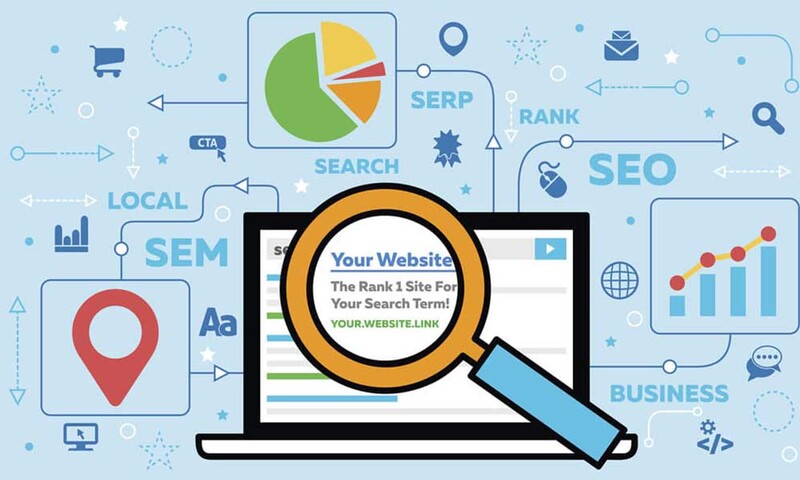
Benefits of clean link sharing

  • Short, concise links help users easily grasp the main content of the website.
  • Compared to lengthy, complicated links, clean links are easily remembered and shared again.
  • Clean links create a more professional, trustworthy feel for the website.
  • SEO optimized, search engines prioritize links that are short, easy to understand and contain keywords related to the content.
  • Increase click-through rate (CTR) because clean links attract more users to click, thereby increasing natural traffic to the website.
  • Other websites will easily link to your website if your link is short and easy to understand.
Benefits of clean link sharing

How to create clean links

Method 1: Create manually

Step 1: Identify the root link, which is the basic part of the link, containing the domain name and path to the website. For example: https://www.example.com/bai-viet/

Step 2: Delete the information after the question mark ? in the link.

Step 3: Delete the information after the hashtag # in the link.

Method 2: Through URL Cleaning

Additionally, you can use third-party online URL cleaning tools or browser extensions to clean URLs before sharing.

For example, you visit https://urlclean.com/ and paste the uncleaned URL into the blank box
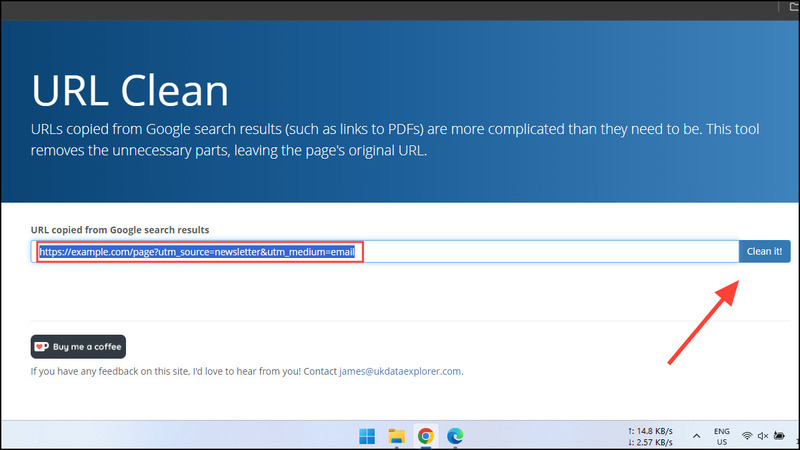
Click the 'Clean it' button

Then click the 'Clean it' button to get a clean URL. However, make sure you don't use these tools for links that contain personal information. At the same time, it should be noted that cleaning a URL does not guarantee that it will be completely safe.
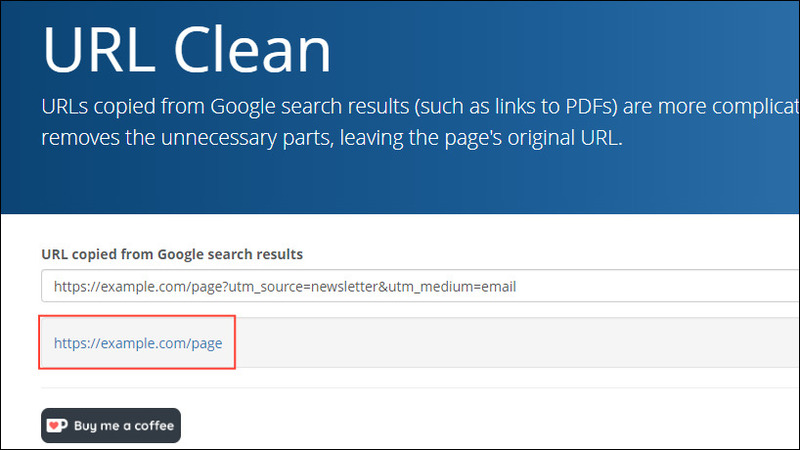
URL after being "clean"
URL after being “cleaned”

See more: Code converts Website interface to black and white background to commemorate or to mourn

Conclusion

Share clean links is a simple but effective way to improve user experience and optimize website SEO. Immediately apply the tips in this article to create professional links and attract more users.


Tags: cleaneffectivelyLearnLinksSharesimply
Previous Post

Ways to access websites blocked by Internet operators

Next Post

Turn on Link Preview on Telegram – Protect yourself from fraud effectively

AnonyViet

AnonyViet

Related Posts

How to change the default font on Windows 10
Tips

How to change the default font on Windows 10

April 13, 2026
5 tips for using a Browser to replace an App (helps save RAM, time and money)
Tips

5 tips for using a Browser to replace an App (helps save RAM, time and money)

April 13, 2026
How to make funny MeMe photos without Photoshop within 10 seconds
Tips

How to make funny MeMe photos without Photoshop within 10 seconds

April 11, 2026
How to quickly design your own Logo without Photoshop
Tips

How to quickly design your own Logo without Photoshop

April 10, 2026
How to convert Website into App on Windows
Tips

How to convert Website into App on Windows

April 9, 2026
Instructions for getting 3 months of Adobe Express Pro for free
Tips

Instructions for getting 3 months of Adobe Express Pro for free

April 9, 2026
Next Post
Turn on Link Preview on Telegram – Protect yourself from fraud effectively

Turn on Link Preview on Telegram - Protect yourself from fraud effectively

0 0 votes
Article Rating
Subscribe
Login
Notify of
guest

guest

0 Comments
Oldest
Newest Most Voted
Inline Feedbacks
View all comments

Recent News

How to add Watermark to Google Docs to protect copyright

How to add Watermark to Google Docs to protect copyright

April 19, 2026
How to intercept traffic using Burp Suite to analyze HTTP/HTTPS

How to intercept traffic using Burp Suite to analyze HTTP/HTTPS

April 18, 2026
How to avoid Adblock detection on Youtube with 4 good tips

How to avoid Adblock detection on Youtube with 4 good tips

April 17, 2026
How to transfer ChatGPT data to Claude is extremely simple

How to transfer ChatGPT data to Claude is extremely simple

April 16, 2026
How to add Watermark to Google Docs to protect copyright

How to add Watermark to Google Docs to protect copyright

April 19, 2026
How to intercept traffic using Burp Suite to analyze HTTP/HTTPS

How to intercept traffic using Burp Suite to analyze HTTP/HTTPS

April 18, 2026
How to avoid Adblock detection on Youtube with 4 good tips

How to avoid Adblock detection on Youtube with 4 good tips

April 17, 2026
AnonyViet - English Version

AnonyViet

AnonyViet is a website share knowledge that you have never learned in school!

We are ready to welcome your comments, as well as your articles sent to AnonyViet.

Follow Us

Contact:

Email: anonyviet.com[@]gmail.com

Main Website: https://anonyviet.com

Recent News

How to add Watermark to Google Docs to protect copyright

How to add Watermark to Google Docs to protect copyright

April 19, 2026
How to intercept traffic using Burp Suite to analyze HTTP/HTTPS

How to intercept traffic using Burp Suite to analyze HTTP/HTTPS

April 18, 2026
No Result
View All Result
  • Home
  • News
  • Software
  • Knowledge
  • MMO
  • Tips
  • Security
  • Network
  • Office

wpDiscuz
0
0
Would love your thoughts, please comment.x
()
x
| Reply