• Home
  • News
  • Software
  • Knowledge
  • MMO
  • Tips
  • Security
  • Network
  • Office
AnonyViet - English Version
  • Home
  • News
  • Software
  • Knowledge
  • MMO
  • Tips
  • Security
  • Network
  • Office
No Result
View All Result
  • Home
  • News
  • Software
  • Knowledge
  • MMO
  • Tips
  • Security
  • Network
  • Office
No Result
View All Result
AnonyViet - English Version
No Result
View All Result

How to return to the old Photos app interface on iOS 18

AnonyViet by AnonyViet
September 25, 2024
in Software
0

How to return Photos app interface as before on iOS 18 is an issue that attracts the attention of many users. With changes in display and arrangement, many people feel uncomfortable and want to return to the familiar interface. In this article, AnonyViet will guide you on how to customize to bring the Photos app back to a state similar to before upgrading to iOS 18.

Join the channel Telegram belong to AnonyViet 👉 Link 👈

IOS 18 changes the interface of the Photos application

iOS 18 brings a lot of new features to the iPhone, but it also brings some controversial changes, including to the Photos app interface. Many users are annoyed by the new way Photos is organized and displayed, making it more complicated to find and manage images.
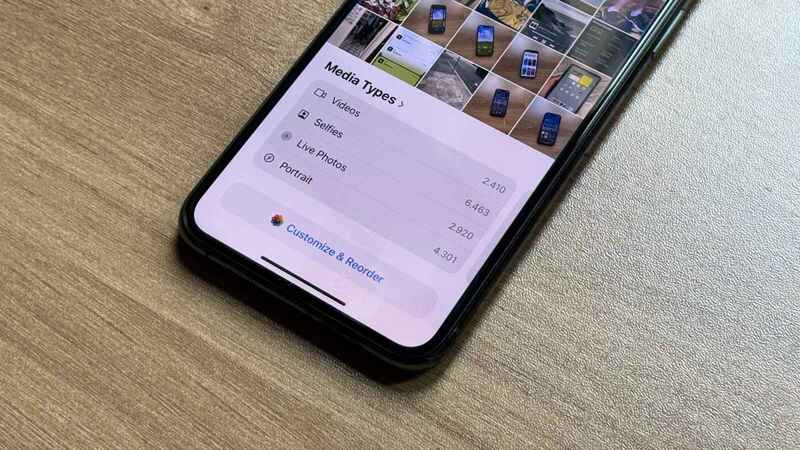
Photos app interface is more complicated when upgraded to iOS 18

Many users have expressed their dissatisfaction with the new interface of the Photos app on social networks. According to them, the new design is too complicated, difficult to operate and less user-friendly than before. Some even compared the interface to “chaos” and “disorganization.”

This isn't the first time Apple has faced backlash for redesigning its Photos app. During the iOS 18 beta, Apple was forced to remove the Carousel view after it was criticized by many developers for being confusing. But don't worry! Apple still allows you to customize and restore the Photos interface to a more familiar look than the pre-iOS 18 version.
You can restore the Photos interface

See also: How to Hide Ads on iPhone iOS 18 with Distraction Control

How to restore the old Photos app interface on iOS 18

However, users can easily adjust the Photos app, even return it to the display before updating iOS 18. The steps to restore the Photos app to its old state on iOS 18 are as follows:

Step 1: To get started, open the Photos app on your phone.

Step 2: Scroll down to the bottom and select Customize & Organize.

Step 3: Uncheck all items except Media Types and Extensions, then tap the “x” in the right corner to exit.
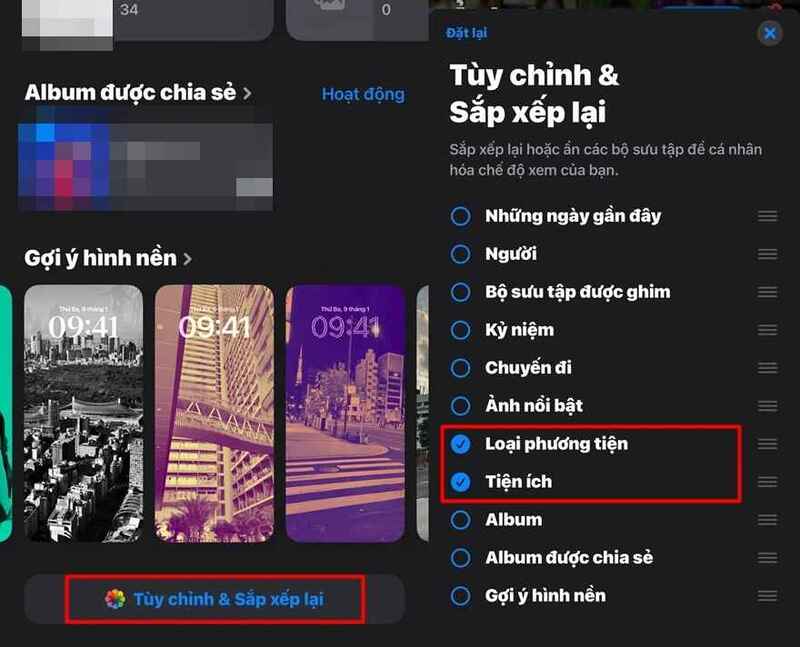
How to restore the old Photos app interface on iOS 18

After completing the above steps, your Photos app will return to almost the same as before the iOS 18 update. However, with the Customize & Rearrange feature, you can still change the layout of the app as you like to better suit your personal usage needs.

See also: What is Game Mode on iOS 18? How to use it?

Conclusion

So, with just a few simple steps, you can restore Photos app interface as before on iOS 18. Customization makes it easier for you to use and get used to the application, suitable for your personal needs. Hopefully through this article, you will feel more comfortable using Photos on your iPhone.
Tags: AppinterfaceiOSphotosreturn
Previous Post

How to change account name on Windows 10 login screen

Next Post

Screenshot Remote: Take screenshots of your PC remotely with super ease

AnonyViet

AnonyViet

Related Posts

What to do when your company opening information is stolen?
Software

What to do when your company opening information is stolen?

November 4, 2026
Experience Galaxy Tab S12 Ultra: Price of 40 million is a worthy investment to replace a laptop
Software

Experience Galaxy Tab S12 Ultra: Price of 40 million is a worthy investment to replace a laptop

November 2, 2026
Receive Driver Booster 14 license key immediately for free for 6 months
Software

Receive Driver Booster 14 license key immediately for free for 6 months

November 1, 2026
Online pagoda game: Experience practice and relieve stress at home
Software

Online pagoda game: Experience practice and relieve stress at home

November 1, 2026
Instructions for receiving Avira Prime 3 months for free, no credit card
Software

Instructions for receiving Avira Prime 3 months for free, no credit card

October 31, 2026
Instructions for installing CleanYourTv to remove Android TV ads
Software

Instructions for installing CleanYourTv to remove Android TV ads

October 29, 2026
Next Post
Screenshot Remote: Take screenshots of your PC remotely with super ease

Screenshot Remote: Take screenshots of your PC remotely with super ease

0 0 votes
Article Rating
Subscribe
Login
Notify of
guest

guest

0 Comments
Oldest
Newest Most Voted

Recent News

What to do when your company opening information is stolen?

What to do when your company opening information is stolen?

November 4, 2026
How to get 0 in Docker credits to run AI Agent for free

How to get $250 in Docker credits to run AI Agent for free

November 3, 2026
Experience Galaxy Tab S12 Ultra: Price of 40 million is a worthy investment to replace a laptop

Experience Galaxy Tab S12 Ultra: Price of 40 million is a worthy investment to replace a laptop

November 2, 2026
Cách Đăng ký Nhận Code ChatGPT Business

Cách Đăng ký Nhận Code ChatGPT Business

November 2, 2026
What to do when your company opening information is stolen?

What to do when your company opening information is stolen?

November 4, 2026
How to get 0 in Docker credits to run AI Agent for free

How to get $250 in Docker credits to run AI Agent for free

November 3, 2026
Experience Galaxy Tab S12 Ultra: Price of 40 million is a worthy investment to replace a laptop

Experience Galaxy Tab S12 Ultra: Price of 40 million is a worthy investment to replace a laptop

November 2, 2026
AnonyViet - English Version

AnonyViet

AnonyViet is a website share knowledge that you have never learned in school!

We are ready to welcome your comments, as well as your articles sent to AnonyViet.

Follow Us

Contact:

Email: anonyviet.com[@]gmail.com

Main Website: https://anonyviet.com

Recent News

What to do when your company opening information is stolen?

What to do when your company opening information is stolen?

November 4, 2026
How to get 0 in Docker credits to run AI Agent for free

How to get $250 in Docker credits to run AI Agent for free

November 3, 2026
  • Home
  • Home 2
  • Home 3
  • Home 4
  • Home 5
  • Home 6
  • Next Dest Page
  • Sample Page

say88 tỷ lệ kèo nhà cái kèo nhà cái 5 febet

No Result
View All Result
  • Home
  • News
  • Software
  • Knowledge
  • MMO
  • Tips
  • Security
  • Network
  • Office

say88 tỷ lệ kèo nhà cái kèo nhà cái 5 febet

wpDiscuz
0
0
Would love your thoughts, please comment.x
()
x
| Reply