• Home
  • News
  • Software
  • Knowledge
  • MMO
  • Tips
  • Security
  • Network
  • Office
AnonyViet - English Version
  • Home
  • News
  • Software
  • Knowledge
  • MMO
  • Tips
  • Security
  • Network
  • Office
No Result
View All Result
  • Home
  • News
  • Software
  • Knowledge
  • MMO
  • Tips
  • Security
  • Network
  • Office
No Result
View All Result
AnonyViet - English Version
No Result
View All Result

How to adjust the width of the iPhone flashlight beam iOS 18

AnonyViet by AnonyViet
August 28, 2024
in Software
0

Adjust the beam width of the flashlight iPhone iOS 18 is an exciting new feature waiting for you to explore on your iPhone. With iOS 18, Apple has brought many significant improvements, including the ability to customize the beam width of the flashlight. Let's find out with AnonyViet how to use this feature most effectively.

Join the channel Telegram belong to AnonyViet 👉 Link 👈

Explore the new flashlight feature on iOS 18

With iOS 18, you'll discover a lot of new features on your iPhone. Most of these features were highlighted by Apple in the Keynote at WWDC this year. However, there are still many interesting things that users can discover on their own.
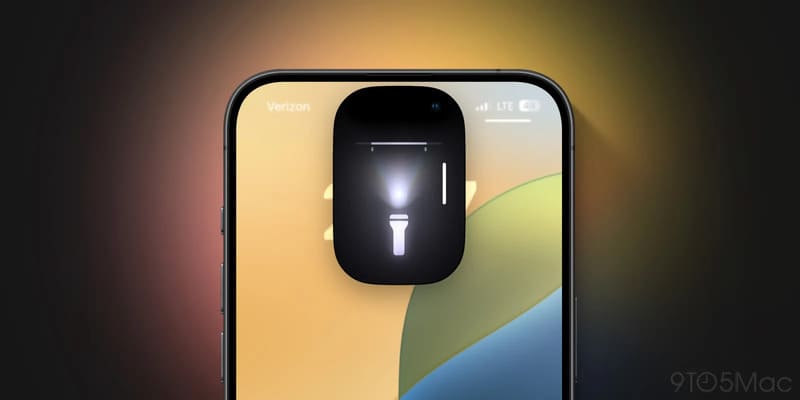
Explore the new flashlight feature on iOS 18

iPhone users have been able to adjust the brightness of their flashlight for a long time. But starting with iOS 18, you can also adjust the width of the beam. However, one thing to note is that this feature is only available on some iPhone models.

See also: How to Hide and Lock Apps Using Face ID on iOS 18

Adaptive True Tone Flash technology

Starting with the iPhone 14 Pro, Apple has adopted Adaptive True Tone Flash technology, which uses a 3×3 LED array combined with a lens mount. With this hardware, the iPhone can focus light on a wide or narrow area depending on the frame the user is capturing.

It's the same technology, but now you have control over it in the flashlight app. However, it requires specialized hardware, so it's not available on all iPhone models. Only iPhone 14 Pro and 15 Pro/ Pro Max users can use this feature.
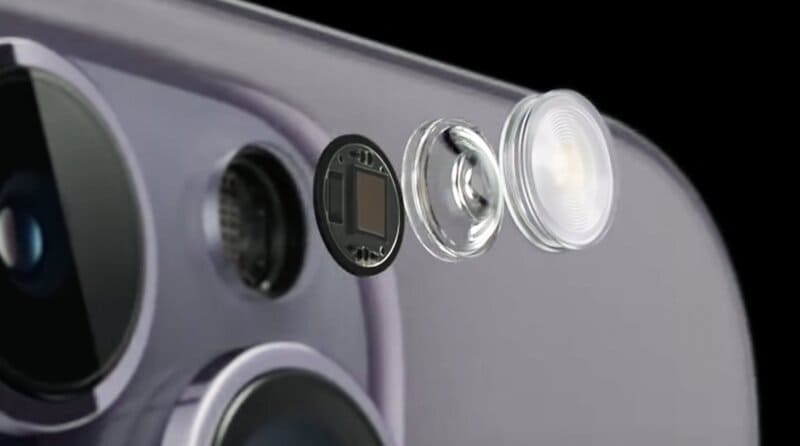
Adaptive True Tone Flash technology

Instructions for adjusting the beam width of the flashlight

To change the width of the flashlight, follow these steps:

Step 1: Turn on the flashlight on your iPhone from the Lock Screen or Control Center.

Step 2: Adjust the flashlight to appear in the expanded view in Dynamic Island by tapping its icon.
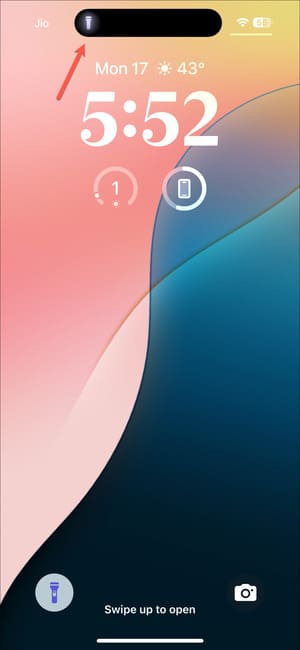
Tap the flashlight icon on Dynamic Island

Step 3: Now, you will see that in addition to the vertical slider used to increase/decrease the light intensity, there is also a horizontal slider.

Step 4: Slide your finger to the right to expand the beam's width and drag to the left to narrow it.
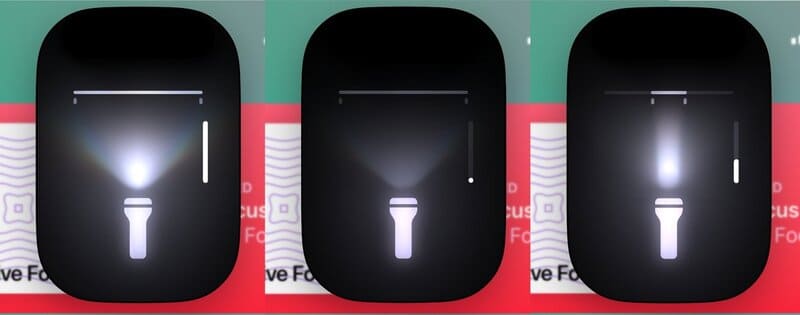
Adjust the beam width of the flashlight

It can move between three different widths, just like the Adaptive True Tone flash has three different widths for the Telephoto, Main, and Utlra Wide lenses.

At the time of writing, iOS 18 is still in the Developer Beta. The public beta will be available next month and the public update will be available this fall, but you can install the Developer Beta now if you want.

See also: Instruct Install iOS 18 Beta to try out the new feature

Conclusion

Through the article, we have learned together how to Adjust the beam width of the flashlight iPhone iOS 18. Hopefully, with the detailed information and instructions, you will be able to make the most of this new feature on your iPhone. Please continue to follow us for more useful information about new products and features from Apple ok


Tags: adjustbeamFlashlightiOSiPhonewidth
Previous Post

Instructions for making Tet photos from thousands of kilometers away without Photoshop

Next Post

How to View Multiple Time Zones on Windows 10 Using Taskbar and Start

AnonyViet

AnonyViet

Related Posts

Receive copyright for 3 Halloween software worth 0
Software

Receive copyright for 3 Halloween software worth $150

October 23, 2026
Instructions for receiving 3 months of MultCloud Premium for free with 200GB data
Software

Instructions for receiving 3 months of MultCloud Premium for free with 200GB data

October 17, 2026
Instructions for receiving pension through VNeID without going to the ward
Software

Instructions for receiving pension through VNeID without going to the ward

October 16, 2026
Record first, choose focus later: how to use 4K 60 fps Cinema mode on iPhone 18 Pro
Software

Record first, choose focus later: how to use 4K 60 fps Cinema mode on iPhone 18 Pro

October 15, 2026
How to receive 22k from Viettel Tammi on the occasion of 22nd birthday
Software

How to receive 22k from Viettel Tammi on the occasion of 22nd birthday

October 15, 2026
3 valuable upgrades on Samsung Galaxy A08 compared to its predecessor A07
Software

3 valuable upgrades on Samsung Galaxy A08 compared to its predecessor A07

October 12, 2026
Next Post
How to View Multiple Time Zones on Windows 10 Using Taskbar and Start

How to View Multiple Time Zones on Windows 10 Using Taskbar and Start

0 0 votes
Article Rating
Subscribe
Login
Notify of
guest

guest

0 Comments
Oldest
Newest Most Voted

Recent News

Receive copyright for 3 Halloween software worth 0

Receive copyright for 3 Halloween software worth $150

October 23, 2026
How to use Messenger without a Facebook account

How to use Messenger without a Facebook account

October 22, 2026
Instructions on how to exit iOS 27 Beta and update to the official version

Instructions on how to exit iOS 27 Beta and update to the official version

October 22, 2026
Instructions for updating PHP to avoid PHP2Shell

Instructions for updating PHP to avoid PHP2Shell

October 22, 2026
Receive copyright for 3 Halloween software worth 0

Receive copyright for 3 Halloween software worth $150

October 23, 2026
How to use Messenger without a Facebook account

How to use Messenger without a Facebook account

October 22, 2026
Instructions on how to exit iOS 27 Beta and update to the official version

Instructions on how to exit iOS 27 Beta and update to the official version

October 22, 2026
AnonyViet - English Version

AnonyViet

AnonyViet is a website share knowledge that you have never learned in school!

We are ready to welcome your comments, as well as your articles sent to AnonyViet.

Follow Us

Contact:

Email: anonyviet.com[@]gmail.com

Main Website: https://anonyviet.com

Recent News

Receive copyright for 3 Halloween software worth 0

Receive copyright for 3 Halloween software worth $150

October 23, 2026
How to use Messenger without a Facebook account

How to use Messenger without a Facebook account

October 22, 2026
  • Home
  • Home 2
  • Home 3
  • Home 4
  • Home 5
  • Home 6
  • Next Dest Page
  • Sample Page

say88 tỷ lệ kèo nhà cái kèo nhà cái 5 febet

No Result
View All Result
  • Home
  • News
  • Software
  • Knowledge
  • MMO
  • Tips
  • Security
  • Network
  • Office

say88 tỷ lệ kèo nhà cái kèo nhà cái 5 febet

wpDiscuz
0
0
Would love your thoughts, please comment.x
()
x
| Reply