• Home
  • News
  • Software
  • Knowledge
  • MMO
  • Tips
  • Security
  • Network
  • Office
AnonyViet - English Version
  • Home
  • News
  • Software
  • Knowledge
  • MMO
  • Tips
  • Security
  • Network
  • Office
No Result
View All Result
  • Home
  • News
  • Software
  • Knowledge
  • MMO
  • Tips
  • Security
  • Network
  • Office
No Result
View All Result
AnonyViet - English Version
No Result
View All Result

Instructions for using Copilot on Telegram

AnonyViet by AnonyViet
June 2, 2024
in Software
0

Recently, Microsoft introduced AI chatbot Copilot on Telegram as a new bot. This is a step forward in their “copilot-for-social” plan, with the goal of bringing generative AI technology to popular messaging apps like WhatsApp and Telegram. So how to use it? Copilot on Telegram how? Let's find out through the article below!

Join the channel Telegram belong to AnonyViet 👉 Link 👈

Benefits of Copilot on Telegram

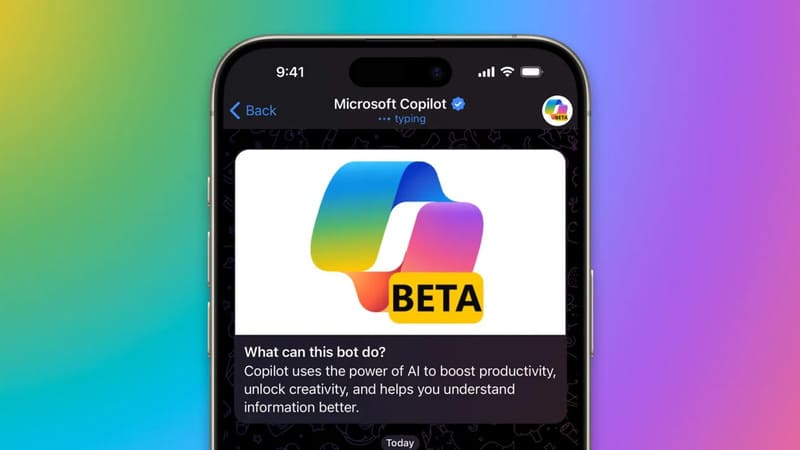
Copilot AI is a Microsoft product, now available on the Telegram application. Powered by GPT-4 technology, Copilot AI promises to bring new interactive experiences to users on all platforms from Android, iOS, Web, Windows, to macOS.

Copilot on Telegram which is in beta testing can be used for a variety of purposes, including:

  • Helps find movies and travel destinations that suit your interests.
  • Provides advice on how to exercise effectively and improve gaming skills.
  • Create music playlists to suit your mood or personal activities,…
Benefits of Copilot on Telegram

How to use Copilot on Telegram

Step 1: Open the Telegram app/website on your phone or PC and log in to your account.

Step 2: Search for 'Microsoft' or 'Copilot' and then click on the Microsoft Copilot (@CopilotOfficialBot) result displayed on the screen.
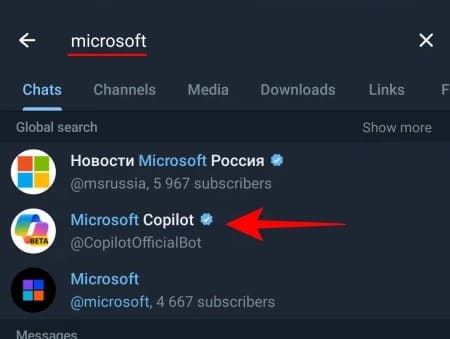
Click on the Microsoft Copilot result (@CopilotOfficialBot)

Or you can quickly click on the Copilot for Telegram page HERE > Click Try Now.

Click Try Now
Click Try Now

Step 3: Click Start > Click 'I accept' to agree to the terms.
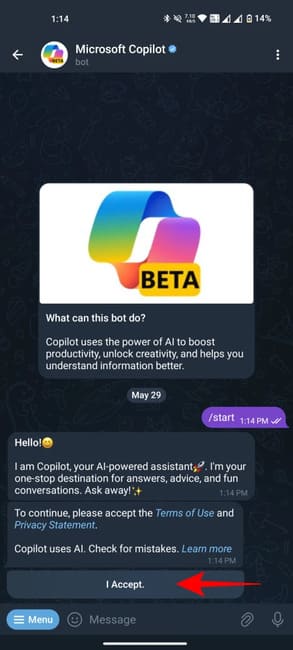
Click 'I accept'
Click 'I accept'

Step 4: Click 'Send my mobile number' to verify the phone number.

Step 5: Click 'Share contact' to confirm.
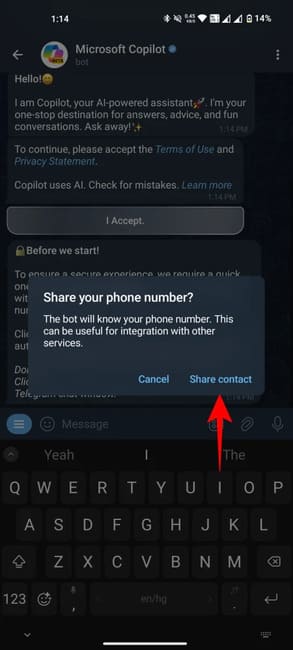
Click 'Share contact' to confirm

Once you're set up, you can start chatting with Copilot. The bot will suggest some topics to start with. You can choose from these suggestions or ask your own questions. Copilot will provide detailed answers, with reference links and Bing site suggestions.
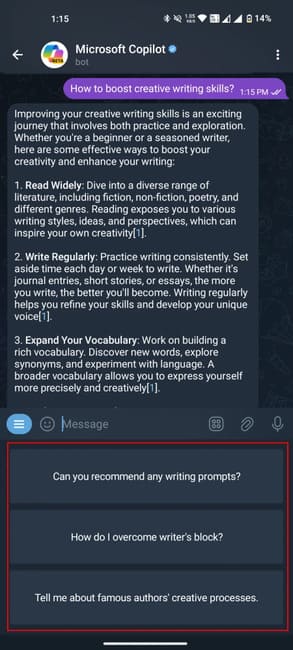
Start chatting with Copilot on Telegram

Popular Slash commands

Copilot supports Telegram slash commands, including:

  • Invite friends: /share
  • Restart the conversation: /restart
  • See function: /ideas

You can also find Slash commands by clicking the Menu button.
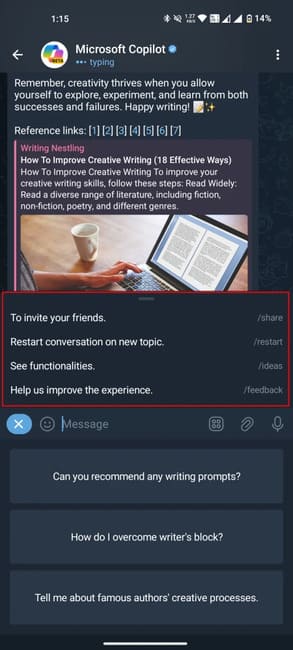
Popular Slash commands

Copilot limitations on Telegram

  • Only reply in text, no support for creating images like on the web.
  • Only deployed in regions such as the US, UK, and Asian countries. The system will automatically block bot access if it identifies a phone number from Europe.
  • The different response modes (Creative, Balanced and Precise) are not available for switching like when using Copilot on other platforms.
  • The number of messages sent daily is limited, not exceeding 30 messages.

Copilot limitations on Telegram

Epilogue

So, we have learned together how to use it Copilot on Telegram. With the simple steps presented, you can easily turn Telegram into an indispensable AI assistant in your daily life. Good luck!


Tags: CopilotInstructionsTelegram
Previous Post

Best Game Torrent Websites

Next Post

How to fix VNeID error message “Your device is not secure…”

AnonyViet

AnonyViet

Related Posts

Is Xiaomi Redmi A7 a valuable choice in the popular smartphone segment?
Software

Is Xiaomi Redmi A7 a valuable choice in the popular smartphone segment?

July 14, 2026
Compact design, durable battery, excellent camera: Review of OPPO Reno 16 Pro 5G
Software

Compact design, durable battery, excellent camera: Review of OPPO Reno 16 Pro 5G

July 12, 2026
Download the free 3D Pinball Space Cadet game on the App Store now
Software

Download the free 3D Pinball Space Cadet game on the App Store now

July 12, 2026
Learn new skills with iPad 11 (A16) 128GB: when is enough, when should you upgrade to a higher level?
Software

Learn new skills with iPad 11 (A16) 128GB: when is enough, when should you upgrade to a higher level?

July 10, 2026
Instructions for taking free buses in Ho Chi Minh City from July 2026
Software

Instructions for taking free buses in Ho Chi Minh City from July 2026

July 9, 2026
3 steps to change Zalo number when sim is revoked
Software

3 steps to change Zalo number when sim is revoked

July 8, 2026
Next Post
How to fix VNeID error message “Your device is not secure…”

How to fix VNeID error message "Your device is not secure..."

0 0 votes
Article Rating
Subscribe
Login
Notify of
guest

guest

0 Comments
Oldest
Newest Most Voted

Recent News

Instructions for Getting Netflix 30 Days Free to Watch Movies

Instructions for Getting Netflix 30 Days Free to Watch Movies

July 18, 2026
How to create a website introducing yourself using Bio Link for free

How to create a website introducing yourself using Bio Link for free

July 17, 2026
Hippie OSINT Toolkit: The ultimate information investigation toolkit

Hippie OSINT Toolkit: The ultimate information investigation toolkit

July 17, 2026
HP 16GB RAM Laptop: Who should choose and is it necessary?

HP 16GB RAM Laptop: Who should choose and is it necessary?

July 17, 2026
Instructions for Getting Netflix 30 Days Free to Watch Movies

Instructions for Getting Netflix 30 Days Free to Watch Movies

July 18, 2026
How to create a website introducing yourself using Bio Link for free

How to create a website introducing yourself using Bio Link for free

July 17, 2026
Hippie OSINT Toolkit: The ultimate information investigation toolkit

Hippie OSINT Toolkit: The ultimate information investigation toolkit

July 17, 2026
AnonyViet - English Version

AnonyViet

AnonyViet is a website share knowledge that you have never learned in school!

We are ready to welcome your comments, as well as your articles sent to AnonyViet.

Follow Us

Contact:

Email: anonyviet.com[@]gmail.com

Main Website: https://anonyviet.com

Recent News

Instructions for Getting Netflix 30 Days Free to Watch Movies

Instructions for Getting Netflix 30 Days Free to Watch Movies

July 18, 2026
How to create a website introducing yourself using Bio Link for free

How to create a website introducing yourself using Bio Link for free

July 17, 2026
  • Home
  • Home 2
  • Home 3
  • Home 4
  • Home 5
  • Home 6
  • Next Dest Page
  • Sample Page

say88 tỷ lệ kèo nhà cái kèo nhà cái 5 febet

No Result
View All Result
  • Home
  • News
  • Software
  • Knowledge
  • MMO
  • Tips
  • Security
  • Network
  • Office

say88 tỷ lệ kèo nhà cái kèo nhà cái 5 febet

wpDiscuz
0
0
Would love your thoughts, please comment.x
()
x
| Reply