• Home
  • News
  • Software
  • Knowledge
  • MMO
  • Tips
  • Security
  • Network
  • Office
AnonyViet - English Version
  • Home
  • News
  • Software
  • Knowledge
  • MMO
  • Tips
  • Security
  • Network
  • Office
No Result
View All Result
  • Home
  • News
  • Software
  • Knowledge
  • MMO
  • Tips
  • Security
  • Network
  • Office
No Result
View All Result
AnonyViet - English Version
No Result
View All Result

6 ways to hide IP address on iPhone to avoid being tracked

AnonyViet by AnonyViet
May 12, 2024
in Software
0

Are you worried about your personal information being tracked when using iPhone? Let's explore how hide IP address on iPhone to surf the web safely and protect your privacy.

Join the channel Telegram belong to AnonyViet 👉 Link 👈

What is an IP address?

An IP address is an online address that can be used to monitor your online activities and collect personal information to sell to organizations that advertise products that are relevant to you.

How to know IP address on iPhone?

If you want to know the above IP address Iphoneyou can do the following:

Step 1: Go to Settings > select Wi-Fi

Step 2: Then click the Information icon (i) next to the network name. At IPv4 Address, you can see your IP address.
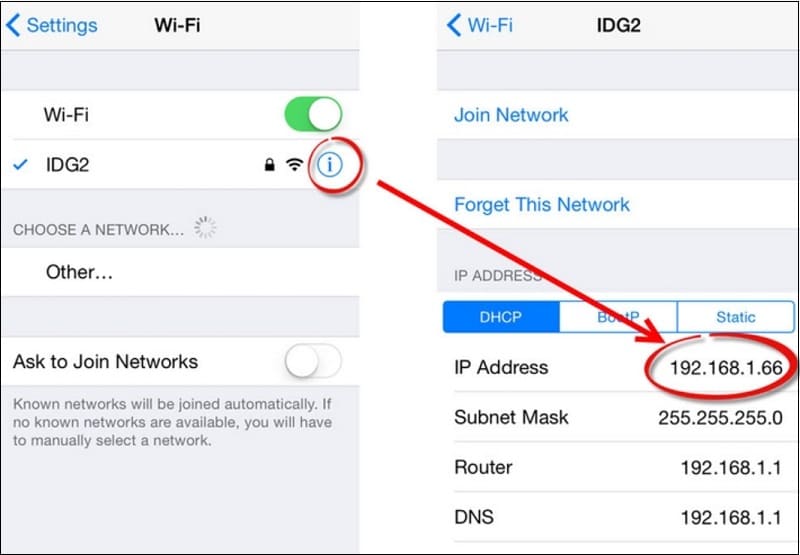
How to know IP address on iPhone

How to hide IP address on iPhone

Method 1: Use Safari

In fact, iPhone offers users a series of free tools to help hide your IP address while surfing the web, helping you avoid being tracked, receiving unwanted ads or having your personal information collected. core.

If you have an iPhone (including iPhone 14 Series, iPhone 13 Series, iPhone 12 Series, or any iPhone version), you probably know and use the Safari web browser. On this browser, Apple has integrated a feature that allows users to easily hide their IP address through the following steps:

Step 1: Open Settings on iPhone and select Safari.

Step 2: Select Hide IP Address.
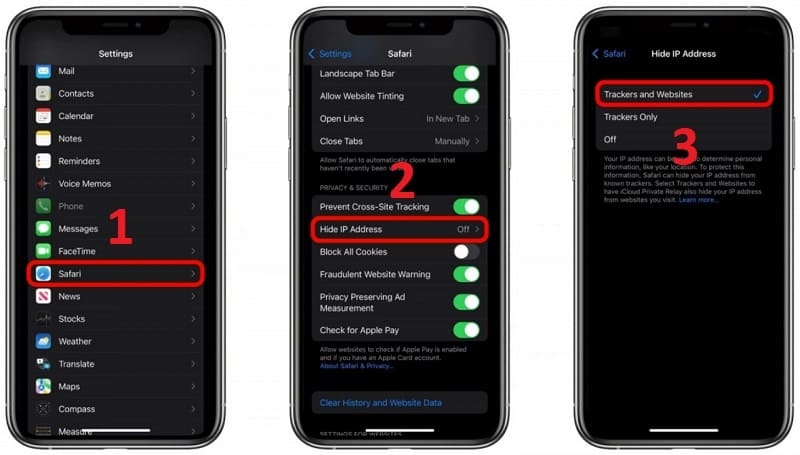
How to hide IP address on iPhone in Safari

Step 3: Two options will appear, and you need to choose the appropriate option:

  • Trackers and Websites: The job is to stop ads from tracking you across websites and hide your IP address on your device.
  • Trackers Only: Blocks ad trackers but still allows websites to see your IP address.

Method 2: Use iCloud Private Relay

Not only Safari, you can also use iCloud Private Relay service – similar to a virtual VPN network that effectively hides the IP address on the iPhone.

To use this service, you need to sign up for a service plan and pay monthly, and also need an iCloud account. Steps to hide IP address are as follows:

Step 1: Go to Settings on your phone and click Your Name.

Step 2: Select iCloud and then select Private Relay.
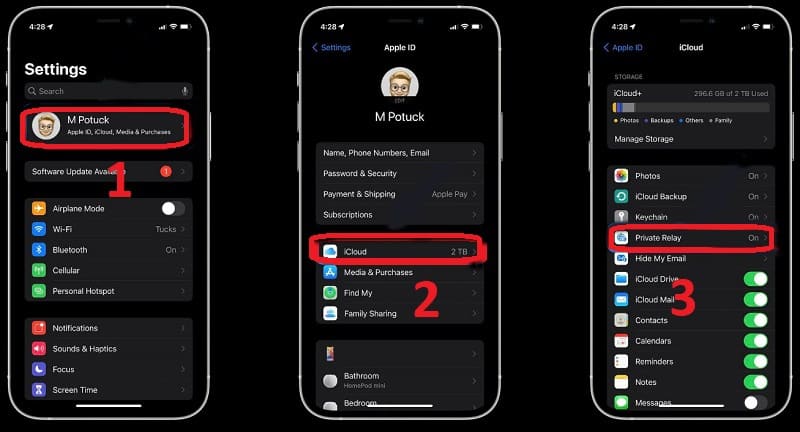
Use iCloud Private Relay to hide your IP address

Step 3: Activate Private Transitions by moving the slider to the right.

Step 4: Click IP Address Location.

Step 5: Choose between Maintain general location or Use country and time zone to control IP addresses and avoid tracking when used in a specific country and time zone .

Method 3: Use the Mail Privacy Protection feature

Mail Privacy Protection is an email privacy protection feature, usually built into iOS 15 and above devices, that helps prevent ad tracking in emails.

To activate, please:

Step 1: Go to Settings > select Mail (Mail)

Step 2: Select Privacy Protection > Enable Protect Mail Activity.
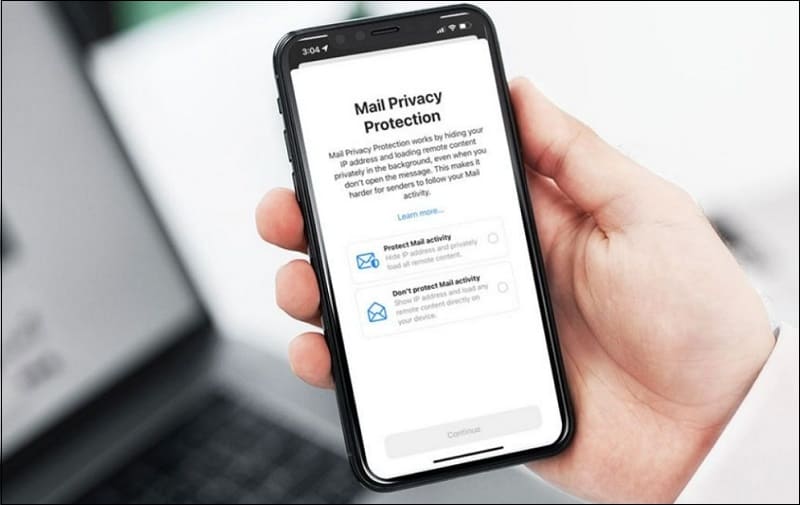
Use Mail Privacy Protection feature to hide IP
Use the Mail Privacy Protection feature

Method 4: Use mobile settings

You can also prevent ad tracking in Mail and Safari by:

Step 1: Go to Settings > select Mobile (Cellular)

Step 2: Select Cellular Data Options > Enable 'Limit IP Address Tracking'.
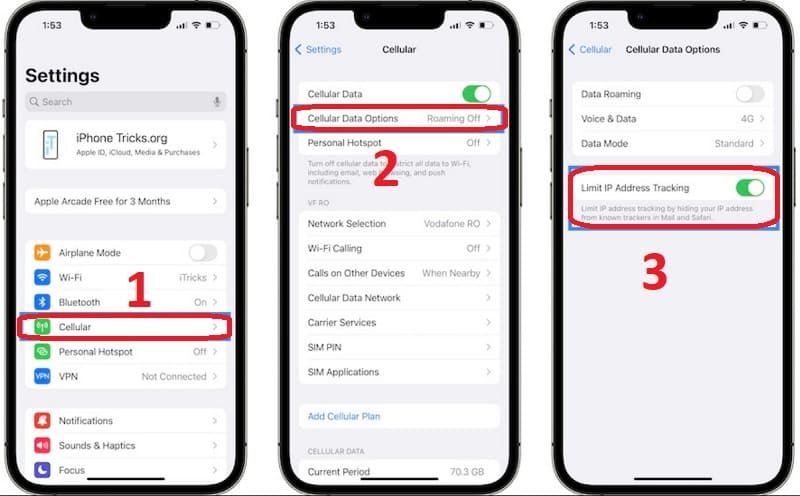
Enable 'Limit IP Address Tracking'.

Method 5: Use VPN network

Connecting to the Internet via VPN keeps all the data you send and receive secure over the VPN connection, thereby hiding your IP address more effectively. How to use VPN is similar to iCloud Private Relay.
Use a VPN network to hide your IP address
Use a VPN network

Method 6: Use Ad Blockers applications

Application Ad Blockers helps you block ads by downloading and installing this application on your phone and activating it on the web browser you are using.
Use Ad Blockers applications

Epilogue

With the above tips, you can safely surf the web without worrying about being tracked. Please apply the method hide IP address on iPhone to enjoy a more private and secure internet experience. Good luck!


Tags: addressavoidhideiPhonetrackedways
Previous Post

How to get YouTube Music Premium for free on Android

Next Post

Instructions for converting audio files into text on Zalo

AnonyViet

AnonyViet

Related Posts

JG Cache Cleaner: Smart web data cleaning utility
Software

JG Cache Cleaner: Smart web data cleaning utility

June 25, 2026
How to create luxurious portrait photos using the Dola app
Software

How to create luxurious portrait photos using the Dola app

June 24, 2026
Cách hạ cấp iOS 27 xuống iOS 26 an toàn, không lo mất dữ liệu
Software

Cách hạ cấp iOS 27 xuống iOS 26 an toàn, không lo mất dữ liệu

June 20, 2026
Hướng dẫn cài đặt iOS 27 Developer Beta
Software

Hướng dẫn cài đặt iOS 27 Developer Beta

June 17, 2026
Instructions on how to activate the new Siri on iOS 27
Software

Instructions on how to activate the new Siri on iOS 27

June 15, 2026
PDF editing application on Android worth 199k is free
Software

PDF editing application on Android worth 199k is free

June 10, 2026
Next Post
Instructions for converting audio files into text on Zalo

Instructions for converting audio files into text on Zalo

0 0 votes
Article Rating
Subscribe
Login
Notify of
guest

guest

0 Comments
Oldest
Newest Most Voted
Inline Feedbacks
View all comments

Recent News

How to create Comic style advertising photos that attract millions of Likes

How to create Comic style advertising photos that attract millions of Likes

June 27, 2026
How to change the default font in Word

How to change the default font in Word

June 27, 2026
Tips for browsing the web with Safari on iPhone

Tips for browsing the web with Safari on iPhone

June 26, 2026
11 reasons to buy a Macbook instead of a Windows Laptop

11 reasons to buy a Macbook instead of a Windows Laptop

June 26, 2026
How to create Comic style advertising photos that attract millions of Likes

How to create Comic style advertising photos that attract millions of Likes

June 27, 2026
How to change the default font in Word

How to change the default font in Word

June 27, 2026
Tips for browsing the web with Safari on iPhone

Tips for browsing the web with Safari on iPhone

June 26, 2026
AnonyViet - English Version

AnonyViet

AnonyViet is a website share knowledge that you have never learned in school!

We are ready to welcome your comments, as well as your articles sent to AnonyViet.

Follow Us

Contact:

Email: anonyviet.com[@]gmail.com

Main Website: https://anonyviet.com

Recent News

How to create Comic style advertising photos that attract millions of Likes

How to create Comic style advertising photos that attract millions of Likes

June 27, 2026
How to change the default font in Word

How to change the default font in Word

June 27, 2026
  • Home
  • Home 2
  • Home 3
  • Home 4
  • Home 5
  • Home 6
  • Next Dest Page
  • Sample Page

6789 kv999

No Result
View All Result
  • Home
  • News
  • Software
  • Knowledge
  • MMO
  • Tips
  • Security
  • Network
  • Office

6789 kv999

wpDiscuz
0
0
Would love your thoughts, please comment.x
()
x
| Reply