• Home
  • News
  • Software
  • Knowledge
  • MMO
  • Tips
  • Security
  • Network
  • Office
AnonyViet - English Version
  • Home
  • News
  • Software
  • Knowledge
  • MMO
  • Tips
  • Security
  • Network
  • Office
No Result
View All Result
  • Home
  • News
  • Software
  • Knowledge
  • MMO
  • Tips
  • Security
  • Network
  • Office
No Result
View All Result
AnonyViet - English Version
No Result
View All Result

How to know if any Youtube channel has monetization enabled or not

AnonyViet by AnonyViet
February 7, 2024
in Software
0

How to know if any Youtube channel has monetization enabled is an important issue for those who want to make money on Youtube. This article will share with you the 2 simplest ways to check whether a video or a Youtube channel has been monetized or not. Let's follow along!

Join the channel Telegram belong to AnonyViet 👉 Link 👈

How to know if any Youtube channel has monetization enabled or not

Method 1: Check the source code of the Youtube channel

Step 1: Visit the Youtube channel you want to check out. For example, I will check Thanh Nien Newspaper's Youtube channel.

Step 2: Right-click anywhere on the channel and select 'View page source'. Or you can press Ctrl + U to open the source code.

Step 3: Press the key combination Ctrl + F to open the search box. Then, enter the keyword is_monetization_enabled and press Enter.
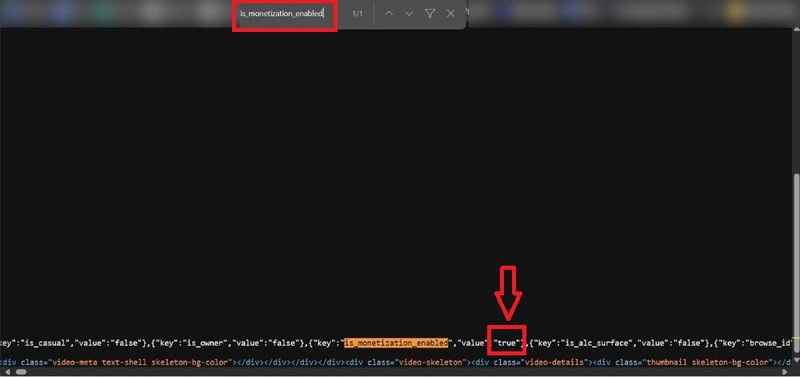
How to know if any Youtube channel has monetization enabled
Press Ctrl + F > Enter is_monetization_enabled > Enter

Step 4: If you see the value of the key is True, it means that Youtube channel has been enabled for monetization. On the contrary, if the value is False, it means that YouTube channel has not been monetized yet.

As shown in the picture, BTN channel has been enabled to make money.

Method 2: Use the utility Is YouTube Channel Monetized?

Step 1: Install the extension Is YouTube Channel Monetized? into your browser. You can download this utility here.

How to know if any Youtube channel has monetization enabled
Install the extension Is YouTube Channel Monetized?

Step 2: After installation is complete, access the Youtube channel you want to check. You will see under each video title or right under the channel name there will be a blue line 'Channel is monetized' or 'Video is monetized', which means that channel/video has been enabled for monetization. On the contrary, if there is the text 'Channel is not monetized' in red, it means that video/channel has not been monetized yet.
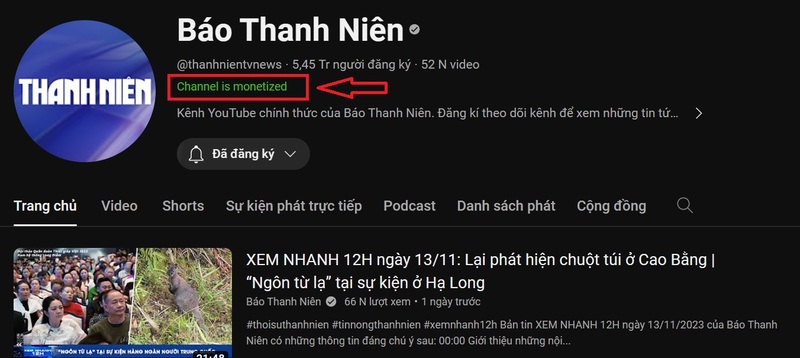
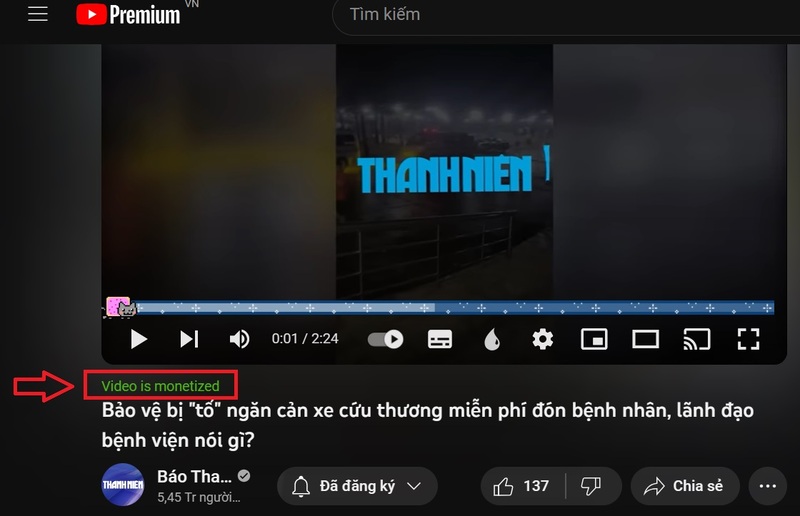
How to know if any Youtube channel has monetization enabled
'Channel is monetized' means the channel has monetization enabled
How to know if any Youtube channel has monetization enabled
You can check any youtube video

With the above two methods, you can easily check whether a channel is available Youtube or whether a video has been monetized or not. You can apply both methods to get the most accurate results.

Epilogue

Hope this article has helped you know How to know if any Youtube channel has monetization enabled or not. If you find this article useful, please like and share with your friends and relatives. Thank you for reading this article and good luck!


The article scored: 5/5 – (100 votes)

Tags: ChannelenabledMonetizationYoutube
Previous Post

How to set multiple photos as wallpaper on iPhone to avoid boredom

Next Post

Instructions on how to create and post 3D 360-degree photos on Facebook

AnonyViet

AnonyViet

Related Posts

Receive copyright for 3 Halloween software worth 0
Software

Receive copyright for 3 Halloween software worth $150

October 23, 2026
Instructions for receiving 3 months of MultCloud Premium for free with 200GB data
Software

Instructions for receiving 3 months of MultCloud Premium for free with 200GB data

October 17, 2026
Instructions for receiving pension through VNeID without going to the ward
Software

Instructions for receiving pension through VNeID without going to the ward

October 16, 2026
Record first, choose focus later: how to use 4K 60 fps Cinema mode on iPhone 18 Pro
Software

Record first, choose focus later: how to use 4K 60 fps Cinema mode on iPhone 18 Pro

October 15, 2026
How to receive 22k from Viettel Tammi on the occasion of 22nd birthday
Software

How to receive 22k from Viettel Tammi on the occasion of 22nd birthday

October 15, 2026
3 valuable upgrades on Samsung Galaxy A08 compared to its predecessor A07
Software

3 valuable upgrades on Samsung Galaxy A08 compared to its predecessor A07

October 12, 2026
Next Post
Instructions on how to create and post 3D 360-degree photos on Facebook

Instructions on how to create and post 3D 360-degree photos on Facebook

0 0 votes
Article Rating
Subscribe
Login
Notify of
guest

guest

0 Comments
Oldest
Newest Most Voted

Recent News

Instructions for registering for OxionAI Pro for 1 year with many powerful AI models

Instructions for registering for OxionAI Pro for 1 year with many powerful AI models

October 24, 2026
How are Windows 11 Pro and Windows 10 Pro different?

How are Windows 11 Pro and Windows 10 Pro different?

October 23, 2026
Instructions for using CleanYourTV: Remove ads on Android TV, Google TV

Instructions for using CleanYourTV: Remove ads on Android TV, Google TV

October 23, 2026
Receive copyright for 3 Halloween software worth 0

Receive copyright for 3 Halloween software worth $150

October 23, 2026
Instructions for registering for OxionAI Pro for 1 year with many powerful AI models

Instructions for registering for OxionAI Pro for 1 year with many powerful AI models

October 24, 2026
How are Windows 11 Pro and Windows 10 Pro different?

How are Windows 11 Pro and Windows 10 Pro different?

October 23, 2026
Instructions for using CleanYourTV: Remove ads on Android TV, Google TV

Instructions for using CleanYourTV: Remove ads on Android TV, Google TV

October 23, 2026
AnonyViet - English Version

AnonyViet

AnonyViet is a website share knowledge that you have never learned in school!

We are ready to welcome your comments, as well as your articles sent to AnonyViet.

Follow Us

Contact:

Email: anonyviet.com[@]gmail.com

Main Website: https://anonyviet.com

Recent News

Instructions for registering for OxionAI Pro for 1 year with many powerful AI models

Instructions for registering for OxionAI Pro for 1 year with many powerful AI models

October 24, 2026
How are Windows 11 Pro and Windows 10 Pro different?

How are Windows 11 Pro and Windows 10 Pro different?

October 23, 2026
  • Home
  • Home 2
  • Home 3
  • Home 4
  • Home 5
  • Home 6
  • Next Dest Page
  • Sample Page

say88 tỷ lệ kèo nhà cái kèo nhà cái 5 febet

No Result
View All Result
  • Home
  • News
  • Software
  • Knowledge
  • MMO
  • Tips
  • Security
  • Network
  • Office

say88 tỷ lệ kèo nhà cái kèo nhà cái 5 febet

wpDiscuz
0
0
Would love your thoughts, please comment.x
()
x
| Reply