• Home
  • News
  • Software
  • Knowledge
  • MMO
  • Tips
  • Security
  • Network
  • Office
AnonyViet - English Version
  • Home
  • News
  • Software
  • Knowledge
  • MMO
  • Tips
  • Security
  • Network
  • Office
No Result
View All Result
  • Home
  • News
  • Software
  • Knowledge
  • MMO
  • Tips
  • Security
  • Network
  • Office
No Result
View All Result
AnonyViet - English Version
No Result
View All Result

How to use Deep Fake on Stable Diffusion to change faces

AnonyViet by AnonyViet
August 5, 2023
in Tips
0

In the current technology era, Deep Fake is becoming a hot and controversial topic. Although Deep Fake can offer potential applications in the fields of entertainment and art, if misused, it can lead to unpredictable consequences. In today’s article, AnonyViet will guide you how to use Deep Fake on Stable Diffusion to change face in video.

Join the channel Telegram belong to AnonyViet ???? Link ????

Note: The article only shows how to do it for entertainment and experience purposes only. Absolutely do not promote any abuse of Deep Fake to perform illegal and unethical activities.

What is Deep Fake?

Deep Fake is an image or video spoofing technique in which a user can create a video or image with unreal content by using artificial intelligence (AI) technology to change the face of a person. others.

How to use Deep Fake on Stable Diffusion to change the face in the video

To use Deep Fake on Stable Diffusion To change the face in the video, you can follow these steps:

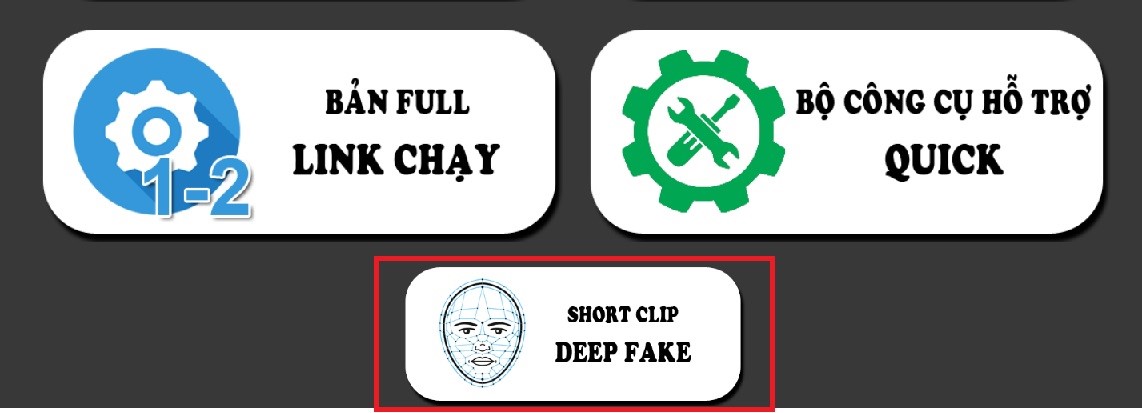
Step 1: You visit the page Stable Diffusion Life > Select “Short Clip Deep Fake”
How to use Deep Fake on Stable Diffusion
Select “Short Clip Deep Fake”

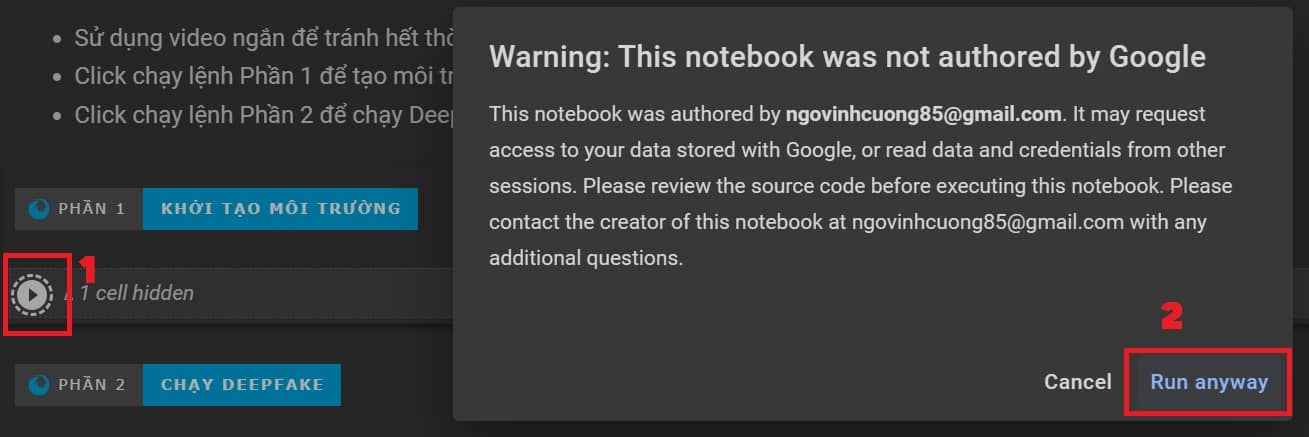
Step 2: At the “Initialize environment” section, click the arrow to run > Select “Run anyway” > Select “Connect to Google Drive”
How to use Deep Fake on Stable Diffusion
Click on the arrow to run > Select “Run anyway”

Step 3: While waiting for the system to run (quite a long time), prepare:

  • 1 image that you want to add face to (.jpg extension)
  • 1 video you want to change face (.mp4 extension)

Step 4: After running the “Initialize environment” part, you will see the message as shown

How to use Deep Fake on Stable Diffusion
Notice that “Environment initialization” is done

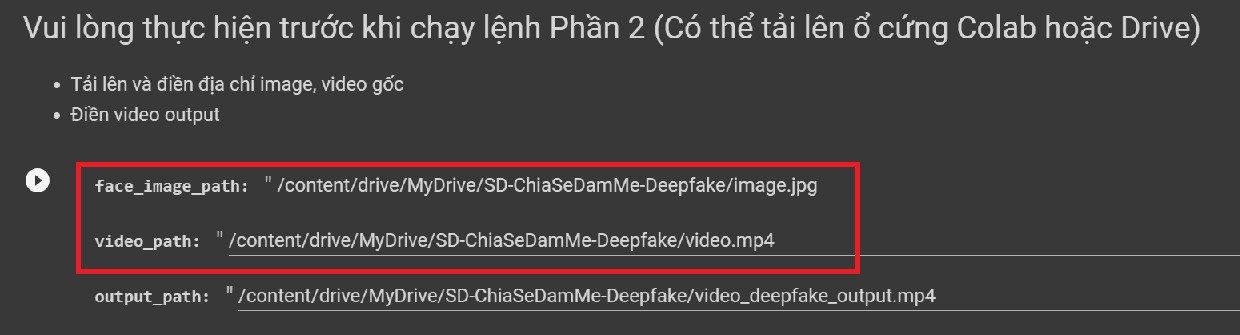
Now go to Google Drive > Open the folder “SD-ChiaSeDamMe-Deepfake” > Paste 2 image and video files into it.

Note: Normally, the system will create a Deepfake folder for you, but if you don’t see that folder, you can create it manually, by clicking the “+ New” sign > Select “New folder” , named SD-ChiaSeDamMe-Deepfake

Step 5: Rename the image to “image.jpg”, rename the video to “video.mp4”

Or you can change the name on the Colab site, as long as the file name on Colab and Drive is the same.
How to use Deep Fake on Stable Diffusion
Links to image and video files

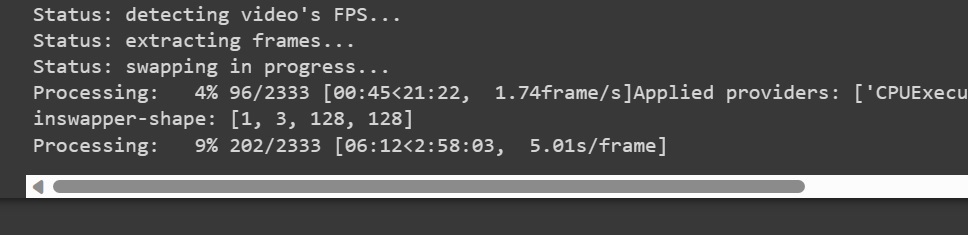
Step 6: Click the arrow button to start running Part 2

The longer the video length, the longer the gen time, for example, a 34-second video I made takes about 2 hours.
How to use Deep Fake on Stable Diffusion
Wait for the Processing part to 100% to complete

And the result is like this

Note: If you want to create a second video, please change the video name, image, output in the Colab page.

Epilogue

So through the above instructions, you can know How to use Deep Fake on Stable Diffusion to change face in video easily. Remember to use it for the right purpose to avoid unwanted consequences. Hope you are succesful.


Rate this post

Tags: changeDeepDiffusionfacesfakeStable
Previous Post

Genuine Windows Key for only $5.78 at MyKeysShop!

Next Post

Hacker hides Malware in images and executes how?

AnonyViet

AnonyViet

Related Posts

How to add sliders to Facebook Stories to easily rewind videos
Tips

How to add sliders to Facebook Stories to easily rewind videos

April 21, 2026
How to change the default font on Windows 10
Tips

How to change the default font on Windows 10

April 13, 2026
5 tips for using a Browser to replace an App (helps save RAM, time and money)
Tips

5 tips for using a Browser to replace an App (helps save RAM, time and money)

April 13, 2026
How to make funny MeMe photos without Photoshop within 10 seconds
Tips

How to make funny MeMe photos without Photoshop within 10 seconds

April 11, 2026
How to quickly design your own Logo without Photoshop
Tips

How to quickly design your own Logo without Photoshop

April 10, 2026
How to convert Website into App on Windows
Tips

How to convert Website into App on Windows

April 9, 2026
Next Post
Hacker hides Malware in images and executes how?

Hacker hides Malware in images and executes how?

0 0 votes
Article Rating
Subscribe
Login
Notify of
guest

guest

0 Comments
Oldest
Newest Most Voted
Inline Feedbacks
View all comments

Recent News

Create an avatar to celebrate April 30 with a beautiful red flag shirt with yellow stars

Create an avatar to celebrate April 30 with a beautiful red flag shirt with yellow stars

April 30, 2026
How to get 2 months of Super Duolingo for free worth 300k

How to get 2 months of Super Duolingo for free worth 300k

April 30, 2026
How to create a Face Sticker Collection using ChatGPT

How to create a Face Sticker Collection using ChatGPT

April 29, 2026
How to install the cute Bongo Cat mouse pointer for Windows

How to install the cute Bongo Cat mouse pointer for Windows

April 29, 2026
Create an avatar to celebrate April 30 with a beautiful red flag shirt with yellow stars

Create an avatar to celebrate April 30 with a beautiful red flag shirt with yellow stars

April 30, 2026
How to get 2 months of Super Duolingo for free worth 300k

How to get 2 months of Super Duolingo for free worth 300k

April 30, 2026
How to create a Face Sticker Collection using ChatGPT

How to create a Face Sticker Collection using ChatGPT

April 29, 2026
AnonyViet - English Version

AnonyViet

AnonyViet is a website share knowledge that you have never learned in school!

We are ready to welcome your comments, as well as your articles sent to AnonyViet.

Follow Us

Contact:

Email: anonyviet.com[@]gmail.com

Main Website: https://anonyviet.com

Recent News

Create an avatar to celebrate April 30 with a beautiful red flag shirt with yellow stars

Create an avatar to celebrate April 30 with a beautiful red flag shirt with yellow stars

April 30, 2026
How to get 2 months of Super Duolingo for free worth 300k

How to get 2 months of Super Duolingo for free worth 300k

April 30, 2026
No Result
View All Result
  • Home
  • News
  • Software
  • Knowledge
  • MMO
  • Tips
  • Security
  • Network
  • Office

wpDiscuz
0
0
Would love your thoughts, please comment.x
()
x
| Reply