If you have a Microsoft account and use it to lock your computer on Windows 10
| Join the channel Telegram belong to AnonyViet 👉 Link 👈 |
It’s terrible if you trot forgot account and not sure how?
- To avoid this. AnonyViet recommend create a separate hard drive Use it to prevent you from forgetting your password or hitting a car with memory loss in the future! It will help you Reset your lost password. Here I will guide Create USB Reset Windows 10 Local account password (Please follow)
First, you open Control Panel and access the line as shown in the picture
- Control Panel -> User Accounts
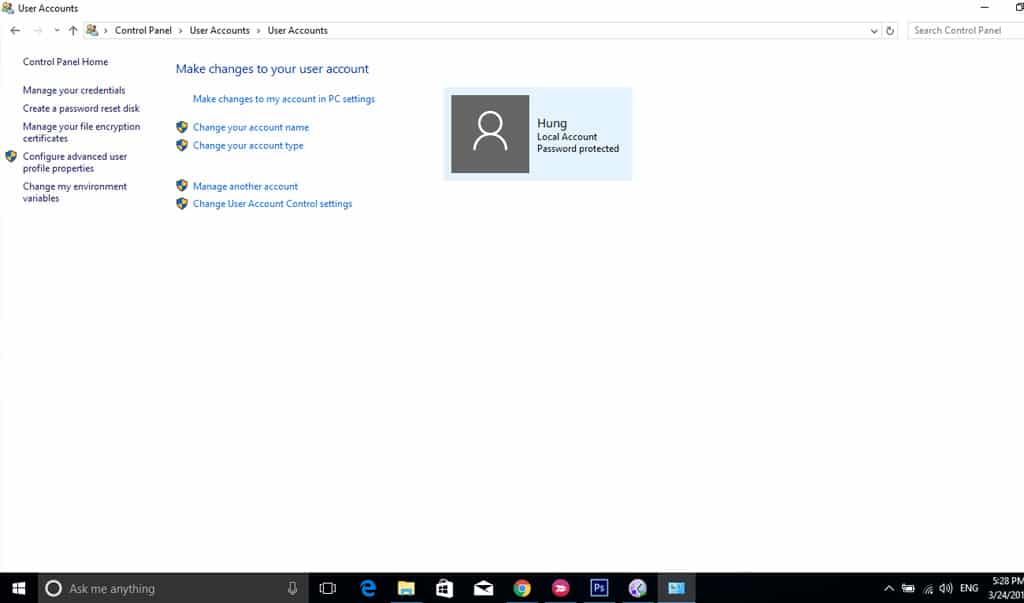
You click Create a password reset disk, to proceed with the setup and construction USB
Note
Remember to plug the USB in, or it will give an error. You don’t need Format USB (Erase) because it will create a password reset file about a few Kb, so if the USB has documents, it won’t affect me! You can rest assured
![[IMG]](https://anonyviet.com/wp-content/uploads/2017/03/C6Dw6.jpg "Create USB Reset Windows 10 Local account password 16")
- Then you will see Wizard showing up (As In Picture)
- You click next
![[IMG]](https://anonyviet.com/wp-content/uploads/2017/03/C6JNE.jpg "Create USB Reset Windows 10 Local account password 17")
Enter password your current password. After enter correctly it will create a key in USB your.
![[IMG]](https://anonyviet.com/wp-content/uploads/2017/03/C6Kx8.jpg "Create USB Reset Windows 10 Local account password 18")
Press Finish to generate your own key.
![[IMG]](https://anonyviet.com/wp-content/uploads/2017/03/C6RBr.jpg "Create USB Reset Windows 10 Local account password 19")
Enter USB your file will appear userkey.psw (This file acts as a key)
Use key How about this, please continue reading below!
![[IMG]](https://anonyviet.com/wp-content/uploads/2017/03/C6aCd.jpg "Create USB Reset Windows 10 Local account password 20")
It is done ! Now let’s test it to see if it works!
[toggle title=”Lưu Ý”]Plug in key (USB) I can test it on my new computer =) [/toggle]
- Friend Log Out out or Reset computer again. Afterward entered wrong password Let’s try
- It will show Reset Password Small below as shown in the picture
![[IMG]](https://anonyviet.com/wp-content/uploads/2017/03/C6l2Z.jpg "Create USB Reset Windows 10 Local account password 21")
- After pressing Reset Password you will see USB with yourself.
- Select and press Next
![[IMG]](https://anonyviet.com/wp-content/uploads/2017/03/C6mOk.jpg "Create USB Reset Local account password Windows 10 22")
In this step, enter Password new, and proceed to login with Password has been changed!
If you have the house key, you can enter the house ^^
![[IMG]](https://anonyviet.com/wp-content/uploads/2017/03/C6udX.jpg "Create USB Reset Windows 10 Local account password 23")
India finish to complete the process reset Password
![[IMG]](https://anonyviet.com/wp-content/uploads/2017/03/C6IZl.jpg "Create USB Reset Windows 10 Local account password 24")
The article Create USB Reset Windows 10 Local account password has brought you one more useful tip !! Thank you for watching….
There’s nothing wrong with having a key!
AnonyViet – Better and Better