• Home
  • News
  • Software
  • Knowledge
  • MMO
  • Tips
  • Security
  • Network
  • Office
AnonyViet - English Version
  • Home
  • News
  • Software
  • Knowledge
  • MMO
  • Tips
  • Security
  • Network
  • Office
No Result
View All Result
  • Home
  • News
  • Software
  • Knowledge
  • MMO
  • Tips
  • Security
  • Network
  • Office
No Result
View All Result
AnonyViet - English Version
No Result
View All Result

How to install Facebook live chat for Website

AnonyViet by AnonyViet
February 17, 2023
in Tips
0

Instructions for setting up live chat Facebook for Website

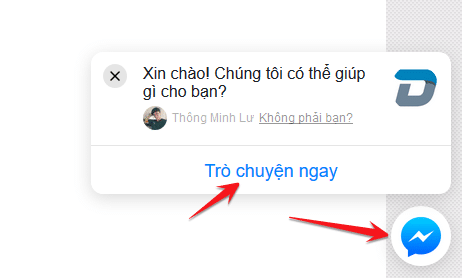
Hello friends, Facebook has never been hot with new updates. This social network accounts for a large user market share in Vietnam. According to recent updates, Facebook has just updated the facebook live chat feature. Allows the website to create a button link for users to easily send messages to Fanpage. Check out the image below to learn more about this feature.

Join the channel Telegram belong to AnonyViet 👉 Link 👈

How to set up Facebook live chat for Website 3

Below the corner of the website will appear a button (button) like the image above. Users click and can chat directly with your fanpage. This will increase interaction and direct customers for your company. And the even better news is that this feature is provided by Facebook for free.

We no longer waste time going around looking for ways to integrate live chat because now. With the free live chat of facebook with super nice interface. Suitable for any website, you can completely create a live chat button for your website. It only takes a few seconds to create. Even people with no technical knowledge can do it.

How to insert Facebook live chat for Website

How to set up Facebook live chat for Website 4

User Requests

  • There is a Fanpage.
  • One Facebook App.
  • A personal website (for you to integrate live chat on).

You go to Fanpage and activate messenger platform. Include your website’s domain name in the Whitelisted Domain section. Refer to the photo below.
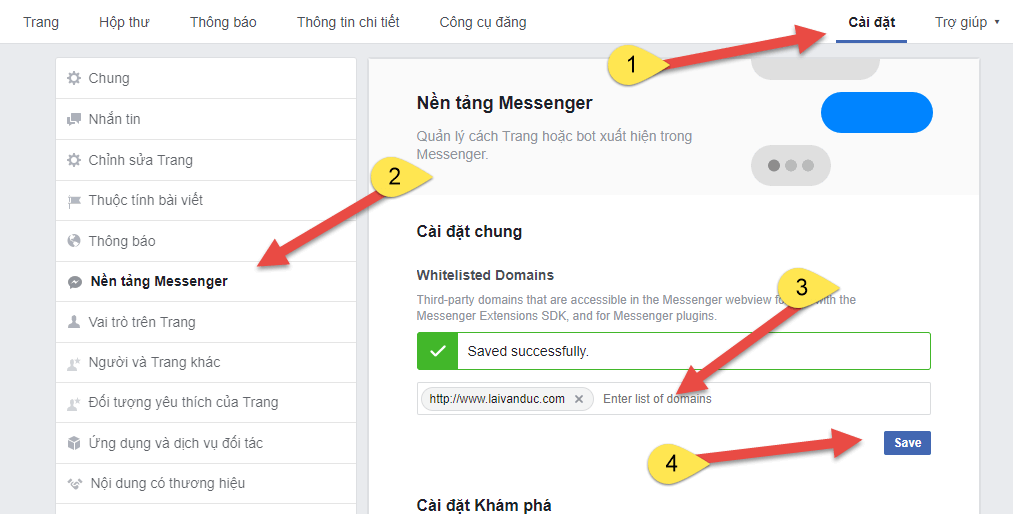
Live chat facebook for website

You copy the code you put below in the middle of the tag of your website. Looking at the tag pair, you probably know it’s HTML already.

If you use the WordPress source code, open the footer.php file. Because this live chat is written in php and is used for the footer area of ​​the website. That’s the standard.

<script>
  window.fbAsyncInit = function() {
    FB.init({
      appId            : 'your-app-id',
      autoLogAppEvents : true,
      xfbml            : true,
      version          : 'v2.11'
    });
  };
  (function(d, s, id){
     var js, fjs = d.getElementsByTagName(s)[0];
     if (d.getElementById(id)) {return;}
     js = d.createElement(s); js.id = id;
     js.src = "https://connect.facebook.net/vi_VN/sdk.js";
     fjs.parentNode.insertBefore(js, fjs);
   }(document, 'script', 'facebook-jssdk'));
</script>
<div class="fb-customerchat" page_id="PAGE_ID"></div>

Next, please replace some information in the code with your information.

  • your-app-id is your Facebook App ID.
  • PAGE_ID is your Fanpage ID by pasting the fanpage link into the address below

Get Fanpage ID

Get Fanpage ID

Fill in the following information in turn:
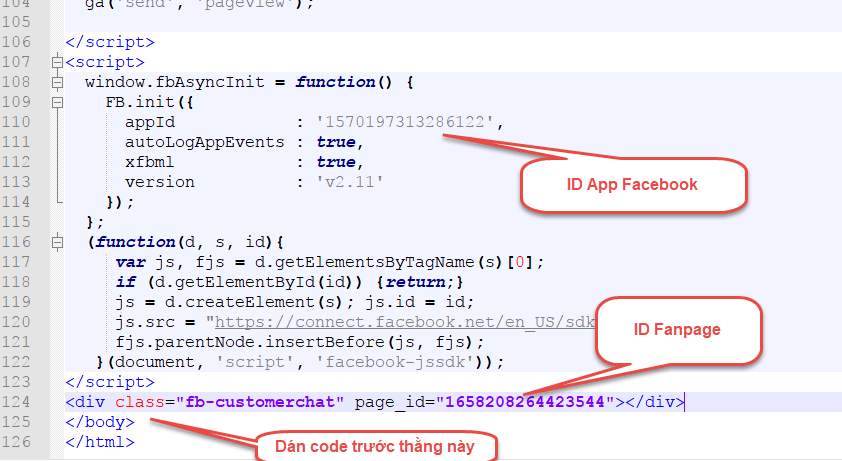
Integrate facebook live chat for website

It is done. Go out and enjoy it guys, it’s that simple. I hope this little trick can help you increase website revenue.

Note

Please turn off other live chat plugins to avoid conflicts with this code of facebook. Because two live chats cannot show the same location.

Like Fanpage or follow website to update the best articles every day.

Good luck
Lmint.

The article achieved: 5/5 – (100 votes)

Previous Post

How to create unlimited Mail and use it forever

Next Post

Share the code to create Facebook Green Tick

AnonyViet

AnonyViet

Related Posts

Instructions to receive Claude Fable 5 for free for 30 days
Tips

Instructions to receive Claude Fable 5 for free for 30 days

June 15, 2026
Delete all Event Logs on Windows to remove traces of activity
Tips

Delete all Event Logs on Windows to remove traces of activity

June 15, 2026
Instructions for creating Minecraft-style food photos
Tips

Instructions for creating Minecraft-style food photos

June 9, 2026
Get free Cambridge courses to prepare for IELTS, Starters, Movers
Tips

Get free Cambridge courses to prepare for IELTS, Starters, Movers

June 4, 2026
How to record reaction videos with Android phones, no app needed
Tips

How to record reaction videos with Android phones, no app needed

June 1, 2026
Instructions on how to get Google AI Pro 1 year for free for new accounts
Tips

Instructions on how to get Google AI Pro 1 year for free for new accounts

June 1, 2026
Next Post
Share the code to create Facebook Green Tick

Share the code to create Facebook Green Tick

0 0 votes
Article Rating
Subscribe
Login
Notify of
guest

guest

0 Comments
Oldest
Newest Most Voted
Inline Feedbacks
View all comments

Recent News

Hướng dẫn cài đặt iOS 27 Developer Beta

Hướng dẫn cài đặt iOS 27 Developer Beta

June 17, 2026
How to handle locked SIMs due to lack of standardization

How to handle locked SIMs due to lack of standardization

June 17, 2026
Instructions to receive Claude Fable 5 for free for 30 days

Instructions to receive Claude Fable 5 for free for 30 days

June 15, 2026
Instructions on how to activate the new Siri on iOS 27

Instructions on how to activate the new Siri on iOS 27

June 15, 2026
Hướng dẫn cài đặt iOS 27 Developer Beta

Hướng dẫn cài đặt iOS 27 Developer Beta

June 17, 2026
How to handle locked SIMs due to lack of standardization

How to handle locked SIMs due to lack of standardization

June 17, 2026
Instructions to receive Claude Fable 5 for free for 30 days

Instructions to receive Claude Fable 5 for free for 30 days

June 15, 2026
AnonyViet - English Version

AnonyViet

AnonyViet is a website share knowledge that you have never learned in school!

We are ready to welcome your comments, as well as your articles sent to AnonyViet.

Follow Us

Contact:

Email: anonyviet.com[@]gmail.com

Main Website: https://anonyviet.com

Recent News

Hướng dẫn cài đặt iOS 27 Developer Beta

Hướng dẫn cài đặt iOS 27 Developer Beta

June 17, 2026
How to handle locked SIMs due to lack of standardization

How to handle locked SIMs due to lack of standardization

June 17, 2026
  • Home
  • Home 2
  • Home 3
  • Home 4
  • Home 5
  • Home 6
  • Next Dest Page
  • Sample Page

6789 kv999

No Result
View All Result
  • Home
  • News
  • Software
  • Knowledge
  • MMO
  • Tips
  • Security
  • Network
  • Office

6789 kv999

wpDiscuz
0
0
Would love your thoughts, please comment.x
()
x
| Reply