• Home
  • News
  • Software
  • Knowledge
  • MMO
  • Tips
  • Security
  • Network
  • Office
AnonyViet - English Version
  • Home
  • News
  • Software
  • Knowledge
  • MMO
  • Tips
  • Security
  • Network
  • Office
No Result
View All Result
  • Home
  • News
  • Software
  • Knowledge
  • MMO
  • Tips
  • Security
  • Network
  • Office
No Result
View All Result
AnonyViet - English Version
No Result
View All Result

Instructions for using SmartArt to create charts on PowerPoint

AnonyViet by AnonyViet
February 16, 2023
in Tips
0

PowerPoint is one of Microsoft’s best presentation and report creation software today. To make your presentation more vivid and unique, today I will show you how to use SmartArt. Let’s get started.

Join the channel Telegram belong to AnonyViet 👉 Link 👈

First, you can download PowerPoint 2016 software at:

DOWNLOAD OFFICE 2016

SmartArt is a useful diagramming tool in PowerPointthis tool helps you to create automatic diagrams for your presentations, which will help you make a better impression and make the audience you present easier to visualize and understand.

To use MmartArtplease choose Insertthen select SmartArt:
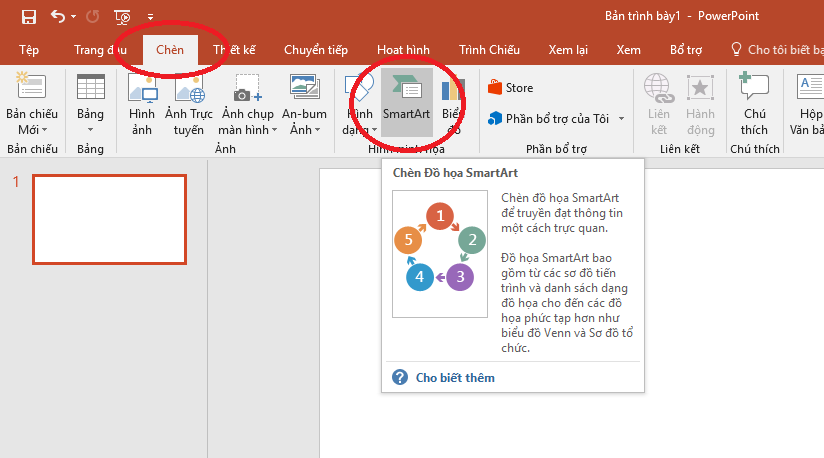
Instructions for using SmartArt to create charts on PowerPoint 10

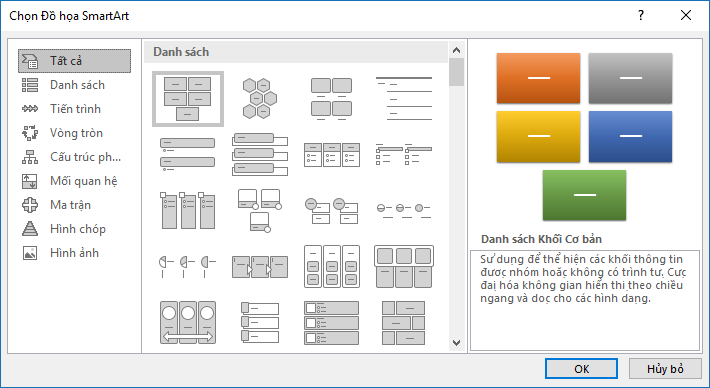
A window pops up, you can see:

In the middle is the frame List, you can choose the appropriate chart you want here. Left List is a series of different chart types, depending on the purpose of use, you can choose your own category to easily find the chart. The upper left part of the frame List is a preview image of the chart you are selecting and below and some information about the chart.
Instructions for using SmartArt to create charts on PowerPoint 11

For example, here I will choose the category Matrix and select the chart like the photo, then press Ok:
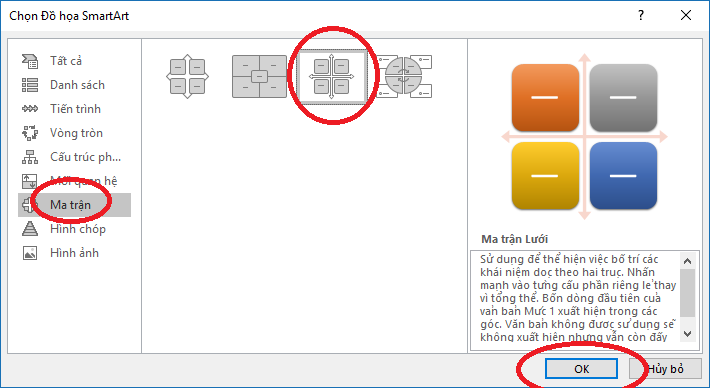
Instructions for using SmartArt to create charts on PowerPoint 12

At this point, the page PowerPoint Yours will show a chart, please write your content in the boxes [ Văn bản ]:
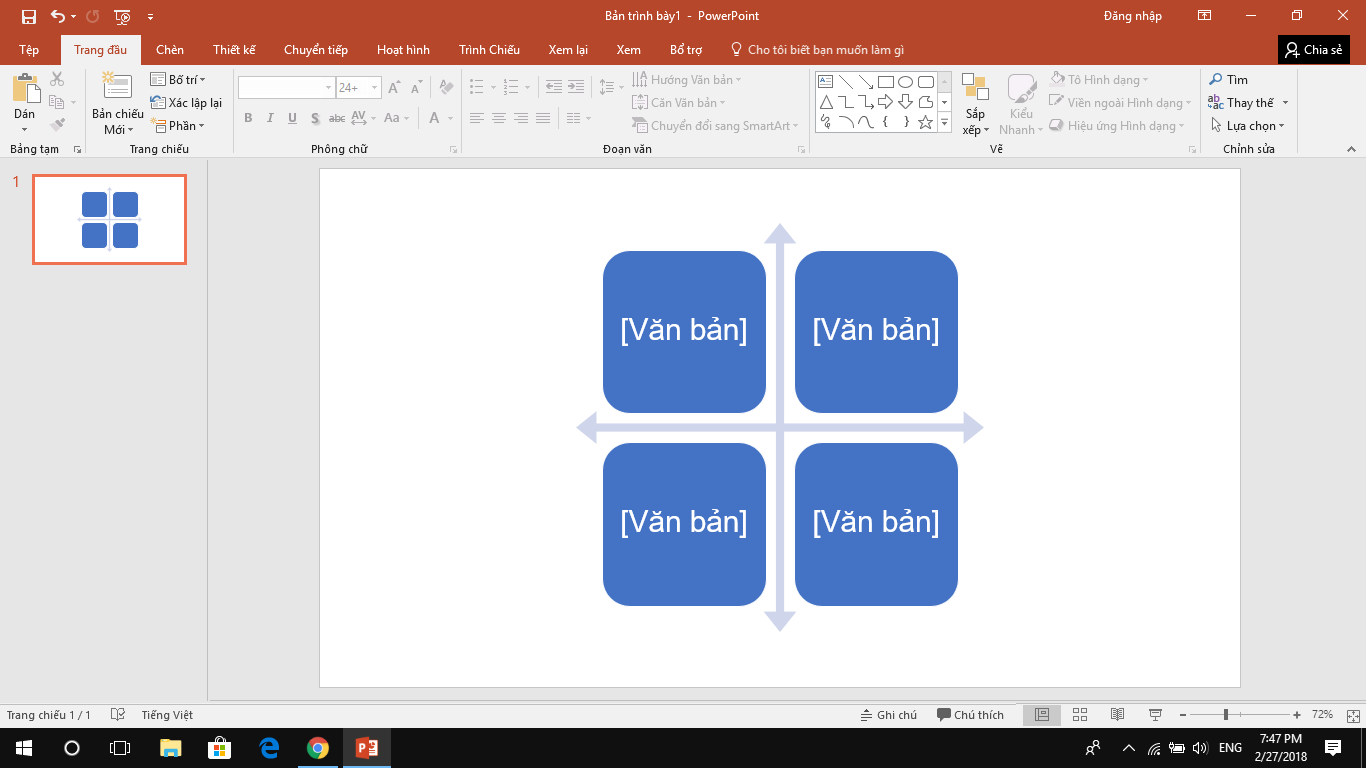
Instructions for using SmartArt to create charts on PowerPoint 13

Next you can customize more for Chart yours, specifically you can Add Effectscustom colors Chart…

First to customize the color, please click Chart and in the section Design please choose Discoloration:
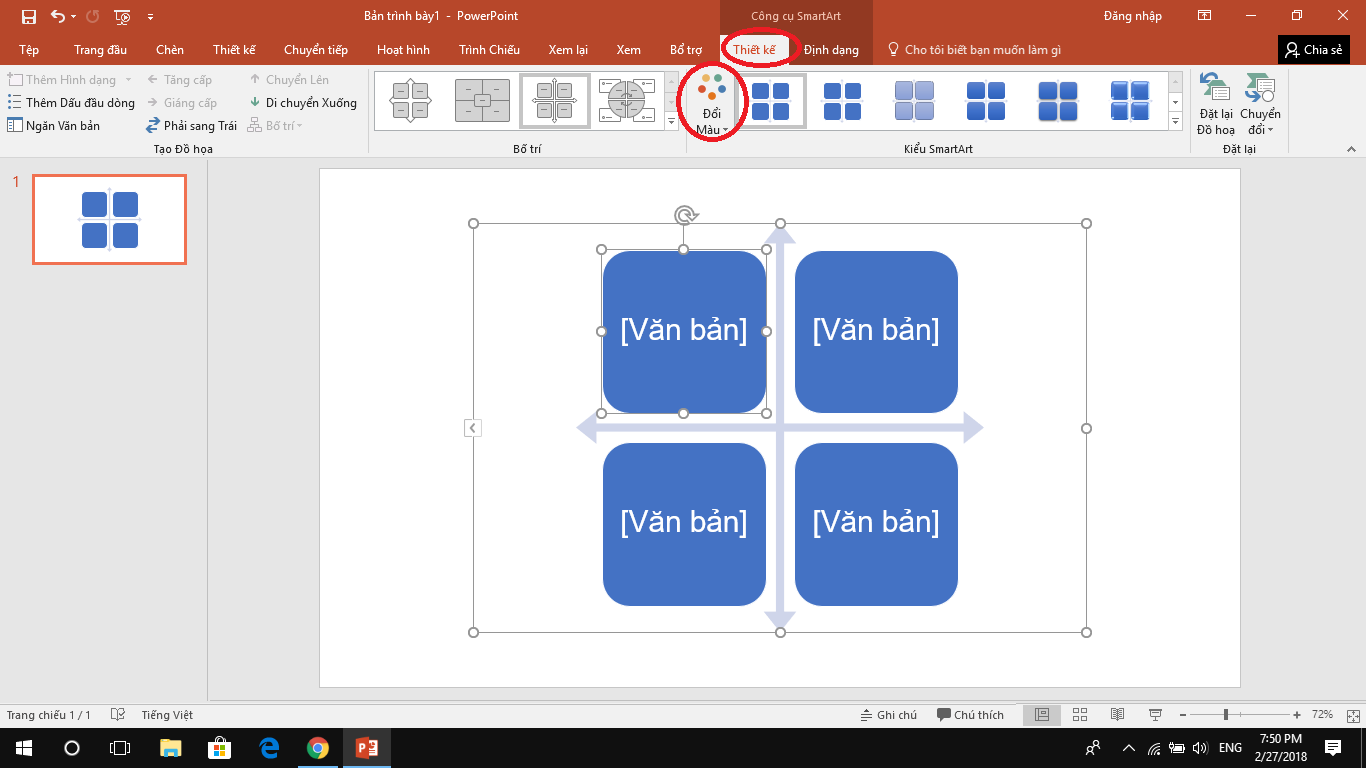
Instructions for using SmartArt to create charts on PowerPoint 14

A color picker will appear, you can choose the right color for you Chart your:
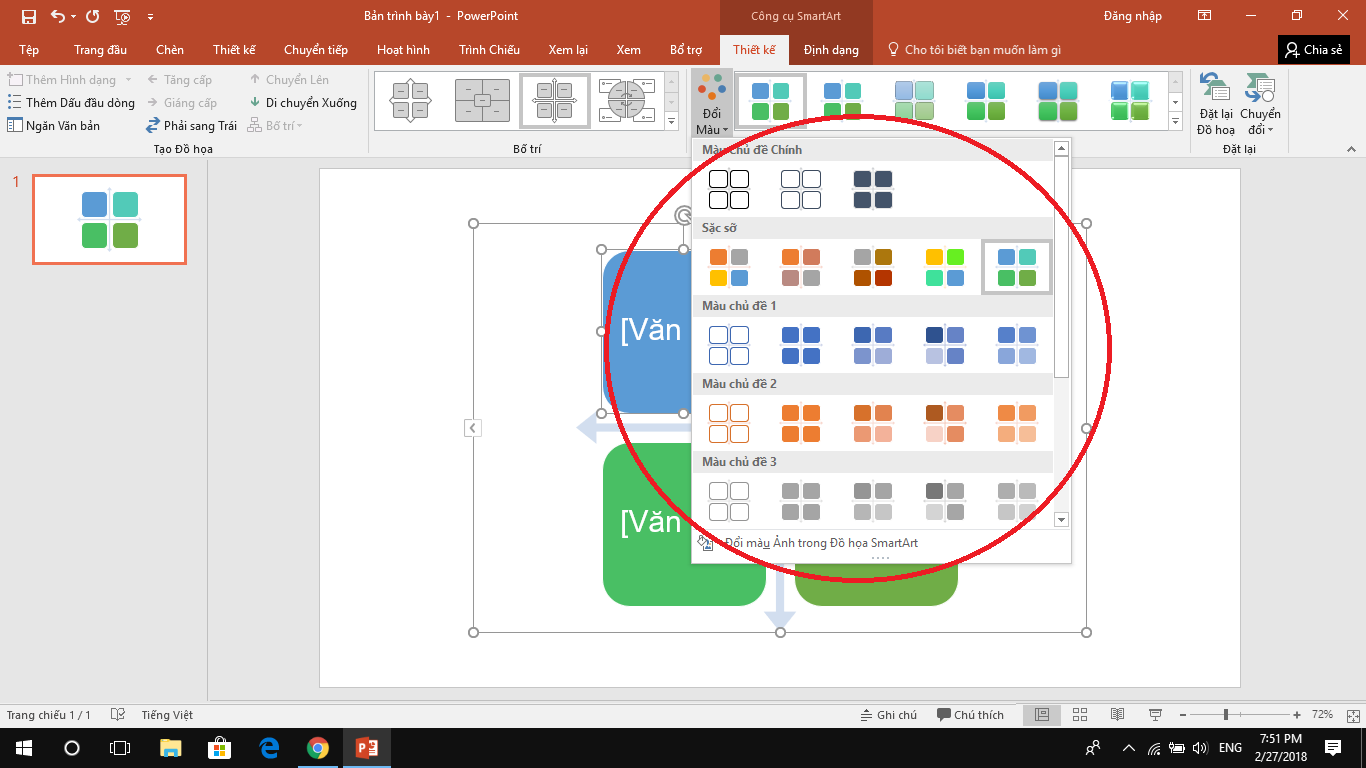
Instructions for using SmartArt to create charts on PowerPoint 15

Also next to the item Discoloration you can also choose the style Chartdepending on the purpose of use, you can choose the styles Expression Thing different:
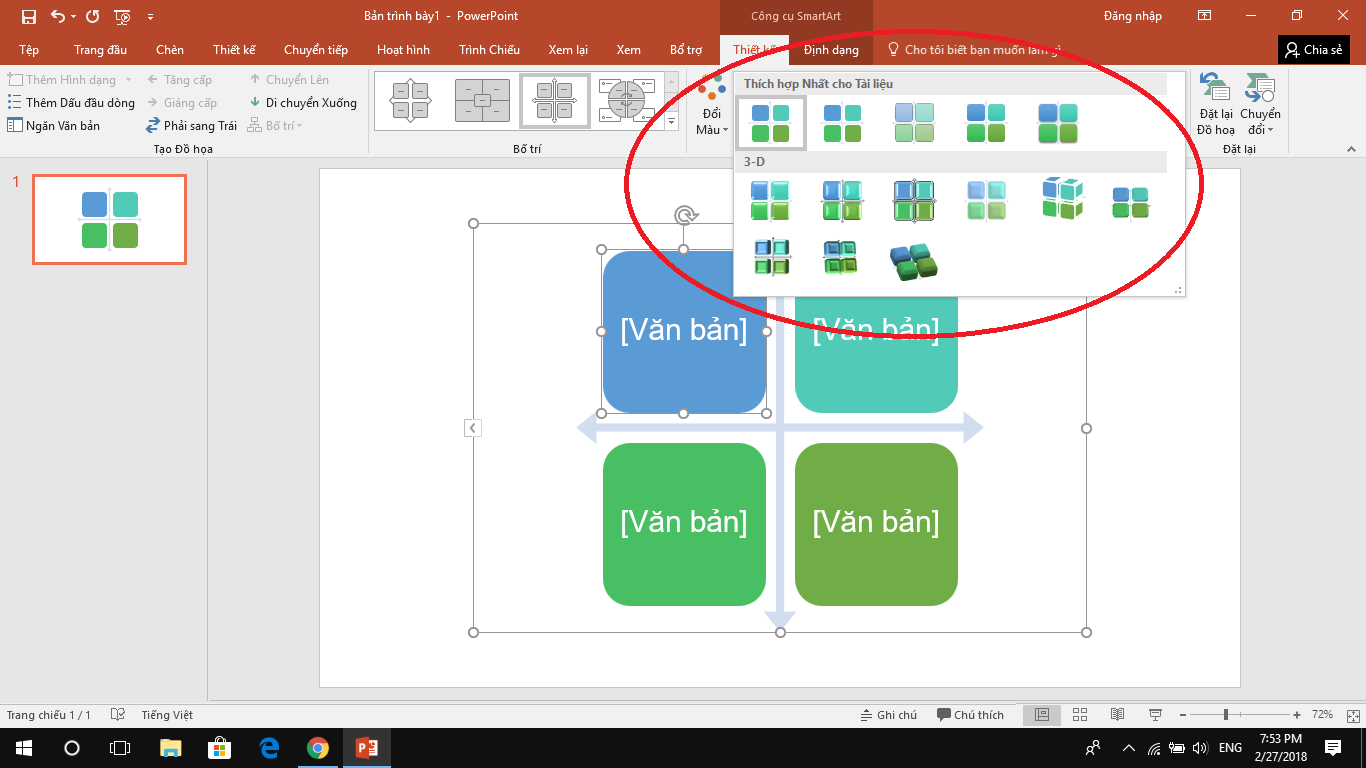
Instructions for using SmartArt to create charts on PowerPoint 16

In addition, in the section Nail Form You can also customize it a lot Chart yours, you can Shape Fill, Shape Outline, Shape Effects… :
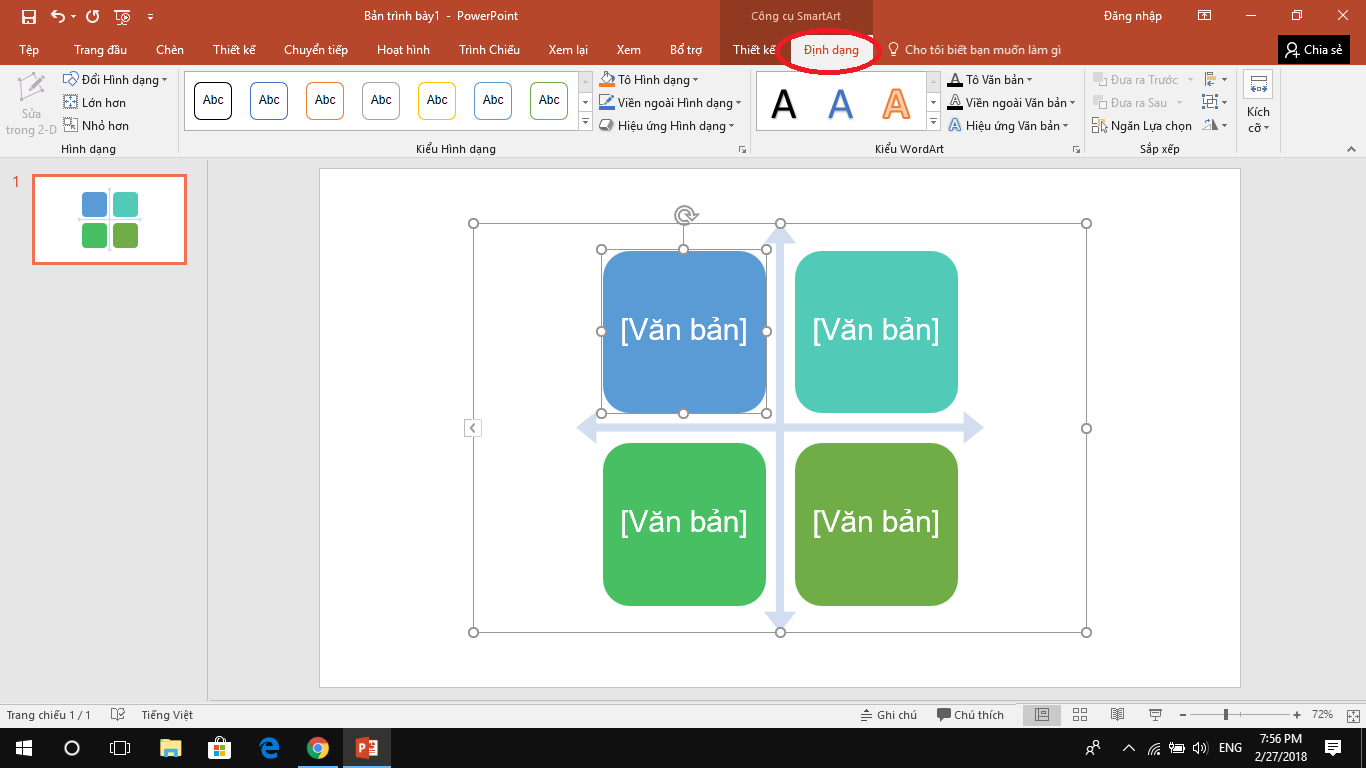
Instructions for using SmartArt to create charts on PowerPoint 17

Recently, I showed you how to use SmartArt to beautify your presentations.

GOOD LUCK.

The article achieved: 5/5 – (100 votes)

Previous Post

How to reduce delay Right-click menu

Next Post

How to cut and merge files simply with HJsplit software

AnonyViet

AnonyViet

Related Posts

How are Windows 11 Pro and Windows 10 Pro different?
Tips

How are Windows 11 Pro and Windows 10 Pro different?

October 23, 2026
Instructions for using CleanYourTV: Remove ads on Android TV, Google TV
Tips

Instructions for using CleanYourTV: Remove ads on Android TV, Google TV

October 23, 2026
How to use Messenger without a Facebook account
Tips

How to use Messenger without a Facebook account

October 22, 2026
The website helps you draw beautifully like TikToker Viet My
Tips

The website helps you draw beautifully like TikToker Viet My

October 21, 2026
Instructions on how to hard reset iPhone 18 Pro / iPhone 18 Pro Max
Tips

Instructions on how to hard reset iPhone 18 Pro / iPhone 18 Pro Max

October 21, 2026
Anyone can do how to increase Internet speed using CMD
Tips

Anyone can do how to increase Internet speed using CMD

October 20, 2026
Next Post
How to cut and merge files simply with HJsplit software

How to cut and merge files simply with HJsplit software

0 0 votes
Article Rating
Subscribe
Login
Notify of
guest

guest

0 Comments
Oldest
Newest Most Voted

Recent News

How are Windows 11 Pro and Windows 10 Pro different?

How are Windows 11 Pro and Windows 10 Pro different?

October 23, 2026
Instructions for using CleanYourTV: Remove ads on Android TV, Google TV

Instructions for using CleanYourTV: Remove ads on Android TV, Google TV

October 23, 2026
Receive copyright for 3 Halloween software worth 0

Receive copyright for 3 Halloween software worth $150

October 23, 2026
How to use Messenger without a Facebook account

How to use Messenger without a Facebook account

October 22, 2026
How are Windows 11 Pro and Windows 10 Pro different?

How are Windows 11 Pro and Windows 10 Pro different?

October 23, 2026
Instructions for using CleanYourTV: Remove ads on Android TV, Google TV

Instructions for using CleanYourTV: Remove ads on Android TV, Google TV

October 23, 2026
Receive copyright for 3 Halloween software worth 0

Receive copyright for 3 Halloween software worth $150

October 23, 2026
AnonyViet - English Version

AnonyViet

AnonyViet is a website share knowledge that you have never learned in school!

We are ready to welcome your comments, as well as your articles sent to AnonyViet.

Follow Us

Contact:

Email: anonyviet.com[@]gmail.com

Main Website: https://anonyviet.com

Recent News

How are Windows 11 Pro and Windows 10 Pro different?

How are Windows 11 Pro and Windows 10 Pro different?

October 23, 2026
Instructions for using CleanYourTV: Remove ads on Android TV, Google TV

Instructions for using CleanYourTV: Remove ads on Android TV, Google TV

October 23, 2026
  • Home
  • Home 2
  • Home 3
  • Home 4
  • Home 5
  • Home 6
  • Next Dest Page
  • Sample Page

say88 tỷ lệ kèo nhà cái kèo nhà cái 5 febet

No Result
View All Result
  • Home
  • News
  • Software
  • Knowledge
  • MMO
  • Tips
  • Security
  • Network
  • Office

say88 tỷ lệ kèo nhà cái kèo nhà cái 5 febet

wpDiscuz
0
0
Would love your thoughts, please comment.x
()
x
| Reply