• Home
  • News
  • Software
  • Knowledge
  • MMO
  • Tips
  • Security
  • Network
  • Office
AnonyViet - English Version
  • Home
  • News
  • Software
  • Knowledge
  • MMO
  • Tips
  • Security
  • Network
  • Office
No Result
View All Result
  • Home
  • News
  • Software
  • Knowledge
  • MMO
  • Tips
  • Security
  • Network
  • Office
No Result
View All Result
AnonyViet - English Version
No Result
View All Result

Instructions to turn on the shield to protect Facebook avatar in 5 seconds

AnonyViet by AnonyViet
February 16, 2023
in Tips
0

Last time I shared with you a Tut that turned on the shield to protect the avatar. However, now that tut has been fixed, so I update the new TUT for everyone. This tut is made by you SUCCESS Send it to Fanpage so I can write articles to share with everyone.

Join the channel Telegram belong to AnonyViet 👉 Link 👈

Thank you for this great tutorial. Now I will show you how to do it from AZ within 5 seconds.

Instructions to turn on Avatar protection shield within 5s

Updated on 5/5/2018.

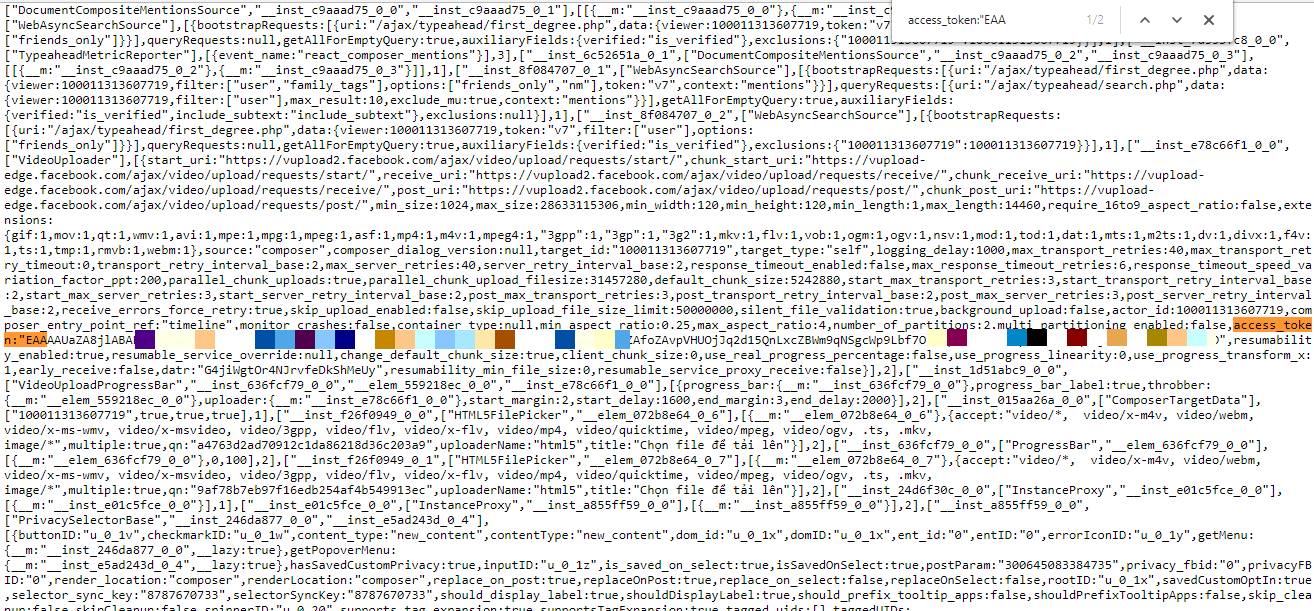
You go to the facebook home wall of the nick that you want to change the protection shield. Then press Ctrl + U to view the source code. Press Ctrl + F and search for the term access_token:"EAA
Instructions to turn on the shield to protect Facebook avatar in 5 seconds 6

Then copy the entire content in brackets “”.

Next, open a new tab in your browser and go to the address below.

https://anonyviet.com/resources/batkhienfb/index.php?token=yourtoken

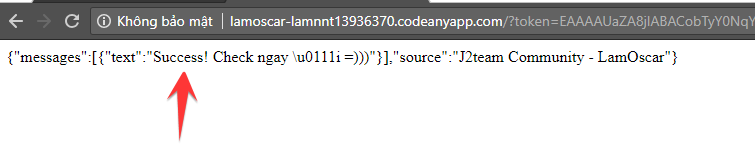
Paste the line of token you copied earlier into the red yourtoken in the link and press enter. If the following results appear, it is successful.
Instructions to turn on the shield to protect Facebook avatar in 5 seconds 7

This is my clone nick before applying tut.

Instructions to turn on the shield to protect Facebook avatar in 5 seconds 8

And here is the result after applying tut.

Instructions to turn on the shield to protect Facebook avatar in 5 seconds 9

Instructions to turn on the shield to protect Facebook avatar in 5 seconds

That’s it, but this tut still has some dangerous things that you reveal the token to others. Others can hack your Facebook account through tokens. But the admin of this link is the administrator of J2Team Community, so it is quite reputable. You can safely use it.

How to download images when avatar protection is enabled

Although it’s called protecting the avatar, people in the IT industry can still download it. Try it out!

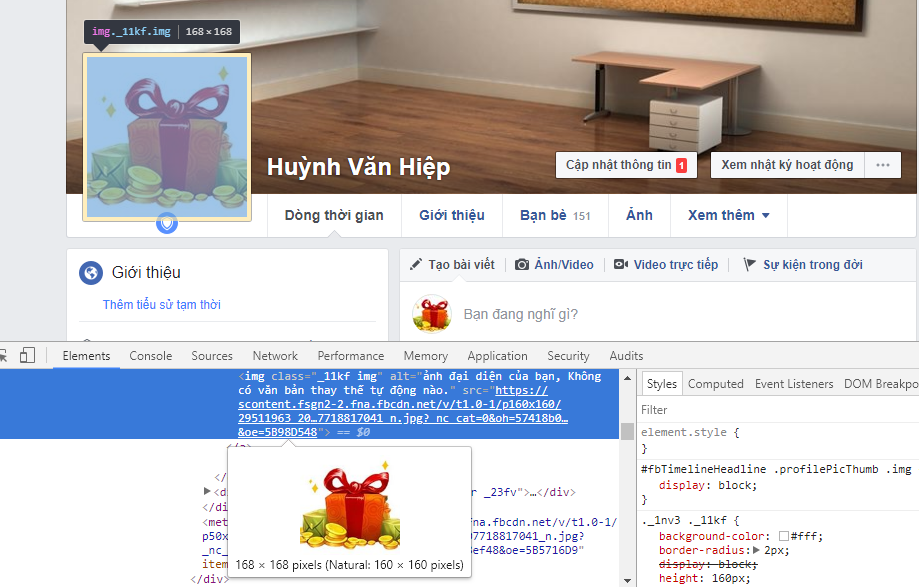
Press the F12 key to enter the browser’s developer tools. Then select Avatar and find the image link to download.
Instructions to turn on the shield to protect Facebook avatar in 5 seconds 10

The weakness of this Tut is that you can only download 160 x 160 px images. But you can already download the image!! But if you use this image to create fake acc and rip nick, you will be detected and die. Hope this sharing of mine is useful.

Like Fanpage or follow website for quick updates of good articles.

Good luck
Lmint – source J2Team Community

The article achieved: 5/5 – (100 votes)

Previous Post

Free Android application programming course and how to make money from them

Next Post

Share PSD Membership card of the church of God

AnonyViet

AnonyViet

Related Posts

How to add sliders to Facebook Stories to easily rewind videos
Tips

How to add sliders to Facebook Stories to easily rewind videos

April 21, 2026
How to change the default font on Windows 10
Tips

How to change the default font on Windows 10

April 13, 2026
5 tips for using a Browser to replace an App (helps save RAM, time and money)
Tips

5 tips for using a Browser to replace an App (helps save RAM, time and money)

April 13, 2026
How to make funny MeMe photos without Photoshop within 10 seconds
Tips

How to make funny MeMe photos without Photoshop within 10 seconds

April 11, 2026
How to quickly design your own Logo without Photoshop
Tips

How to quickly design your own Logo without Photoshop

April 10, 2026
How to convert Website into App on Windows
Tips

How to convert Website into App on Windows

April 9, 2026
Next Post
Share PSD Membership card of the church of God

Share PSD Membership card of the church of God

0 0 votes
Article Rating
Subscribe
Login
Notify of
guest

guest

0 Comments
Oldest
Newest Most Voted
Inline Feedbacks
View all comments

Recent News

How to create a Face Sticker Collection using ChatGPT

How to create a Face Sticker Collection using ChatGPT

April 29, 2026
How to install the cute Bongo Cat mouse pointer for Windows

How to install the cute Bongo Cat mouse pointer for Windows

April 29, 2026
Tips for pinning the step counter to the iPhone screen to monitor your health

Tips for pinning the step counter to the iPhone screen to monitor your health

April 28, 2026
How to turn off password suggestions on iPhone: Prevent Safari from auto-filling passwords

How to turn off password suggestions on iPhone: Prevent Safari from auto-filling passwords

April 27, 2026
How to create a Face Sticker Collection using ChatGPT

How to create a Face Sticker Collection using ChatGPT

April 29, 2026
How to install the cute Bongo Cat mouse pointer for Windows

How to install the cute Bongo Cat mouse pointer for Windows

April 29, 2026
Tips for pinning the step counter to the iPhone screen to monitor your health

Tips for pinning the step counter to the iPhone screen to monitor your health

April 28, 2026
AnonyViet - English Version

AnonyViet

AnonyViet is a website share knowledge that you have never learned in school!

We are ready to welcome your comments, as well as your articles sent to AnonyViet.

Follow Us

Contact:

Email: anonyviet.com[@]gmail.com

Main Website: https://anonyviet.com

Recent News

How to create a Face Sticker Collection using ChatGPT

How to create a Face Sticker Collection using ChatGPT

April 29, 2026
How to install the cute Bongo Cat mouse pointer for Windows

How to install the cute Bongo Cat mouse pointer for Windows

April 29, 2026
No Result
View All Result
  • Home
  • News
  • Software
  • Knowledge
  • MMO
  • Tips
  • Security
  • Network
  • Office

wpDiscuz
0
0
Would love your thoughts, please comment.x
()
x
| Reply