• Home
  • News
  • Software
  • Knowledge
  • MMO
  • Tips
  • Security
  • Network
  • Office
AnonyViet - English Version
  • Home
  • News
  • Software
  • Knowledge
  • MMO
  • Tips
  • Security
  • Network
  • Office
No Result
View All Result
  • Home
  • News
  • Software
  • Knowledge
  • MMO
  • Tips
  • Security
  • Network
  • Office
No Result
View All Result
AnonyViet - English Version
No Result
View All Result

Instructions for Verified green ticks for Pages and Facebook profiles

AnonyViet by AnonyViet
February 15, 2023
in Tips
0

Hi guys, the green tick is used by Facebook to mark authenticated pages. That is, the title or trademark has been recognized by Facebook as celebrity copyright. This means that these pages will never die when reported.

Join the channel Telegram belong to AnonyViet 👉 Link 👈

So how to verify the sign green tick? Today I will guide you to do it. However, to get the tick mark, you need to meet some requirements set by Facebook. This is not a trick, but actually authenticating to get a Tick.

Pre-authentication requirements

  • You are a person who has appeared on newspaper pages (can create fake newspaper pages and self-publish articles).
  • You have some news on radio and television.
  • Being listed on Wikimedia is an advantage (not even having it).
  • You represent a well-known brand or business.

Instructions for verifying the Facebook green tick

Instructions for Verified green ticks for Pages and Facebook profiles

Step 1

Visit Facebook’s celebrity credentials page at the address below.

Step 2

Select the verification type (If you want to verify the Page, select the page, for the personal page, select the personal page).

Step 3

If you choose to verify the Page, then in the Select Page to verify you will choose your page.

Instructions to Verified the green tick for Pages and Facebook profiles 4

If you choose to verify your Profile, paste your profile’s address in.
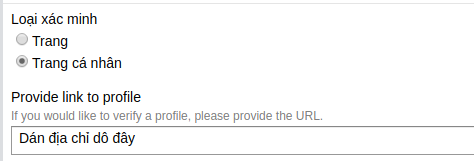
Instructions to Verified green ticks for Pages and Facebook profiles 5

Step 4

Press select File and attach a photo of your ID or business license.
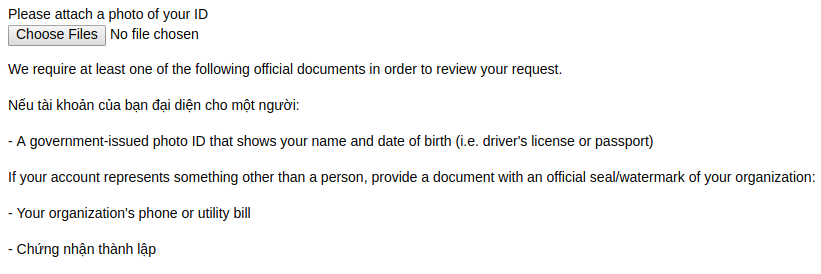
Instructions to Verified green ticks for Pages and Facebook profiles 6

Step 5

In the additional information, please compose a professional English mantra to convince Facebook. Your spell must meet the following criteria:

  • Content that introduces yourself or your business in a convincing and formal way.
  • Attach links to articles or wikimedia.
  • There are links to clips of famous events that you or your business have attended.

Because this authentication application is reviewed by Facebook staff, not Robot. So I can’t give you a mantra pattern. You have to compose yourself to convince the staff to consider it.

Step 6

Click submit and access the link below to access Facebook’s support inbox.

Finish and wait for the results

Wait for their response about the validation. Then send a photo with a photo of the government-provided document in the Your answer. Facebook will review and confirm the green tick for you. The latest period is 1 week to 1.5 weeks.

Note: You can only resubmit the form 30 days after receiving a response from Facebook.

In brief

This is a guide to authenticating a genuine famous Fanpage or personal page. One day you’re in the news and you’re socially recognized on Wikimedia, then confirm it. But if you don’t have any identity, Facebook will not authenticate you.

Do not use Scripts on the network. Because green tick authentication must interfere with Facebook’s database. Scripts on the net are for entertainment purposes only. Pressing F5 to reload the page is to lose the green tick immediately, some scripts also insert malicious code to get Cookies and hack your account.

Like Fanpage or follow website for quick updates of good articles.

Good luck
Lmint.

The article achieved: 5/5 – (100 votes)

Previous Post

How to use 1 Gmail to register any account

Next Post

Share Action Water Reflection create reflections for Photoshop

AnonyViet

AnonyViet

Related Posts

How to create funny selfies with pets for your pets
Tips

How to create funny selfies with pets for your pets

June 19, 2026
Chrome extension not working error and the fastest way to fix it
Tips

Chrome extension not working error and the fastest way to fix it

June 19, 2026
Instructions to receive Claude Fable 5 for free for 30 days
Tips

Instructions to receive Claude Fable 5 for free for 30 days

June 15, 2026
Delete all Event Logs on Windows to remove traces of activity
Tips

Delete all Event Logs on Windows to remove traces of activity

June 15, 2026
Instructions for creating Minecraft-style food photos
Tips

Instructions for creating Minecraft-style food photos

June 9, 2026
Get free Cambridge courses to prepare for IELTS, Starters, Movers
Tips

Get free Cambridge courses to prepare for IELTS, Starters, Movers

June 4, 2026
Next Post
Share Action Water Reflection create reflections for Photoshop

Share Action Water Reflection create reflections for Photoshop

0 0 votes
Article Rating
Subscribe
Login
Notify of
guest

guest

0 Comments
Oldest
Newest Most Voted
Inline Feedbacks
View all comments

Recent News

Instructions for creating Adam’s voice for million-view TikTok videos

Instructions for creating Adam’s voice for million-view TikTok videos

June 21, 2026
Cloud Infrastructure Resilience: Mitigating Advanced Layer 7 Vulnerabilities and Securing High-Throughput Database Handshakes

Cloud Infrastructure Resilience: Mitigating Advanced Layer 7 Vulnerabilities and Securing High-Throughput Database Handshakes

June 20, 2026
Cách hạ cấp iOS 27 xuống iOS 26 an toàn, không lo mất dữ liệu

Cách hạ cấp iOS 27 xuống iOS 26 an toàn, không lo mất dữ liệu

June 20, 2026
How to create funny selfies with pets for your pets

How to create funny selfies with pets for your pets

June 19, 2026
Instructions for creating Adam’s voice for million-view TikTok videos

Instructions for creating Adam’s voice for million-view TikTok videos

June 21, 2026
Cloud Infrastructure Resilience: Mitigating Advanced Layer 7 Vulnerabilities and Securing High-Throughput Database Handshakes

Cloud Infrastructure Resilience: Mitigating Advanced Layer 7 Vulnerabilities and Securing High-Throughput Database Handshakes

June 20, 2026
Cách hạ cấp iOS 27 xuống iOS 26 an toàn, không lo mất dữ liệu

Cách hạ cấp iOS 27 xuống iOS 26 an toàn, không lo mất dữ liệu

June 20, 2026
AnonyViet - English Version

AnonyViet

AnonyViet is a website share knowledge that you have never learned in school!

We are ready to welcome your comments, as well as your articles sent to AnonyViet.

Follow Us

Contact:

Email: anonyviet.com[@]gmail.com

Main Website: https://anonyviet.com

Recent News

Instructions for creating Adam’s voice for million-view TikTok videos

Instructions for creating Adam’s voice for million-view TikTok videos

June 21, 2026
Cloud Infrastructure Resilience: Mitigating Advanced Layer 7 Vulnerabilities and Securing High-Throughput Database Handshakes

Cloud Infrastructure Resilience: Mitigating Advanced Layer 7 Vulnerabilities and Securing High-Throughput Database Handshakes

June 20, 2026
  • Home
  • Home 2
  • Home 3
  • Home 4
  • Home 5
  • Home 6
  • Next Dest Page
  • Sample Page

6789 kv999

No Result
View All Result
  • Home
  • News
  • Software
  • Knowledge
  • MMO
  • Tips
  • Security
  • Network
  • Office

6789 kv999

wpDiscuz
0
0
Would love your thoughts, please comment.x
()
x
| Reply