Well Structured Query Language SQL is a simple query-based language that is easy to read and write. It is one of the most popular languages in the world.
| Join the channel Telegram of the AnonyViet 👉 Link 👈 |

In today’s world, we all know how important data is. In this article, we will learn the most common SQL queries through examples.
The purpose of this article is to let you know the basic and advanced queries used in data science.
Note: All queries are written in PostgreSQL.
10 SQL statements you need to memorize
1. Select all columns
If you want to select all available fields in the table, use the following syntax: * helps us to select all the columns in the table.
SELECT * FROM employees

2. Where
We can use the clause WHEREthis clause filters the data based on the given statement.
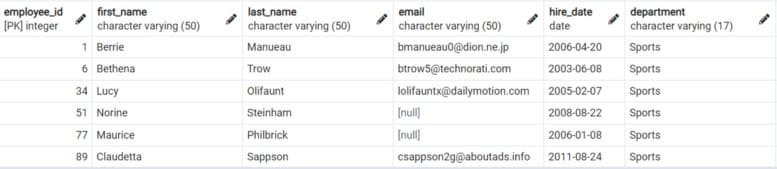
Example: Write a query to print all the variables for Sports.
SELECT * FROM employeesWHERE department="Sports"
3. Group by and Having . clause
The Group By clause groups rows with the same value.
Example: What is the total salary for each department?
SELECT SUM(salary) as total_salary,department
FROM employees
GROUP BY department

In SQL, aggregate functions such as SUM, AVG, MAX, MIN, and COUNT cannot be used in the WHERE clause. If we want to filter our table using an aggregate function, we need to use the HAVING clause.
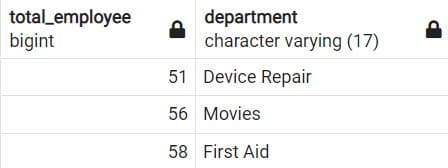
For example: Which departments have more than 50 employees?
SELECT count(*) as total_employee,department
FROM employees
GROUP BY department
HAVING COUNT(*) > 50
4. Order By and Limit
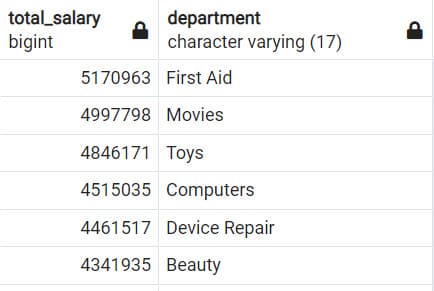
Example: Find total salary by department and sort descending by total salary column.
SELECT SUM(salary) as total_salary,department FROM employees
GROUP BY department
ORDER BY total_salary desc
The Limit command is used to specify the number of records to return.
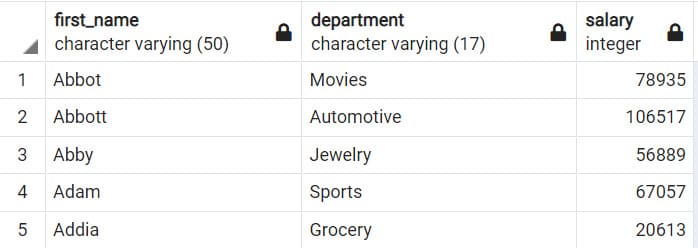
Example: Write a query that finds the first 5 employees with their first_name, department and salary and sorted by first_name.
Note: The default Order By clause sorts the results in ASCENDING order.
SELECT first_name,department,salary from employees
ORDER BY first_name
LIMIT 5
5. Date . function
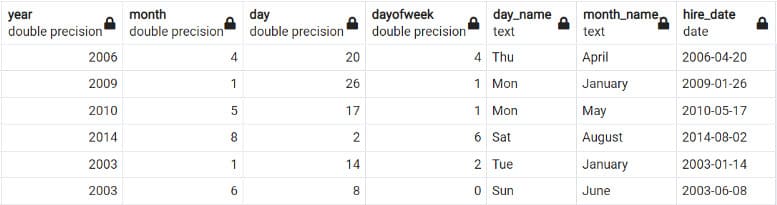
In PostgreSQL, you can easily extract values from date columns. You will see the most used date functions below.
SELECT
date_part('year',hire_date) as year,
date_part('month',hire_date) as month,
date_part('day',hire_date) as day,
date_part('dow',hire_date) as dayofweek,
to_char(hire_date, 'Dy') as day_name,
to_char(hire_date,'Month') as month_name,
hire_date
FROM employees
6. Combine Inner, Left or Right
Clause Inner Join Create a new table by combining rows with matching values in two or more tables.
Example: Query all employee information and their departments.
Note: The blue panel is our first and the green panel is our second.
SELECT * FROM employees e
INNER JOIN departments d
ON e.department = d.department

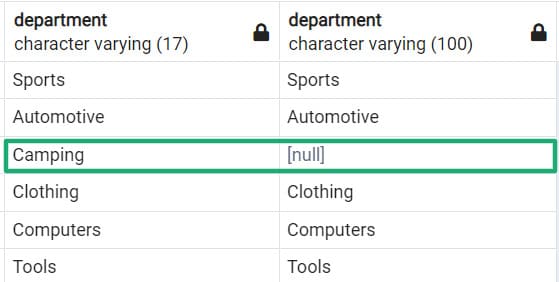
Left Join returns all rows from the left table and matching rows from the right table. If no matching rows are found in the right table, then NULL is used. (opposite for Right Join)
Example: Write a query that prints all departments from employees and matches departments from the departments table.
SELECT e.department,d.department FROM employees e
LEFT JOIN departments  d
ON e.department = d.department
7. Subqueries
A subquery is an SQL query nested inside a larger query.
A subquery can occur in:
- a SELECT . clause
- a FROM . clause
- a WHERE . clause
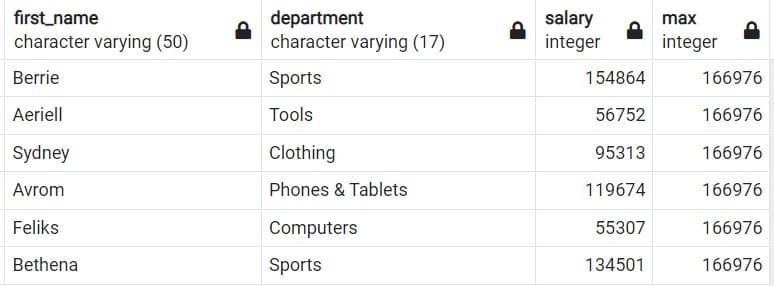
Example: Query first_name, department and salary of each employee and also the maximum salary given.
SELECT first_name,department,salary,(SELECT max(salary) FROM employees)
FROM employees
8. Related Subqueries
A related subquery is a way to read every row in a table and compare the values in each row with the related data. It is used whenever a subquery must return a different result or set of results for each candidate row considered by the main query.
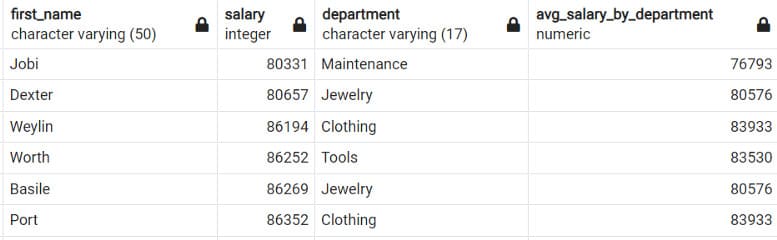
Example: Write a query to find the name, salary, department and average salary by department.
SELECT first_name,salary,department,round((SELECT AVG(salary)
    FROM employees e2
    WHERE e1.department = e2.department
    GROUP BY department )) as avg_salary_by_department
FROM employees e1
WHERE salary > (SELECT AVG(salary)
    FROM employees e2
    WHERE e1.department = e2.department
    GROUP BY department )
ORDER BY salary
9. Case . clause
CASE statement is used to implement logic where you want to set the value of one column depending on the value in other columns.
It is similar to the IF-ELSE statement in Excel.
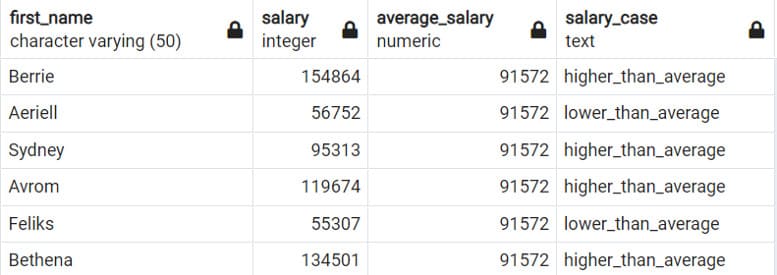
Example: Write a query to print out the name, salary, and average salary, as well as a new column indicating whether the employee’s salary is above average.
SELECT first_name,salary,(SELECT ROUND(AVG(salary)) FROM employees) as average_salary,
(CASE WHEN salary > (SELECT AVG(salary) FROM employees) THEN 'higher_than_average'
ELSE 'lower_than_average' END) as Salary_Case
FROM employees
10. Windows function
Windows functions apply aggregate and rank functions over a specific window (set of rows). The OVER clause is used with Windows functions to identify that Windows. The OVER clause does two things:
- Partition the rows to form a set of rows (using PARTITION BY).
- Sort the rows in those partitions into a specific order (using the ORDER BY clause).
Various aggregate functions like SUM(), COUNT(), AVERAGE(), MAX() and MIN() applied on a particular window (set of rows) are called aggregate window functions .
10.1. Examples of Aggregation
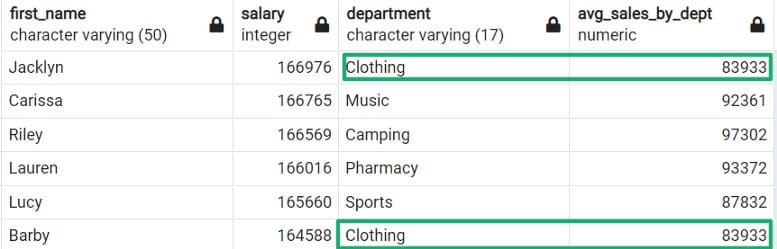
The following query will give you the average salary for each department.
SELECT first_name,salary,department,
ROUND(AVG(salary) OVER(PARTITION BY department)) as avg_sales_by_dept
FROM employees
ORDER BY salary DESC
10.2. Rating of values
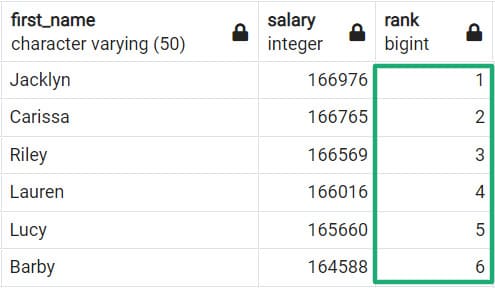
The Rank() function is a window function that assigns the rank to each row in a partition of the result set.
The following example sorts the table by salary (descending). The value 1 is the highest salary value.
SELECT first_name,salary,RANK() OVER(ORDER BY salary DESC)
FROM employees