• Home
  • News
  • Software
  • Knowledge
  • MMO
  • Tips
  • Security
  • Network
  • Office
AnonyViet - English Version
  • Home
  • News
  • Software
  • Knowledge
  • MMO
  • Tips
  • Security
  • Network
  • Office
No Result
View All Result
  • Home
  • News
  • Software
  • Knowledge
  • MMO
  • Tips
  • Security
  • Network
  • Office
No Result
View All Result
AnonyViet - English Version
No Result
View All Result

Turn on the feature to block offensive or disturbing comments on Facebook

AnonyViet by AnonyViet
November 5, 2023
in Tips
0

Blocking comments by keywords is an outstanding feature added by Facebook in the recent update. With this feature, users can easily block comments containing certain words, phrases, and emoticons. Or some offensive or disturbing words in your article. However, because this is a test version, it is only available on the Facebook Web version at this time.

Join the channel Telegram belong to AnonyViet 👉 Link 👈

Turn on the feature to block offensive or disturbing comments on Facebook

Today, AnonyViet will guide you to turn on the feature to automatically block offensive comments. And it affects your personal page.

How to block offensive comments by keywords on Facebook

To use the feature to block comments containing “banned” keywords in articles. Please follow these steps:

First, log in to Facebook, click on the section Setting.
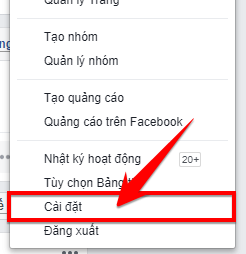
Go to Facebook Settings

Step 2: On the Settings page, click select Timeline and tagging in the menu on the left side of the screen.

 Timeline

Step 3: Here it will list the account settings. Now find the item Hide comments containing certain words from your timeline. And click Edit to turn this feature on.
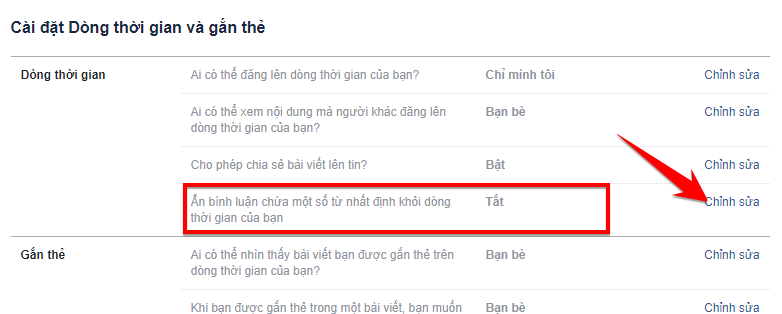
Click Edit.

Step 4: Here, you can add words or phrases that are offensive and do not want to appear. And finally press Save changes to save the settings.
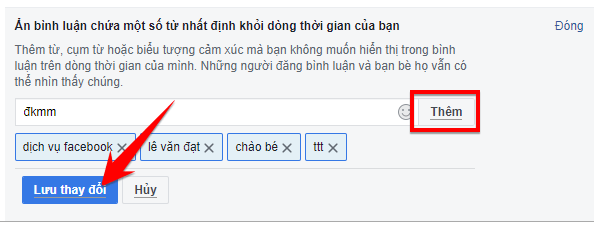
Save changes

Summary of the article

Thus, AnonyViet has shown you how to block offensive or annoying comments by keywords. This is an extremely useful feature for users of this social network. For users who are often offended or bullied, this is their lifesaving feature. It will help you control comment content in many places such as: News Feed, Group, Fanpage,… A better way.

N1412.

The article scored: 5/5 – (100 votes)

Previous Post

Shutterstock launches Creative AI – Photo editing with artificial intelligence

Next Post

Epic is giving Game Turnip Boy Commits Tax Evasion free of charge

AnonyViet

AnonyViet

Related Posts

How to change the default font on Windows 10
Tips

How to change the default font on Windows 10

April 13, 2026
5 tips for using a Browser to replace an App (helps save RAM, time and money)
Tips

5 tips for using a Browser to replace an App (helps save RAM, time and money)

April 13, 2026
How to make funny MeMe photos without Photoshop within 10 seconds
Tips

How to make funny MeMe photos without Photoshop within 10 seconds

April 11, 2026
How to quickly design your own Logo without Photoshop
Tips

How to quickly design your own Logo without Photoshop

April 10, 2026
How to convert Website into App on Windows
Tips

How to convert Website into App on Windows

April 9, 2026
Instructions for getting 3 months of Adobe Express Pro for free
Tips

Instructions for getting 3 months of Adobe Express Pro for free

April 9, 2026
Next Post
Epic is giving Game Turnip Boy Commits Tax Evasion free of charge

Epic is giving Game Turnip Boy Commits Tax Evasion free of charge

0 0 votes
Article Rating
Subscribe
Login
Notify of
guest

guest

0 Comments
Oldest
Newest Most Voted
Inline Feedbacks
View all comments

Recent News

How to add Watermark to Google Docs to protect copyright

How to add Watermark to Google Docs to protect copyright

April 19, 2026
How to intercept traffic using Burp Suite to analyze HTTP/HTTPS

How to intercept traffic using Burp Suite to analyze HTTP/HTTPS

April 18, 2026
How to avoid Adblock detection on Youtube with 4 good tips

How to avoid Adblock detection on Youtube with 4 good tips

April 17, 2026
How to transfer ChatGPT data to Claude is extremely simple

How to transfer ChatGPT data to Claude is extremely simple

April 16, 2026
How to add Watermark to Google Docs to protect copyright

How to add Watermark to Google Docs to protect copyright

April 19, 2026
How to intercept traffic using Burp Suite to analyze HTTP/HTTPS

How to intercept traffic using Burp Suite to analyze HTTP/HTTPS

April 18, 2026
How to avoid Adblock detection on Youtube with 4 good tips

How to avoid Adblock detection on Youtube with 4 good tips

April 17, 2026
AnonyViet - English Version

AnonyViet

AnonyViet is a website share knowledge that you have never learned in school!

We are ready to welcome your comments, as well as your articles sent to AnonyViet.

Follow Us

Contact:

Email: anonyviet.com[@]gmail.com

Main Website: https://anonyviet.com

Recent News

How to add Watermark to Google Docs to protect copyright

How to add Watermark to Google Docs to protect copyright

April 19, 2026
How to intercept traffic using Burp Suite to analyze HTTP/HTTPS

How to intercept traffic using Burp Suite to analyze HTTP/HTTPS

April 18, 2026
No Result
View All Result
  • Home
  • News
  • Software
  • Knowledge
  • MMO
  • Tips
  • Security
  • Network
  • Office

wpDiscuz
0
0
Would love your thoughts, please comment.x
()
x
| Reply