• Home
  • News
  • Software
  • Knowledge
  • MMO
  • Tips
  • Security
  • Network
  • Office
AnonyViet - English Version
  • Home
  • News
  • Software
  • Knowledge
  • MMO
  • Tips
  • Security
  • Network
  • Office
No Result
View All Result
  • Home
  • News
  • Software
  • Knowledge
  • MMO
  • Tips
  • Security
  • Network
  • Office
No Result
View All Result
AnonyViet - English Version
No Result
View All Result

The simplest and most beautiful way to create Intro on Youtube with Panzoid

AnonyViet by AnonyViet
January 26, 2023
in Tips
0

For those of you who watch youtube, it’s not difficult for you to see a short video about who they are on youtube? That is also called the Intro of that 1 video. And for every youtuber or every content creator, this is a pretty important component when creating content. And in this article, I will show you how to use a simple tool like Panzoid to make 2D and 3D intros!

Join the channel Telegram of the AnonyViet 👉 Link 👈

What is intro? Is it important?

Intro Video is simply understood as a short video with a duration usually between 5s and 30s and is inserted before each video. The main purpose as well as the role of creating Intro Video is to create a brand for the owner of that video so that when viewers follow the Intro part, they can guess who its owner is. In addition, the Intro Video section also provides a general introduction to the video owner such as name, style, main features and more.

Intro AnhEmTV

In some cases, video content creators may place the Video Intro in the middle of the video, at the end, or after each different video segment to create a focal point that matches the video content. Take for example in the Video of AnhEmTV then after the opening speech, to start the intro, he would say “Let’s start”. It is their own style to create emphasis as well as to match the content of the video.

So have you seen the advantages of intros as content creators? Then let’s learn about Panzoid together!

Panzoid – The simplest intro creation website

Want to create your own Intro? You can’t use complicated tools to create that video? Or is your device too weak to use intro creation software? Don’t worry, there’s Panzoid. Panzoid is a tool to create intro videos on webstie (as a webserver) that has been around for a long time. From the interface is not very eye-catching because it has been around for a long time, but in terms of tools to make 3d intros, it can be said that this is a completely great webserver.
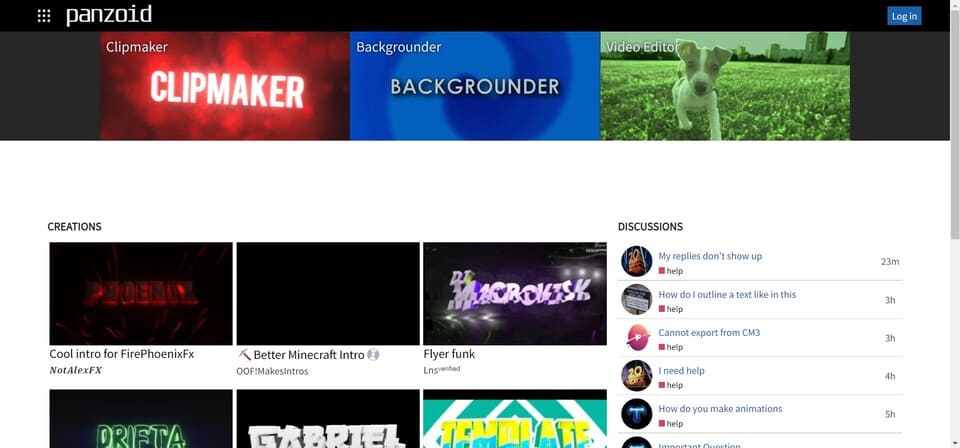
The simplest and most beautiful way to create Intro on Youtube with Panzoid

With this online tool, the free version has a Watermark attached; The paid version has a relatively reasonable price, you only need to spend $ 1.99 / month for the Starter package to be able to use the tool more conveniently and effectively than ever before. This means you will get 360 Render over 1 year with 3 months of Video hosting at their server. Especially, with the more advanced plan, you will get 6000 Renders over 1 year and unlimited storage from $11.99/month.

Instructions for creating intro with panzoid

Then in this article, I will show you 2 ways to create intro with panzoid including:

  • Instructions for creating Intro
  • Instructions for using the ready-made intro . template

Then let’s go into the items in this section!

Access to Panzoid here

Instructions for creating Intro

Note: the steps below are for reference only

Step 1: Access website

Step 2: Choose your style and choose clip maker

The simplest and most beautiful way to create Intro on Youtube with Panzoid

Step 3: You adjust the basic settings including:

  • Video Resolution (resolution)
  • Frame Rate (Aspect Ratio)
  • Length (Intro Length)

Step 4: You proceed to process the background and Text

Step 5: add effects in FX mode. For example: RGB Shift, Mirror, Bloom, Glitch,…:

Step 6: Proceed to add Camera Animation

Step 7: Adjust audio files

Step 8: Start rendering file and download

Instructions for using Template intro

Note: You should leave the author’s credit if used to ensure respect for the work they do!

Step 1: You proceed to access Panzoid

The simplest and most beautiful way to create Intro on Youtube with Panzoid

Step 2: At the square icon in the top right corner, click and select Creations
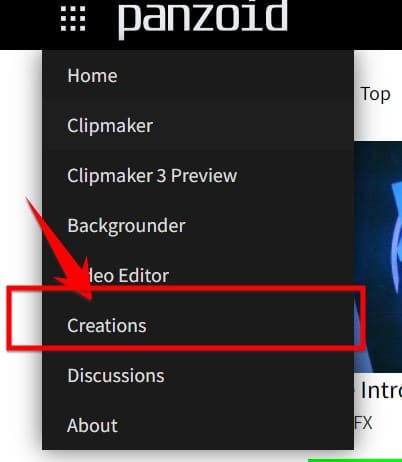
Select creation

Step 3: Go to the search field and write the keyword after “Intro” and press Enter

Find an intro

Step 4: Find the right template for you

Step 5: Click “Open Clipmaker”
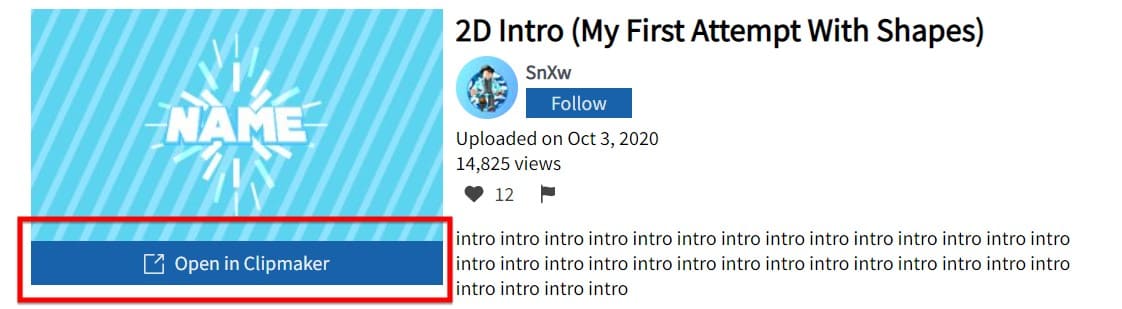
Open Clipmaker

Step 6: Select the Object section (with a 3d box shape) and proceed to change it to your name.

Note: usually there will be 2 templates available, Name or yourname. Please choose the one that matches your name!
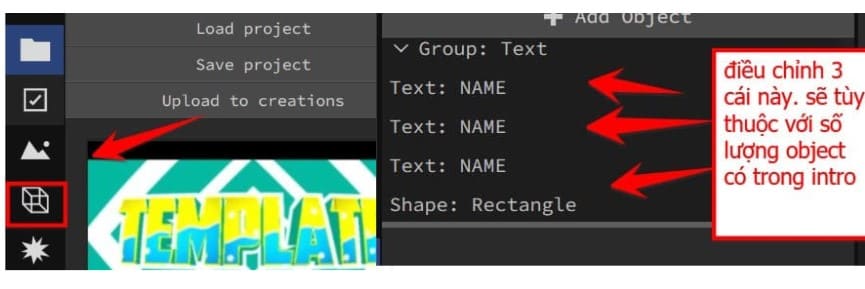
Change name

Step 7: Proceed to export the video

see more: How to create a Livestream to play videos running 24/7 like music

The article achieved: 5/5 – (100 votes)

Tags: beautifulcreateIntroPanzoidsimplestYoutube
Previous Post

PoC CVE-2021-40444 – Attach Virus to Word File

Next Post

The reasons I like and dislike Linux

AnonyViet

AnonyViet

Related Posts

Get free Cambridge courses to prepare for IELTS, Starters, Movers
Tips

Get free Cambridge courses to prepare for IELTS, Starters, Movers

June 4, 2026
How to record reaction videos with Android phones, no app needed
Tips

How to record reaction videos with Android phones, no app needed

June 1, 2026
Instructions on how to get Google AI Pro 1 year for free for new accounts
Tips

Instructions on how to get Google AI Pro 1 year for free for new accounts

June 1, 2026
Top free AI tools to help write, test and optimize content
Tips

Top free AI tools to help write, test and optimize content

June 1, 2026
Instructions for receiving Lovable Pro 12 months for free
Tips

Instructions for receiving Lovable Pro 12 months for free

May 29, 2026
Instructions for receiving 1 month of ElevenLabs Creator for free worth
Tips

Instructions for receiving 1 month of ElevenLabs Creator for free worth $22

May 25, 2026
Next Post
The reasons I like and dislike Linux

The reasons I like and dislike Linux

0 0 votes
Article Rating
Subscribe
Login
Notify of
guest

guest

0 Comments
Oldest
Newest Most Voted
Inline Feedbacks
View all comments

Recent News

How to convert HEIC photos to JPG on iPhone without using an app

How to convert HEIC photos to JPG on iPhone without using an app

June 5, 2026
Get free Cambridge courses to prepare for IELTS, Starters, Movers

Get free Cambridge courses to prepare for IELTS, Starters, Movers

June 4, 2026
How to check network speed on Apple TV when the image is jerky or lagging

How to check network speed on Apple TV when the image is jerky or lagging

June 3, 2026
Instructions on how to prevent acquaintances from seeing your Tiktok

Instructions on how to prevent acquaintances from seeing your Tiktok

June 2, 2026
How to convert HEIC photos to JPG on iPhone without using an app

How to convert HEIC photos to JPG on iPhone without using an app

June 5, 2026
Get free Cambridge courses to prepare for IELTS, Starters, Movers

Get free Cambridge courses to prepare for IELTS, Starters, Movers

June 4, 2026
How to check network speed on Apple TV when the image is jerky or lagging

How to check network speed on Apple TV when the image is jerky or lagging

June 3, 2026
AnonyViet - English Version

AnonyViet

AnonyViet is a website share knowledge that you have never learned in school!

We are ready to welcome your comments, as well as your articles sent to AnonyViet.

Follow Us

Contact:

Email: anonyviet.com[@]gmail.com

Main Website: https://anonyviet.com

Recent News

How to convert HEIC photos to JPG on iPhone without using an app

How to convert HEIC photos to JPG on iPhone without using an app

June 5, 2026
Get free Cambridge courses to prepare for IELTS, Starters, Movers

Get free Cambridge courses to prepare for IELTS, Starters, Movers

June 4, 2026
No Result
View All Result
  • Home
  • News
  • Software
  • Knowledge
  • MMO
  • Tips
  • Security
  • Network
  • Office

6789 kv999

wpDiscuz
0
0
Would love your thoughts, please comment.x
()
x
| Reply