• Home
  • News
  • Software
  • Knowledge
  • MMO
  • Tips
  • Security
  • Network
  • Office
AnonyViet - English Version
  • Home
  • News
  • Software
  • Knowledge
  • MMO
  • Tips
  • Security
  • Network
  • Office
No Result
View All Result
  • Home
  • News
  • Software
  • Knowledge
  • MMO
  • Tips
  • Security
  • Network
  • Office
No Result
View All Result
AnonyViet - English Version
No Result
View All Result

The next version of Windows 10 is called Manganese

AnonyViet by AnonyViet
February 2, 2023
in Tips
0

Microsoft completed the Windows 10 20H1 update much earlier than expected. Update 20H1 seems to be ready to go to RTM stage. Micorosft started testing the 20H2 update, codenamed Windows 10 Manganese.

Join the channel Telegram belong to AnonyViet 👉 Link 👈

Manganese, Hmmm……I think this version belongs to the Asian team. Including Chinese, Japanese, Koreanese and Vietnamese big brother. Now there’s also Manganese.The next version of Windows 10 is called Manganese
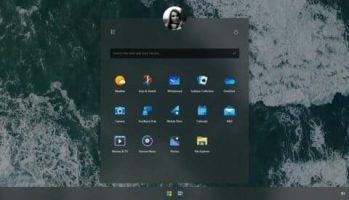
I think you guys are looking forward to the update Windows 10 2004 update (20H1) with new features (and bugs, of course, it’s a tradition). Around that time, rumors and leaks about the next version of Windows 10 began to circulate.

Windows 10’s next feature update is usually referred to as 20H2, but a Twitter user named Tero Alhonen has discovered that that version is internally referred to as “Manganese”.

This finding is based on evidence found in preview builds of Windows 10, specifically the recently released 19603 which features Linux integration into the FIle Explorer application.
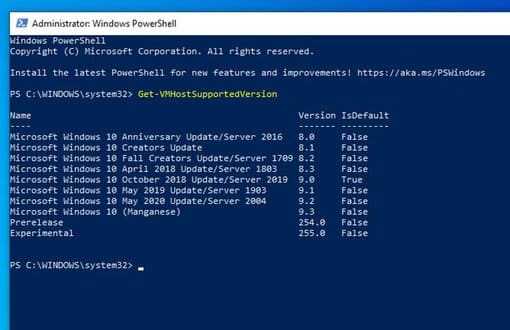
The name of the next version of Windows 10 is Manganese

If you open PowerShell and try to list the available virtual machines, you will see the name of the next version of Windows 10. You can do so by using the command:

Get-VMHostSupportedVersion

A note of the photo above is that the official name of the Windows 10 2004 version will be “May 2020 Update”. So, glad Microsoft will push Windows 10 spring update in May, contrary to what we already know. Well, I don’t know whether to be happy or sad anymore, speeding up will shorten the development time and fix Microsoft’s bugs, this time users must be a guinea pig again.

Something about Windows 10 20H2 “Manganese”

It is a pity that the name “Manganese” has been known since 2019.

Like version 1909 (19H2), we can guess Windows 10 20H2 will be announced around November this year according to Microsoft’s update schedule.

However, one company hinted last year, 19H2 is a one-of-a-kind beta and could be further updated.

Like 20H1, Microsoft started experimenting with how to build 20H2 in early 2020. This is to streamline Windows’ development schedule with Azure.

However, the company does not mention 20H2 as it releases the fast ring almost every week. So it’s hard to say whether the new features of the preview mean anything for the next Windows 10 update or later versions.

In addition, many confusions about Microsoft’s recent change in the development of Windows 10X become more apparent. Redmond has also announced it is canceling plans to release any dual-screen devices running Windows 10X, including the Surface Neo in 2020. Instead, the company wants to prepare Windows 10X for single-screen devices first. and bring some features from Windows 10X to the regular version of Windows 10.

I just hope that Microsoft will redesign the folder arrangement. Especially the users folder, it’s literally a dump.

Are there any brothers as interested in the new interface of Windows 10 as I am, but I find the Start Menu not very convenient.


The article achieved: 5/5 – (100 votes)

Tags: calledManganeseversionWindows
Previous Post

Download Zip Bomb File compressed 46MB decompress to 4500TB

Next Post

How to hack the latest 3G Mobifone capacity 2019

AnonyViet

AnonyViet

Related Posts

How to change the default font on Windows 10
Tips

How to change the default font on Windows 10

April 13, 2026
5 tips for using a Browser to replace an App (helps save RAM, time and money)
Tips

5 tips for using a Browser to replace an App (helps save RAM, time and money)

April 13, 2026
How to make funny MeMe photos without Photoshop within 10 seconds
Tips

How to make funny MeMe photos without Photoshop within 10 seconds

April 11, 2026
How to quickly design your own Logo without Photoshop
Tips

How to quickly design your own Logo without Photoshop

April 10, 2026
How to convert Website into App on Windows
Tips

How to convert Website into App on Windows

April 9, 2026
Instructions for getting 3 months of Adobe Express Pro for free
Tips

Instructions for getting 3 months of Adobe Express Pro for free

April 9, 2026
Next Post
How to hack the latest 3G Mobifone capacity 2019

How to hack the latest 3G Mobifone capacity 2019

0 0 votes
Article Rating
Subscribe
Login
Notify of
guest

guest

0 Comments
Oldest
Newest Most Voted
Inline Feedbacks
View all comments

Recent News

How to add Watermark to Google Docs to protect copyright

How to add Watermark to Google Docs to protect copyright

April 19, 2026
How to intercept traffic using Burp Suite to analyze HTTP/HTTPS

How to intercept traffic using Burp Suite to analyze HTTP/HTTPS

April 18, 2026
How to avoid Adblock detection on Youtube with 4 good tips

How to avoid Adblock detection on Youtube with 4 good tips

April 17, 2026
How to transfer ChatGPT data to Claude is extremely simple

How to transfer ChatGPT data to Claude is extremely simple

April 16, 2026
How to add Watermark to Google Docs to protect copyright

How to add Watermark to Google Docs to protect copyright

April 19, 2026
How to intercept traffic using Burp Suite to analyze HTTP/HTTPS

How to intercept traffic using Burp Suite to analyze HTTP/HTTPS

April 18, 2026
How to avoid Adblock detection on Youtube with 4 good tips

How to avoid Adblock detection on Youtube with 4 good tips

April 17, 2026
AnonyViet - English Version

AnonyViet

AnonyViet is a website share knowledge that you have never learned in school!

We are ready to welcome your comments, as well as your articles sent to AnonyViet.

Follow Us

Contact:

Email: anonyviet.com[@]gmail.com

Main Website: https://anonyviet.com

Recent News

How to add Watermark to Google Docs to protect copyright

How to add Watermark to Google Docs to protect copyright

April 19, 2026
How to intercept traffic using Burp Suite to analyze HTTP/HTTPS

How to intercept traffic using Burp Suite to analyze HTTP/HTTPS

April 18, 2026
No Result
View All Result
  • Home
  • News
  • Software
  • Knowledge
  • MMO
  • Tips
  • Security
  • Network
  • Office

wpDiscuz
0
0
Would love your thoughts, please comment.x
()
x
| Reply