Lovable Pro 12 months free brings a golden opportunity for users to experience the advanced features of one of the leading app creation platforms today. You will not need to write every line of complicated code and still be able to own a smoothly functioning product. This is definitely a great help for those who are nurturing startup projects or making experimental products.
📢 Join the channel Telegram belong to AnonyViet
Update new articles, cool tools and IT tips fastest
What is Lovable?
In essence, Loveable is a programming platform that does not use conventional drag and drop but uses artificial intelligence to convert natural human language into complete lines of source code. You just need to chat and describe your wishes through text commands, also known as prompts. Immediately, the system will automatically analyze comments, design the interface and program corresponding features.
Thanks to this convenience, the system is extremely suitable for many different user groups. People who don’t know anything about programming can still create their own applications. Independent developers who want to make products quickly to test the market also come here. In addition, startup project founders who need to complete the minimum viable product to present to investors also consider this an optimal solution.
Outstanding features when using the Pro version
Although the free version of the system provides quite enough basic tools, to carry out larger and more complex projects, you will need a premium account. When you upgrade to the paid version, your working experience will be raised to a whole new level.
| Core features | Free version | Pro Lite version | Standard Pro version |
| Number of projects initiated | Limited quantity | Unlimited projects | Unlimited projects |
| Response speed of artificial intelligence | Normal speed | Prioritize quick processing | Maximum processing speed |
| Number of credits used | Daily low limit | 300 once and 5 every day | Refresh periodically every month |
| Ability to intervene deeply in source code | Some features are limited | Full support | Full support with priority |
Strategic handshake between LinkedIn and Lovable
In order to bring more added value to its VIP members, the world’s largest professional social network has linked with an AI application creation platform to launch an extremely attractive incentive program. Specifically, this program allows users to activate a free 12-month Lovable Pro package as a Pro Lite version directly from their system.
Upon successful activation, you will immediately receive the upgraded version for up to one year. Not only that, your account will also be immediately credited with 300 credits for one-time use only, along with a regular bonus of 5 credits every day to maintain basic editing activities.
Necessary conditions to receive incentives
- The first core factor is that you must own a properly functioning Linkedin Premium account.
- Currently, this gift affiliate program is only limited to accounts registered in specific regions including the US, UK, Canada and Australia.
For users in other regions, you can flexibly use measures to convert the country region on your personal profile page to supported countries before accessing the offer section so that the system can accurately identify it.
Instructions on how to get Lovable Pro 12 months for free
Please prepare the necessary accounts and follow the instructions below.
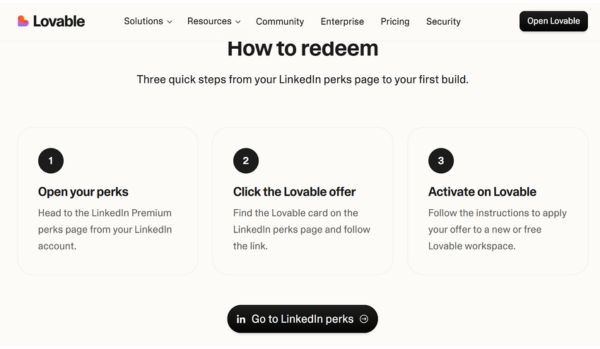
Step 1: You access the link directly HEREthen click on “Premium Perks” on his LinkedIn account.
Step 2: Search for the Lovable partnership program in the offer list and click on the button Redeem.
Step 3: The system will take you to Lovable’s homepage; Here, you log in to your account or create a completely new project (workspace).
Step 4: Click to agree to activate the program so that the system can officially upgrade your account to the Pro Lite version for a period of one year.
Conclusion
Hopefully the detailed guide above has helped you understand how to own it Lovable Pro 12 months free quickly. Start building your first ideas right after successfully activating your account. Wishing you a very effective working experience!
Frequently Asked Questions (Q&A)
1. How to receive incentives if my LinkedIn account is registered in Vietnam?
You can go into your personal LinkedIn account settings, temporarily switch your country region to one of the supported countries (e.g., United States), then reload the Premium Perks page to activate the offer.
2. After the 12-month promotional period expires, will the system automatically deduct money from my card?
Are not. After one year of use, your Lovable account will automatically switch back to the free plan (Free Plan), but the system will not automatically renew or deduct money, unless you actively register to purchase other service packages.
3. What is the biggest difference between the regular Pro package and the Pro package received from this program?
The Pro package received from this affiliate program is the Lite version, so you will not receive monthly refresh credits like when purchasing the standard Pro package directly from the publisher.