• Home
  • News
  • Software
  • Knowledge
  • MMO
  • Tips
  • Security
  • Network
  • Office
AnonyViet - English Version
  • Home
  • News
  • Software
  • Knowledge
  • MMO
  • Tips
  • Security
  • Network
  • Office
No Result
View All Result
  • Home
  • News
  • Software
  • Knowledge
  • MMO
  • Tips
  • Security
  • Network
  • Office
No Result
View All Result
AnonyViet - English Version
No Result
View All Result

The fastest way to download Facebook videos to your computer and phone

AnonyViet by AnonyViet
January 11, 2023
in Tips
0

Every day, when you surf FacebookIn addition to reading hot news, you will also come across many interesting videos on this social networking platform. Currently Facebook only allows users to save video links on the app, so if you want download facebook videos on the device to watch offline or share with friends and family, you will need a support tool like FBVideoDown.

Join the channel Telegram of the AnonyViet 👉 Link 👈

If you do not know, FBVideoDown is an online tool that allows users to quickly download any video from Facebook to the device in the highest resolution. All free. Despite providing many advanced features, FBVideoDown does not require users to register for an account or watch annoying ads. Most importantly, because it is an online website, it can be used on any device.

No need to wait any longer, learn how to use it now!

How to download Facebook videos to your phone

To download cool videos from Facebook to your mobile phone, you can use FBVideoDown with just a few simple steps as shown below.

Step 1: Copy Facebook video link
ear video fb

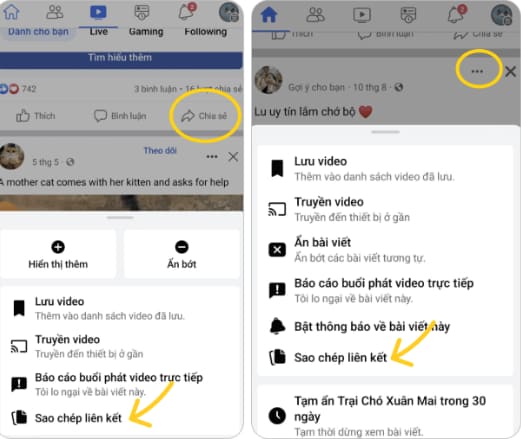
Search for the video you want to download on the Facebook app. Then copy the link of that video by clicking the Share option with the arrow pointing to the right, continue clicking the Copy link option.

Step 2: Go to FBVideoDown and paste the link

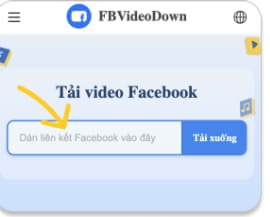
Visit the official website of FBVideoDown at https://www.fbvideodown.com/en/. As soon as the website loads you will see a white box with the words “Paste Facebook link here”. Paste the Facebook video link you just copied in step 1 into the download box and click the blue “Download” button right next to it to start the video download process. This method can also be applied to download facebook stories.
how to download fb videos FBVideoDown

Step 3: Download Facebook videos to your phone

After the FBVideodown system has finished processing, a preview of the Facebook video you want to download will appear. Now just hit the blue “Download” button below this video preview and it will be automatically downloaded to your phone in a moment.

facebook videos

Accomplished! You can now go to the Downloads folder on your phone to watch it again or use the video as you like.

How to download Facebook videos to your computer

How to download videos from Facebook to your computer is as simple and fast as the steps to download videos from Facebook to your phone that we have just instructed above.

Step 1: Copy Facebook video link

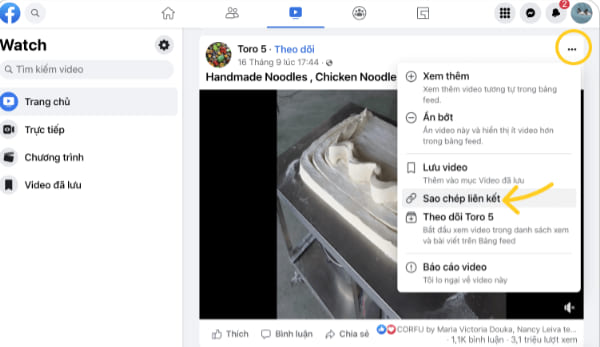
Search for the video you want to download on the Facebook app. Then copy the link of that video by clicking on the ellipsis icon, clicking the Copy link option from the drop-down menu.
How to download Facebook videos to your computer

Step 2: Go to FBVideoDown and paste the link

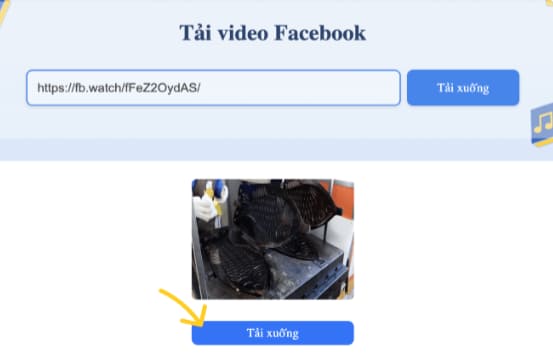
Visit the official website of FBVideoDown at https://www.fbvideodown.com/en/. As soon as this website loads, you will see a white box with the words “Paste Facebook link here”. Paste the Facebook video link you just copied in step 1 into the download box and click the blue “Download” button right next to it to start the video download process.
The fastest way to download Facebook videos to your computer and phone

Step 3: Download Facebook videos to your computer

After the system has finished processing, a preview of the Facebook video you want to download will appear. Click the blue “Download” button below this video preview. Accomplished! The video has been downloaded to your computer. You can also download private facebook videos same way!

End

As you have seen, using FBVideoDown is the simplest and fastest way to download Facebook videos to your mobile devices and computers. It’s completely safe and free, so give it a try!


Rate this post

Tags: computerDownloadFacebookfastestphonevideos
Previous Post

AZDIGI Premium Business Hosting Review

Next Post

What are headers? What does the header mean in Show?

AnonyViet

AnonyViet

Related Posts

How to add sliders to Facebook Stories to easily rewind videos
Tips

How to add sliders to Facebook Stories to easily rewind videos

April 21, 2026
How to change the default font on Windows 10
Tips

How to change the default font on Windows 10

April 13, 2026
5 tips for using a Browser to replace an App (helps save RAM, time and money)
Tips

5 tips for using a Browser to replace an App (helps save RAM, time and money)

April 13, 2026
How to make funny MeMe photos without Photoshop within 10 seconds
Tips

How to make funny MeMe photos without Photoshop within 10 seconds

April 11, 2026
How to quickly design your own Logo without Photoshop
Tips

How to quickly design your own Logo without Photoshop

April 10, 2026
How to convert Website into App on Windows
Tips

How to convert Website into App on Windows

April 9, 2026
Next Post
What are headers?  What does the header mean in Show?

What are headers? What does the header mean in Show?

0 0 votes
Article Rating
Subscribe
Login
Notify of
guest

guest

0 Comments
Oldest
Newest Most Voted
Inline Feedbacks
View all comments

Recent News

Tips for pinning the step counter to the iPhone screen to monitor your health

Tips for pinning the step counter to the iPhone screen to monitor your health

April 28, 2026
How to turn off password suggestions on iPhone: Prevent Safari from auto-filling passwords

How to turn off password suggestions on iPhone: Prevent Safari from auto-filling passwords

April 27, 2026
Instructions for looking up prescriptions on VNeID instead of paper medical books

Instructions for looking up prescriptions on VNeID instead of paper medical books

April 26, 2026
Tips to completely turn off CAPTCHA codes on iPhone and Mac are super simple

Tips to completely turn off CAPTCHA codes on iPhone and Mac are super simple

April 25, 2026
Tips for pinning the step counter to the iPhone screen to monitor your health

Tips for pinning the step counter to the iPhone screen to monitor your health

April 28, 2026
How to turn off password suggestions on iPhone: Prevent Safari from auto-filling passwords

How to turn off password suggestions on iPhone: Prevent Safari from auto-filling passwords

April 27, 2026
Instructions for looking up prescriptions on VNeID instead of paper medical books

Instructions for looking up prescriptions on VNeID instead of paper medical books

April 26, 2026
AnonyViet - English Version

AnonyViet

AnonyViet is a website share knowledge that you have never learned in school!

We are ready to welcome your comments, as well as your articles sent to AnonyViet.

Follow Us

Contact:

Email: anonyviet.com[@]gmail.com

Main Website: https://anonyviet.com

Recent News

Tips for pinning the step counter to the iPhone screen to monitor your health

Tips for pinning the step counter to the iPhone screen to monitor your health

April 28, 2026
How to turn off password suggestions on iPhone: Prevent Safari from auto-filling passwords

How to turn off password suggestions on iPhone: Prevent Safari from auto-filling passwords

April 27, 2026
No Result
View All Result
  • Home
  • News
  • Software
  • Knowledge
  • MMO
  • Tips
  • Security
  • Network
  • Office

wpDiscuz
0
0
Would love your thoughts, please comment.x
()
x
| Reply