Shopee is the largest e-commerce platform in Vietnam at the present time. People are shopping on Shopee more and more. With millions of products and attractive discounts, it’s easy to buy too much without paying attention to the total amount spent. To solve this problem, the author NT Tong shared how to automatically list all Shopee orders and the total amount spent using JS code that is quite simple and very detailed.
| Join the channel Telegram belong to AnonyViet ???? Link ???? |
This code will access your Shopee order history, scan all orders and order details. It then aggregates the data and outputs a table containing all orders and the total amount spent.
Advantages of Shopee order statistics code:
- Automatically list all orders without manual entry
- Save time compared to checking each order
- Indicates the exact total amount spent, helping to manage spending better
The code automatically lists all Shopee orders and the total amount spent
To automatically list all Shopee orders and the total amount spent, you first need to Log in to your Shopee account on the Website.
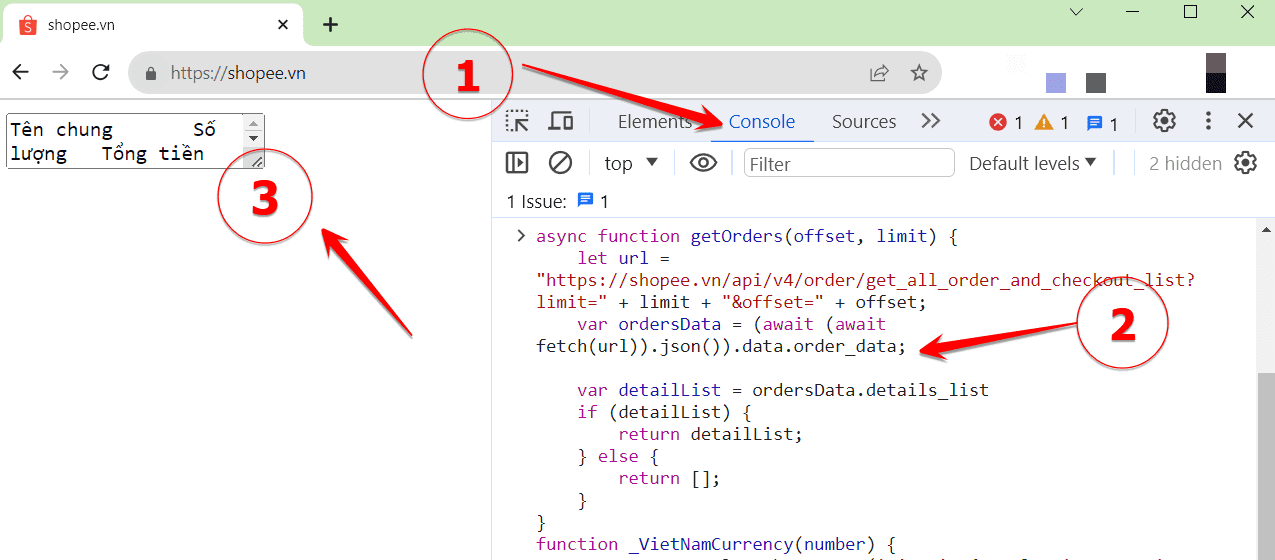
Then press the key F12 (number 1) and select enter Console tab (number 2) Paste the Code below and press Enter.
You can copy the code below or copy it from the author’s main page NT Tong: https://pastecode.io/s/7cpgip63
async function getOrders(offset, limit) {
    let url = "https://shopee.vn/api/v4/order/get_all_order_and_checkout_list?limit=" + limit + "&offset=" + offset;
    var ordersData = (await (await fetch(url)).json()).data.order_data;

    var detailList = ordersData.details_list
    if (detailList) {
        return detailList;
    } else {
        return [];
    }
}
function _VietNamCurrency(number) {
    return new Intl.NumberFormat('vi-VN', { style: 'currency', currency: 'VND' }).format(number);
}
async function getAllOrders() {
    const limit = 20;
    let offset = 0;
    let allOrders = [];
    allOrders.push(
        [
            'Tên chung', 'Số lượng', 'Tổng tiền', 'Trạng thái', 'Tên shop', 'Chi tiết', 'Tiền gốc'
        ].join('\t')
    )
    let sum = 0;
    let count = 0;
    while (true) {
        let data = await getOrders(offset, limit);
        if (data.length == 0)
            break;
        for (const item of data) {
            const infoCard = item.info_card;
            const listType = item.list_type;
            let strListType;
            switch (listType) {
                case 3: strListType = "Hoàn thành"; break;
                case 4: strListType = "Đã hủy"; break;
                case 7: strListType = "Vận chuyển"; break;
                case 8: strListType = "Đang giao"; break;
                case 9: strListType = "Chờ thanh toán"; break;
                case 12: strListType = "Trả hàng"; break;
                default: strListType = "Không rõ"; break;
            }

            const productCount = infoCard.product_count;
            let subTotal = infoCard.subtotal / 1e5;
            count += productCount;
            const orderCard = infoCard.order_list_cards[0];
            const shopName = orderCard.shop_info.username + " - " + orderCard.shop_info.shop_name;
            const products = orderCard.product_info.item_groups;
            const productSumary = products.map(product => product.items.map(item => item.name + "--amount: " + item.amount + "--price: " + _VietNamCurrency(item.item_price)).join(', ')).join('; ');
            const name = products[0].items[0].name;
            if (listType != 4 && listType != 12)
                sum += subTotal;
            else
                subTotal = 0;

            const subTotalNative = _VietNamCurrency(subTotal);
            allOrders.push(
                [
                    name, productCount, subTotalNative, strListType, shopName, productSumary, subTotal
                ].join('\t')
            );

        }
        console.log('Colected: ' + offset);
        offset += limit;
    }

    allOrders.push(
        [
            'Tổng cộng: ', count, _VietNamCurrency(sum)
        ].join('\t')
    );
    var text = allOrders.join('\r\n');
    document.write('<textarea>' + text + '</textarea>');
}
getAllOrders();
After pressing Enteron the main screen side will display 1 content frame (number 3). You press Ctrl + A to highlight all content in the cell
Then open Excel, click Ctrl + V to paste the content of Shopee order statistics into the Excel file. You will then see an overview of all purchased or canceled orders, including: General name, Quantity, Total amount, Status, Shop name, Details, Principal amount. When you scroll down to the bottom of the Excel file, you will see your detailed total amount when shopping on Shopee.
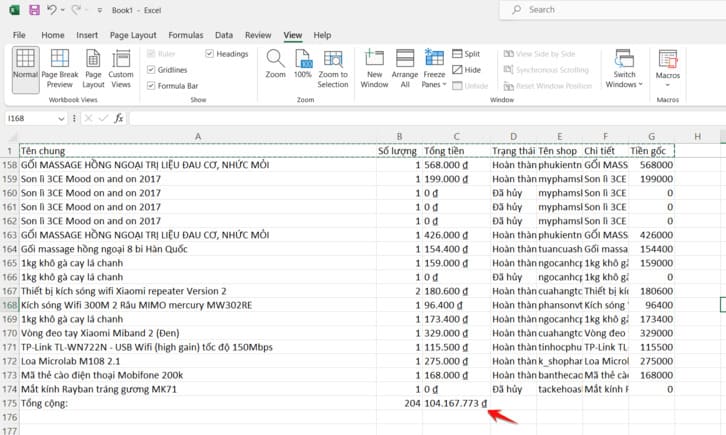
So you can know how many orders you have purchased on Shopee in the past and the amount of money you have spent. I have more than 100 million so I can also get Gold status.
Shopee evaluates member status according to the following criteria:
- Silver Rank: Shoppers complete 3 orders or spend 3,000,000 VND within 6 months.
- Gold Rank: Shoppers complete 75 orders or spend 5,000,000 VND within 6 months.
- Diamond Rank: Shoppers complete 75 orders or spend 20,000,000 VND within 6 months.
To learn about the benefits of each member rank, you can see the information on this page Shopee Rewards described in great detail.