• Home
  • News
  • Software
  • Knowledge
  • MMO
  • Tips
  • Security
  • Network
  • Office
AnonyViet - English Version
  • Home
  • News
  • Software
  • Knowledge
  • MMO
  • Tips
  • Security
  • Network
  • Office
No Result
View All Result
  • Home
  • News
  • Software
  • Knowledge
  • MMO
  • Tips
  • Security
  • Network
  • Office
No Result
View All Result
AnonyViet - English Version
No Result
View All Result

How to edit tax information from ID card to CCCD online

AnonyViet by AnonyViet
May 2, 2024
in Tips
0

Way Edit tax information From ID card to CCCD online quickly and easily, helping people update new information without having to waste time waiting at tax offices.

Join the channel Telegram belong to AnonyViet 👉 Link 👈

Instructions for editing tax information

How to edit tax registration information from ID card to CCCD

To update CCCD for your tax code or change your personal tax code information online, do the following:

Step 1: To get started, visit Homepage of Electronic Tax and select Personal to update information.

Select the Personal section on the E-Tax home page

Step 2: Use your e-Tax account or VNeID application to log in to the system.
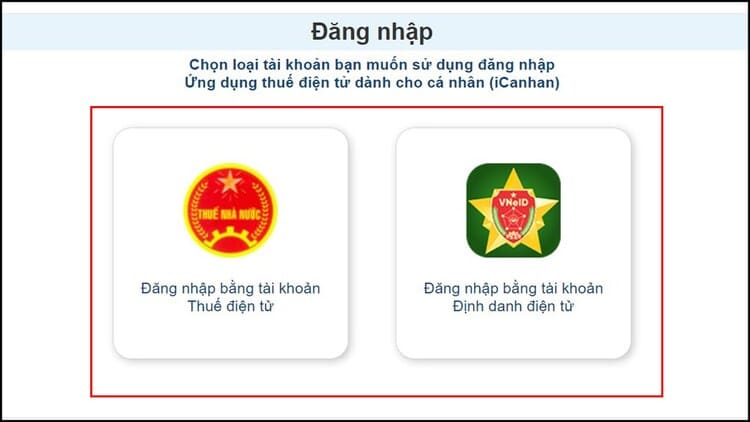
Log in with your Electronic Tax or VNeID account

Step 3: After successfully logging in, select 'Tax registration' and continue to select 'Change information' to update the new CCCD document number.
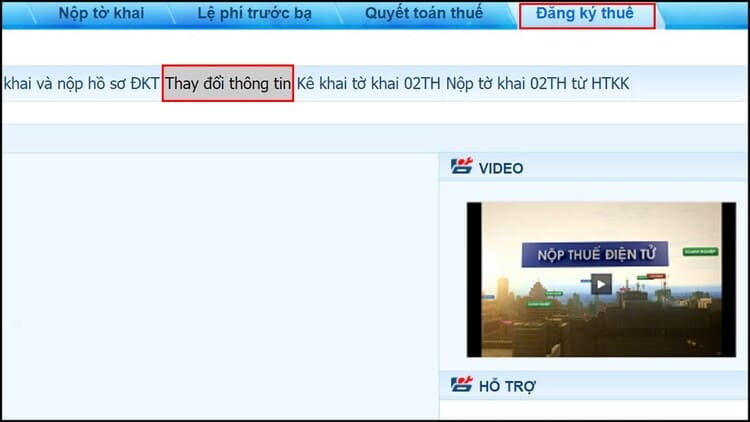
Select 'Tax registration' and select 'Change information'

Step 4: Next, the screen will display previously registered tax details > Select 'Change information' and fill in your CCCD number.

If you need to edit any data, just check the corresponding 'Change information' box before updating the new information.
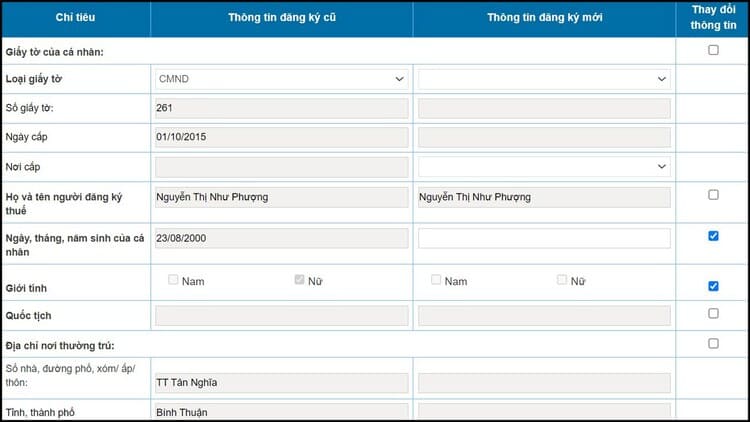
Check the corresponding 'Change information' box

Step 5: Click on 'Get citizen information' to check and compare with the National Population Database. Wait for confirmation from the system, then select 'Complete declaration' and you're done.
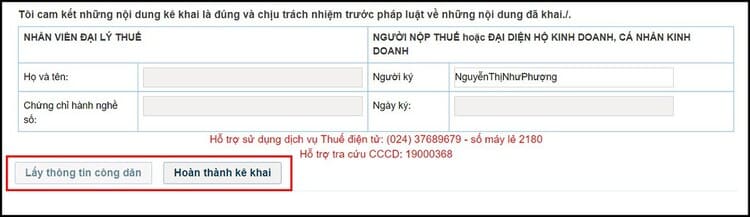
Select 'Get citizen information'

Step 6: At this point, you will receive a successfully adjusted electronic declaration.
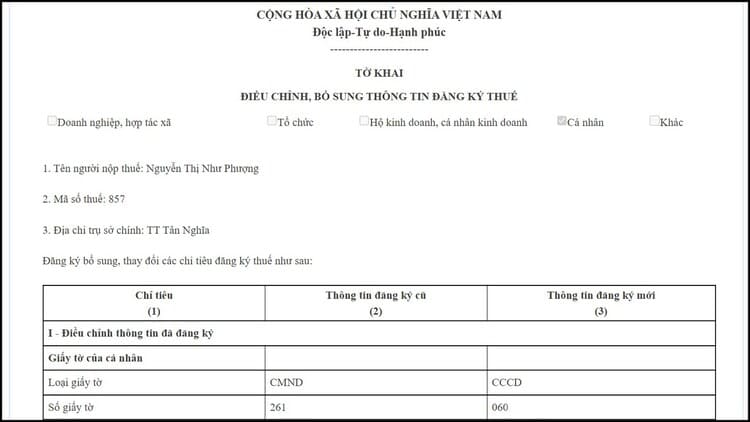
The electronic declaration has been successfully adjusted

How to adjust dependent information

Step 1: Similar to the above steps, everyone accesses the homepage of Electronic Tax > Select 'Personal' and log in the information of the issued electronic tax transaction account > Click 'Register for tax' > Select Declare and submit the technical registration documents.

Select Declare and submit technical registration documents

Step 2: In the Select profile section, click on form No. 20/DK-TCT-NPT registration declaration for individuals with income from TLTC (TT105/2020).
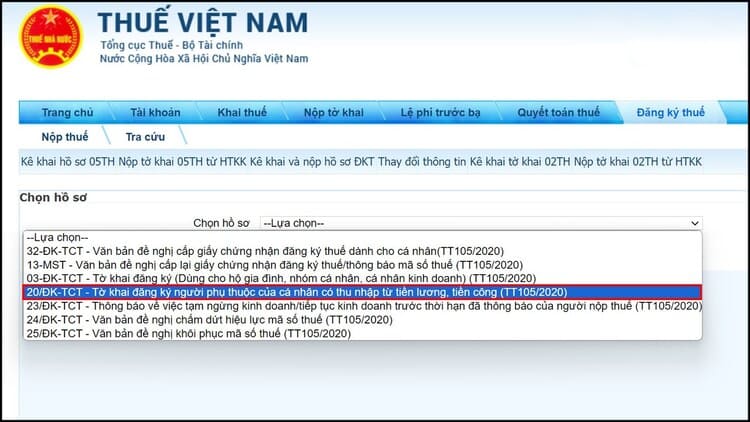
Click to select form number 20/DK-TCT

Step 3: Then, select 'Change tax registration information' > Update the information to be accurate, then click 'Complete declaration' and you're done.
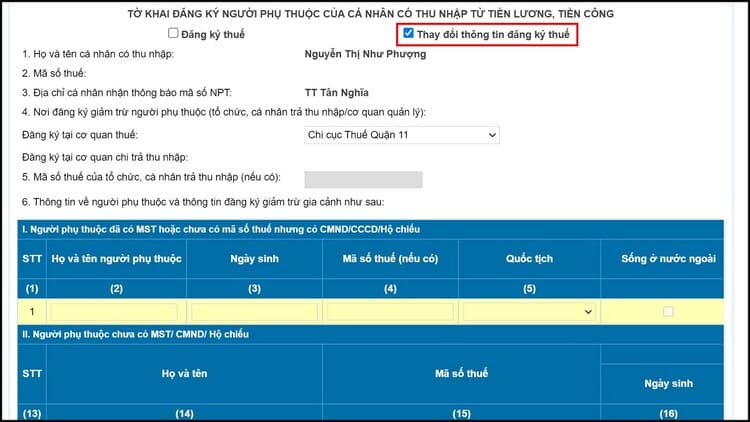
Click 'Complete declaration'

Note

  • Responsibilities of the agency tax is to ensure that updated information is accurately entered into the Tax Registration Application System no later than 3 working days after receiving complete documents from the taxpayer.
  • This agency will issue a Tax Registration Certificate or Notice that your tax code has been updated with new information.
  • Once you have submitted the declaration to update the information, you need to check your email to receive a response from the tax authority, or if the processing deadline has passed and you still do not receive the information, you need to contact the phone number of the Declaration department. Transmission – Support from tax authorities managing MST to receive timely support.
  • In case of converting from a 12-digit ID card or barcode CCCD to a chip-embedded CCCD, there is no need to update tax registration information.

Epilogue

With the simple steps presented, work Edit tax information From ID card to CCCD or dependent information is no longer a problem, helping everyone save a lot of time and effort. Wishing you a successful application!


Article scored: 5/5 – (100 votes)

Tags: cardCCCDeditInformationonlinetax
Previous Post

Share Account iTop VPN VIP for free

Next Post

Find out which Extensions consume the most RAM in your browser

AnonyViet

AnonyViet

Related Posts

Instructions for checking Windows copyright using Powershell to avoid penalties
Tips

Instructions for checking Windows copyright using Powershell to avoid penalties

July 19, 2026
Who leaked Windows 11?
Tips

Who leaked Windows 11?

July 18, 2026
Instructions for Getting Netflix 30 Days Free to Watch Movies
Tips

Instructions for Getting Netflix 30 Days Free to Watch Movies

July 18, 2026
How to create a website introducing yourself using Bio Link for free
Tips

How to create a website introducing yourself using Bio Link for free

July 17, 2026
Instructions on how to receive ShopeeVIP for 12 months for free
Tips

Instructions on how to receive ShopeeVIP for 12 months for free

July 16, 2026
Share code for 1 month of Super Duolingo for free
Tips

Share code for 1 month of Super Duolingo for free

July 15, 2026
Next Post
Find out which Extensions consume the most RAM in your browser

Find out which Extensions consume the most RAM in your browser

0 0 votes
Article Rating
Subscribe
Login
Notify of
guest

guest

0 Comments
Oldest
Newest Most Voted

Recent News

Instructions for checking Windows copyright using Powershell to avoid penalties

Instructions for checking Windows copyright using Powershell to avoid penalties

July 19, 2026
Who leaked Windows 11?

Who leaked Windows 11?

July 18, 2026
Instructions for Getting Netflix 30 Days Free to Watch Movies

Instructions for Getting Netflix 30 Days Free to Watch Movies

July 18, 2026
How to create a website introducing yourself using Bio Link for free

How to create a website introducing yourself using Bio Link for free

July 17, 2026
Instructions for checking Windows copyright using Powershell to avoid penalties

Instructions for checking Windows copyright using Powershell to avoid penalties

July 19, 2026
Who leaked Windows 11?

Who leaked Windows 11?

July 18, 2026
Instructions for Getting Netflix 30 Days Free to Watch Movies

Instructions for Getting Netflix 30 Days Free to Watch Movies

July 18, 2026
AnonyViet - English Version

AnonyViet

AnonyViet is a website share knowledge that you have never learned in school!

We are ready to welcome your comments, as well as your articles sent to AnonyViet.

Follow Us

Contact:

Email: anonyviet.com[@]gmail.com

Main Website: https://anonyviet.com

Recent News

Instructions for checking Windows copyright using Powershell to avoid penalties

Instructions for checking Windows copyright using Powershell to avoid penalties

July 19, 2026
Who leaked Windows 11?

Who leaked Windows 11?

July 18, 2026
  • Home
  • Home 2
  • Home 3
  • Home 4
  • Home 5
  • Home 6
  • Next Dest Page
  • Sample Page

say88 tỷ lệ kèo nhà cái kèo nhà cái 5 febet

No Result
View All Result
  • Home
  • News
  • Software
  • Knowledge
  • MMO
  • Tips
  • Security
  • Network
  • Office

say88 tỷ lệ kèo nhà cái kèo nhà cái 5 febet

wpDiscuz
0
0
Would love your thoughts, please comment.x
()
x
| Reply