Have you ever dreamed of creating a web interface or mobile application just by describing the idea in your mind? With StitchAI tools introduced by Google at Google I/O 2025, that has become a reality. FREE provided in the beta stage, the tool allows users to create visual interface models and even HTML/CSS code from a short or image description.
| Join the channel Telegram belong to Anonyviet 👉 Link 👈 |
What is Stitch?
Stitch is a AI tool developed by Google, published at Google I/O 2025. It allows users to create user interface (UI) for the web or mobile application easily and quickly.
Just enter a description (prompt) such as “a recipe application with the bottom navigation bar” or upload a interface sketch, the Stitch will automatically create an intuitive design with the corresponding HTML/CSS code. This tool uses AI models Gemini 2.5 (Flash or Pro) To bring impressive results, significantly shortening the design time.
Not only for developers or designers, Stitch is also suitable for anyone who wants to test ideas without having to master complex design tools such as Figma or Adobe XD.
The outstanding features of Stitch
Create interface in just a few seconds
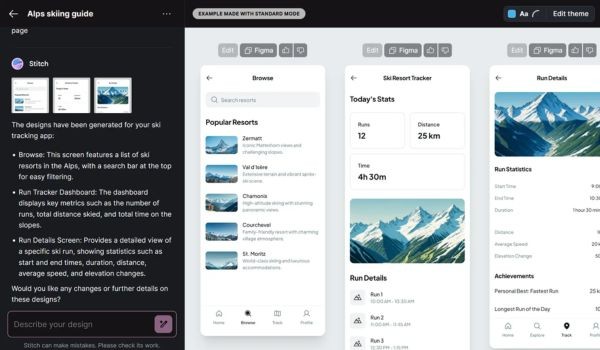
One of the highlights of Stitch is the ability to create an interface almost immediately. You only need to describe your ideas in writing, for example: “A job management application with a minimalist control panel and an additional task button”. Stitch will quickly create an intuitive interface, come with HTML and CSS Ready to use.
If you already have a sketch or screenshot, the Stitch can also turn it into a digital design. The tool supports both web and mobile interface, allowing you to choose between two AI models:
- Gemini 2.5 Flash: Optimal for speed, suitable for simple projects.
- Gemini 2.5 Pro: Provide more detailed and ideal results for complex designs.
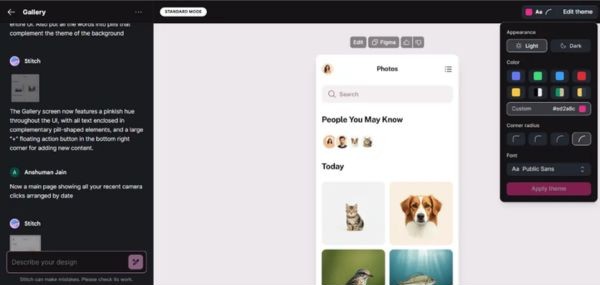
After the interface is created, you can customize: Change the interface, try different layouts or edit the structure. All are performed visually right on the browser, no need to install additional software.
https://www.youtube.com/watch?v=Q39UCziw_my
Supply source code and support Figma
Stitch does not only stop at creating the interface. This tool offers many options to integrate into your work process:
- Copy the code HTML/CSS: The source code created by Stitch is often “clean”, ready for you to integrate into your project. This is a perfect starting point for developers who want to save time.
- Export to Figma: If you want to continue editing in a familiar design environment, Stitch allows design to design FIGMA Only with a few clicks. This is very convenient to work in groups or when you need to follow a available design system.
- Create interface variants: Stitch allows creating many different versions of the same design, making it easy to compare new approaches or testing of new ideas without doing it from the beginning.
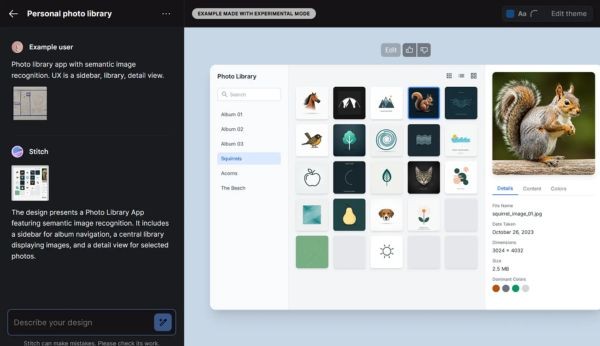
For example, if you ask Stitch to create an image library application with image recognition, the tool will create an interface with a clear layout, displaying image details when selected, and the source code to deploy immediately.
Outstanding advantages of Stitch
Stitch brings some remarkable benefits, making it a tool not to be missed:
- Create an interface in just a few seconds, saving hours of manual work.
- No need for programming or design knowledge, anyone can use it.
- Support both web and mobile interface, with a variety of custom options.
- Currently, Stitch is provided free of charge with the limit of creation (350 times/month with flash, 50 times/month with Pro).
Whether the developer is seeking to speed up the programming process or a designer who wants to test the idea quickly, the Stitch meets the needs.
Limited and developed potential
Although promising, Stitch is still in the beta stage and has some limitations. This tool has not completely replaced professional design software such as Figma or Adobe XD. It is designed to create the original draft, which is the starting point for you to refine more. Some advanced design features have not been supported.
In addition, the stitch only works by Englishthis can make it difficult for users not to be fluent in this language. The interface creation time is sometimes a bit slow, especially when using the test mode with the Gemini 2.5 Pro model. Moreover, you need to have a personal Google account and accept the number of created times per month.
However, Google does not locate Stitch as a complete design tool. This is a test project from Google Labs, focusing on simplifying the prototyping stage and accelerating the idea repetition. With future improvements, Stitch has the potential to become an indispensable tool in the tools of developers and designers.
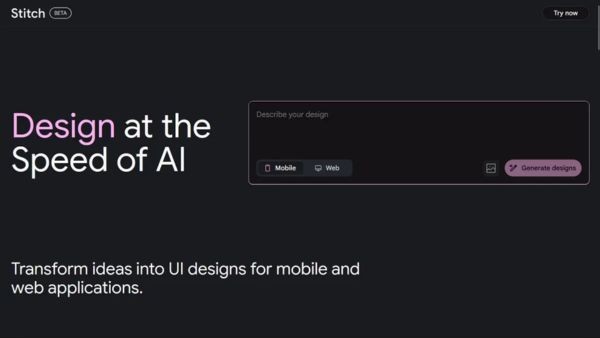
This tool is completely free in the beta period, working right on the browser. You can try it now HERE.
Conclude
Stitch Not only is a tool, but also a bridge between ideas and reality. With the support of Gemini 2.5 models, it offers a new approach to design the interface, saving time and effort. Although there are still some limitations, the tool still proves its potential in simplifying creative processes.