• Home
  • News
  • Software
  • Knowledge
  • MMO
  • Tips
  • Security
  • Network
  • Office
AnonyViet - English Version
  • Home
  • News
  • Software
  • Knowledge
  • MMO
  • Tips
  • Security
  • Network
  • Office
No Result
View All Result
  • Home
  • News
  • Software
  • Knowledge
  • MMO
  • Tips
  • Security
  • Network
  • Office
No Result
View All Result
AnonyViet - English Version
No Result
View All Result

Share Tool DDOS Anonymous DDoSer v1.0 Full Power extremely powerful

AnonyViet by AnonyViet
January 28, 2023
in Security
0

After a long absence. Today I will continue the Series Tool DDoS. With Tool DoS this time, its power can be said to be superior to the old Tools that I have shared. With this soft DoS, its power can knock down relatively “terrible” websites if the network speed is fast. And it’s called Anonymous DDoSer v1.0.

Join the channel Telegram of the AnonyViet 👉 Link 👈

Instructions for using Tool Anonymous DDoSer v1.0

About the concept of DoS, I have shared it with you in previous posts. So in this post I will go straight to the topic. Not rambling much on the post.

First, you need to Download Tool Anonymous DDoSer v1.0 about the computer. Please click on the text below to download.

Attention! Only perform the DDOS Test on your Website or Server. Any act of DDOS entering the Website of another person or organization is against the law.

Download Link

(Original link of the author Pass DDoS)

http://www.fshare.vn/file/REGSATZA6NJE

After the download is successful, you proceed to extract to the Desktop as always.
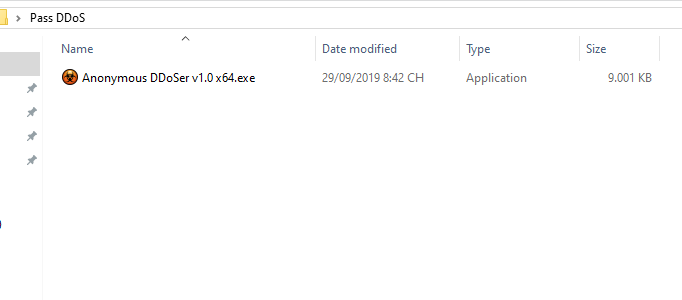
unzip the file

You proceed to run the file Anonymous DDoSer v1.0.exe to open the tool.

Here we must have the Key. To get the key, press Y to get the Key to the computer.

download Anonymous DDoSer v1.0

After clicking yes, a tab will open. Click through the ad to get the Key.
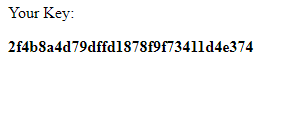
Share Tool DDOS Anonymous DDoSer v1.0 Full Power extremely powerful 3

Paste the Key you just got into the tool.

After pasting the key, the tool will switch to the DoS panel interface.
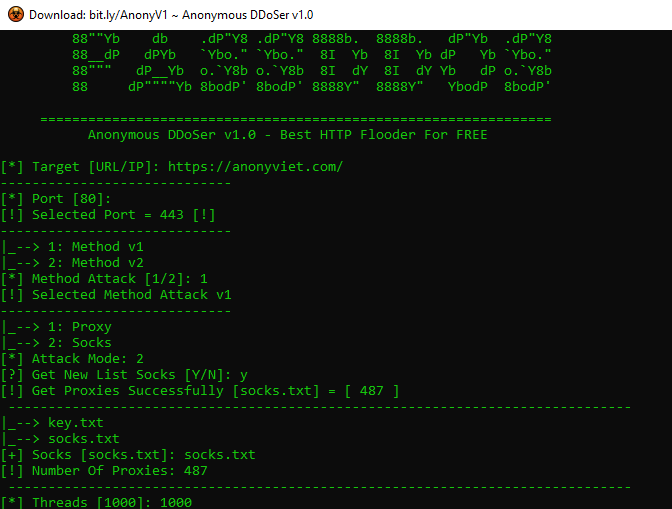
Share Tool DDOS Anonymous DDoSer v1.0 Full Power extremely powerful

  • Target : The address of the website.
  • Port : Press enter to get the default port.
  • Method : Choose an attack method ( 1 or 2 ).
  • Get Socks : Select Yes.
  • Threads : Leave the default to 1000.

After filling in all the information, you just need to press Enter and wait for it to load Socks and check the victim website. Only use DDOS Tool for research and study, please do not destroy or break the law.


The article achieved: 5/5 – (100 votes)

Tags: anonymousDDoSDDoSerextremelyFullPowerpowerfulSharetoolv1.0
Previous Post

15 Tips to use Word every office worker must know

Next Post

6 How to check if your iPhone is being hacked or not?

AnonyViet

AnonyViet

Related Posts

How to intercept traffic using Burp Suite to analyze HTTP/HTTPS
Security

How to intercept traffic using Burp Suite to analyze HTTP/HTTPS

April 18, 2026
How to use hackers use Splitfus to execute PowerShell malicious code
Security

How to use hackers use Splitfus to execute PowerShell malicious code

July 20, 2025
How to implement Shellcode Injection attack technique with Autoit
Security

How to implement Shellcode Injection attack technique with Autoit

March 14, 2025
How to exploit the holy hole of Hijacking on Windows
Security

How to exploit the holy hole of Hijacking on Windows

March 8, 2025
Hamamal: Shellcode execution technique from afar to overcome Antivirus's discovery
Security

Hamamal: Shellcode execution technique from afar to overcome Antivirus's discovery

February 10, 2025
Snov.io Email Finder: Search emails with only company name/domain name/LinkedIn profile
Security

Snov.io Email Finder: Search emails with only company name/domain name/LinkedIn profile

December 14, 2024
Next Post
6 How to check if your iPhone is being hacked or not?

6 How to check if your iPhone is being hacked or not?

0 0 votes
Article Rating
Subscribe
Login
Notify of
guest

guest

0 Comments
Oldest
Newest Most Voted
Inline Feedbacks
View all comments

Recent News

How to create a Face Sticker Collection using ChatGPT

How to create a Face Sticker Collection using ChatGPT

April 29, 2026
How to install the cute Bongo Cat mouse pointer for Windows

How to install the cute Bongo Cat mouse pointer for Windows

April 29, 2026
Tips for pinning the step counter to the iPhone screen to monitor your health

Tips for pinning the step counter to the iPhone screen to monitor your health

April 28, 2026
How to turn off password suggestions on iPhone: Prevent Safari from auto-filling passwords

How to turn off password suggestions on iPhone: Prevent Safari from auto-filling passwords

April 27, 2026
How to create a Face Sticker Collection using ChatGPT

How to create a Face Sticker Collection using ChatGPT

April 29, 2026
How to install the cute Bongo Cat mouse pointer for Windows

How to install the cute Bongo Cat mouse pointer for Windows

April 29, 2026
Tips for pinning the step counter to the iPhone screen to monitor your health

Tips for pinning the step counter to the iPhone screen to monitor your health

April 28, 2026
AnonyViet - English Version

AnonyViet

AnonyViet is a website share knowledge that you have never learned in school!

We are ready to welcome your comments, as well as your articles sent to AnonyViet.

Follow Us

Contact:

Email: anonyviet.com[@]gmail.com

Main Website: https://anonyviet.com

Recent News

How to create a Face Sticker Collection using ChatGPT

How to create a Face Sticker Collection using ChatGPT

April 29, 2026
How to install the cute Bongo Cat mouse pointer for Windows

How to install the cute Bongo Cat mouse pointer for Windows

April 29, 2026
No Result
View All Result
  • Home
  • News
  • Software
  • Knowledge
  • MMO
  • Tips
  • Security
  • Network
  • Office

wpDiscuz
0
0
Would love your thoughts, please comment.x
()
x
| Reply