• Home
  • News
  • Software
  • Knowledge
  • MMO
  • Tips
  • Security
  • Network
  • Office
AnonyViet - English Version
  • Home
  • News
  • Software
  • Knowledge
  • MMO
  • Tips
  • Security
  • Network
  • Office
No Result
View All Result
  • Home
  • News
  • Software
  • Knowledge
  • MMO
  • Tips
  • Security
  • Network
  • Office
No Result
View All Result
AnonyViet - English Version
No Result
View All Result

Sending mail to the future is easy with FutureMe

AnonyViet by AnonyViet
January 25, 2024
in Tips
0

Send a letter to the future is a very good and attractive idea. Have you ever wondered what you will look like in 1 year, 5 years or 10 years? Would you like to send your future self a letter containing what you are thinking, feeling and wanting? If so, let FutureMe help you do it.

Join the channel Telegram belong to AnonyViet 👉 Link 👈

What is FutureMe?

FutureMe is a free service that allows you to send mail to yourself at a time in the future. You can send letters to remind, encourage, or share what you want. You do not need to log in or register an account to use FutureMe. Just compose the message, choose a delivery time, and enter your email.

How to send mail to the future with FutureMe

To send mail into the future with FutureMe, simply follow these steps:

Step 1: Visit the homepage of FutureMe

Step 2: Enter the body of your message in the white box. You can write in any language you want.
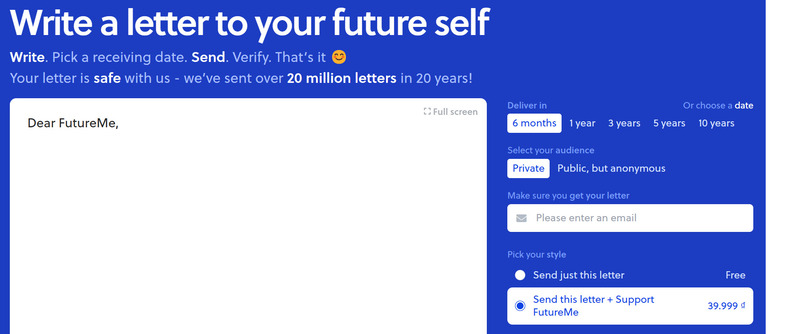
Send a letter to the future
Enter the body of your message in the white box

Step 3: Select the time you want to send the message in the Deliver in section. You can choose 1 year, 2 years, 5 years or customize the date.

Step 4: Select the message display mode in the 'Select your audience' section, you can choose Private so only you can see the message, or Public but Anonymous to allow others to see the message but do not know your name.

Step 5: Enter your email in the 'Make sure you get your letter' box. This is email which you will receive in the future.

Step 6: Click the 'Send to the future' button to complete.
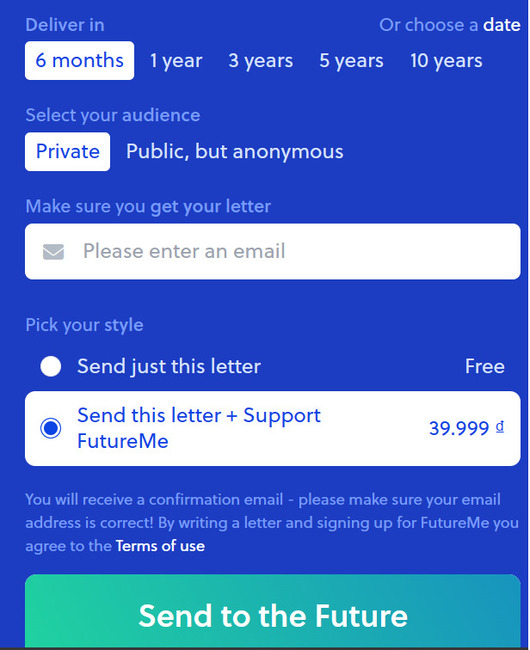
Send a letter to the future
Click the 'Send to the future' button to complete.

FutureMe will save your mail and send it to you at the time you have chosen. You can review sent or received messages in the My Letters section on the FutureMe website.

Benefits of sending mail for the future

Sending letters into the future is a good way to listen to yourself, develop yourself, and direct your own life. You can send mail to:

  • Remind yourself of your goals, dreams, or plans.
  • Encourage yourself when you are having difficulty, stress, or boredom.
  • Share your feelings, thoughts, or experiences.
  • Compare the difference between your present and future.
  • Record your impressions, memories, or valuable lessons.
  • Sending letters into the future is also a way to connect with yourself and realize that life is always surprising, interesting, and meaningful.

FutureMe is a simple service but can bring many benefits to you. Just take a few minutes to compose a letter and send it to your future self. You will feel excited when you receive your mail after a long time. You can also read other people's public letters for inspiration or sympathy.

Epilogue

Send a letter to the future with FutureMe is a great way to get in touch with your past and future self. You can write what you want to say to yourself, from wishes, thanks, apologies to words of encouragement and encouragement. You can also send letters to friends and relatives to create meaningful and surprising gifts. Try FutureMe today and see what you will get in the future!


The article scored: 5/5 – (100 votes)

Tags: easyfutureFutureMeMailsending
Previous Post

How to connect images from the phone screen to the computer screen

Next Post

The most accurate way to view the lunar calendar on iPhone

AnonyViet

AnonyViet

Related Posts

How to use CMD environment variables in Windows
Tips

How to use CMD environment variables in Windows

January 18, 2026
How to add or remove columns in File Explorer Windows 11
Tips

How to add or remove columns in File Explorer Windows 11

January 17, 2026
Sign up for Pluralsight One for 1 year of free access to Online courses
Tips

Sign up for Pluralsight One for 1 year of free access to Online courses

January 16, 2026
How to schedule a Batch file (CMD) to run on Windows
Tips

How to schedule a Batch file (CMD) to run on Windows

January 15, 2026
Instructions for downloading Facebook Videos with new interface 2021
Tips

Instructions for downloading Facebook Videos with new interface 2021

January 14, 2026
How to get ChatGPT K-12 Teacher for free
Tips

How to get ChatGPT K-12 Teacher for free

January 13, 2026
Next Post
The most accurate way to view the lunar calendar on iPhone

The most accurate way to view the lunar calendar on iPhone

0 0 votes
Article Rating
Subscribe
Login
Notify of
guest

guest

0 Comments
Oldest
Newest Most Voted
Inline Feedbacks
View all comments

Recent News

How to use automatic verification bot to register for ChatGPT K12, Spotify Student,…

How to use automatic verification bot to register for ChatGPT K12, Spotify Student,…

January 18, 2026
Instructions on how to create head-grabbing photos – New trend causing TikTok storm

Instructions on how to create head-grabbing photos – New trend causing TikTok storm

January 18, 2026
How to use CMD environment variables in Windows

How to use CMD environment variables in Windows

January 18, 2026
Instructions for installing the application “Are you dead yet” – Demumu

Instructions for installing the application “Are you dead yet” – Demumu

January 17, 2026
How to use automatic verification bot to register for ChatGPT K12, Spotify Student,…

How to use automatic verification bot to register for ChatGPT K12, Spotify Student,…

January 18, 2026
Instructions on how to create head-grabbing photos – New trend causing TikTok storm

Instructions on how to create head-grabbing photos – New trend causing TikTok storm

January 18, 2026
How to use CMD environment variables in Windows

How to use CMD environment variables in Windows

January 18, 2026
AnonyViet - English Version

AnonyViet

AnonyViet is a website share knowledge that you have never learned in school!

We are ready to welcome your comments, as well as your articles sent to AnonyViet.

Follow Us

Contact:

Email: anonyviet.com[@]gmail.com

Main Website: https://anonyviet.com

Recent News

How to use automatic verification bot to register for ChatGPT K12, Spotify Student,…

How to use automatic verification bot to register for ChatGPT K12, Spotify Student,…

January 18, 2026
Instructions on how to create head-grabbing photos – New trend causing TikTok storm

Instructions on how to create head-grabbing photos – New trend causing TikTok storm

January 18, 2026
  • Home
  • Home 2
  • Home 3
  • Home 4
  • Home 5
  • Home 6
  • Next Dest Page
  • Sample Page

https://sun52.network

No Result
View All Result
  • Home
  • News
  • Software
  • Knowledge
  • MMO
  • Tips
  • Security
  • Network
  • Office

https://sun52.network

wpDiscuz
0
0
Would love your thoughts, please comment.x
()
x
| Reply